Samsung’s Galaxy S26 Ultra is shaping up to be one of the most impressive Android flagships of the next cycle. Rumors point to a wild new screen trick that no rival has pulled off yet, the camera system is expected to remain among the best in the industry, and Samsung’s promise of seven years of software updates turns the phone into a long term investment rather than a short lived toy. On paper, it is exactly the kind of device I would recommend to anyone who wants a premium phone that will last. Yet there is one software decision that undercuts the whole experience for me: the Now Bar.
If I could ask Samsung for just a single change to the Galaxy S26 software, it would be this – give us a way to remove the Now Bar completely, or rethink it from the ground up. Not because it crashes or misbehaves, but because it solves a problem that did not exist while creating several new ones in the process.
What Samsung wants the Now Bar to be
The idea behind the Now Bar sounds reasonable at first. Samsung wants a single strip on the lock screen that can surface whatever is supposedly important right now: media controls, countdown timers, navigation updates, contextual suggestions, even small snippets of information it labels as smart or AI powered. 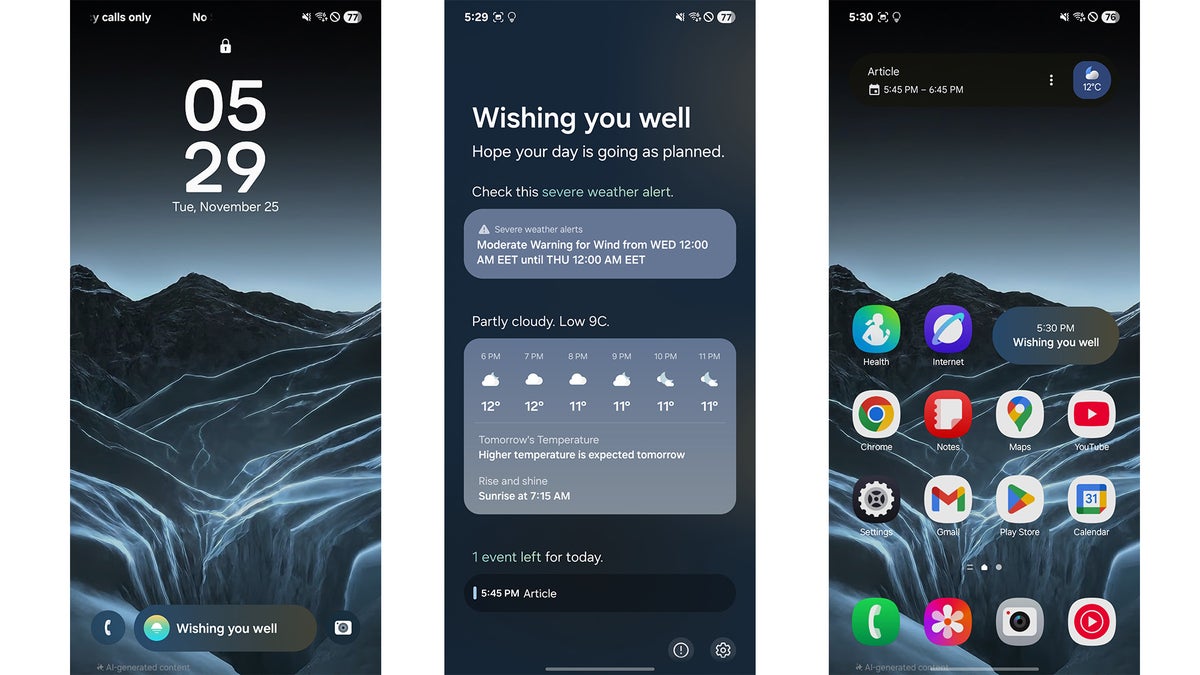
In theory, this magical bar should become the place where you quickly glance, tap once, and get exactly what you need.
In reality, the Now Bar feels less like a helpful assistant and more like visual noise glued to the bottom of the screen. Most of the time it shows something I never asked for: a vague greeting, a motivational one liner, or a suggestion that is neither timely nor relevant. Instead of feeling like intelligence, it feels like filler – a placeholder for an experience that has not actually arrived yet.
When media controls become worse
The biggest sin of the Now Bar, however, is what it does to media controls. Before its introduction, the lock screen offered a big, clean, centrally placed media widget. It was easy to read at a distance, easy to reach with either hand, and the buttons were large enough that you could skip a track without even staring directly at the screen. It did one job, and it did it really well.
The Now Bar replaces that solid solution with a tiny pill wedged between app shortcuts at the bottom. The play and skip icons are miniaturised, cramped together, and pushed into the least ergonomic part of a tall modern display. If you are using the S Pen, it feels fiddly. If you are trying to tap with one thumb while walking, it feels worse. When a feature makes the single most common lock screen interaction – controlling music or podcasts – harder instead of easier, something has gone wrong.
The missing intelligence in this so called smart bar
Samsung frames the Now Bar as an AI infused surface, but it rarely behaves as if it has learned anything about how I actually use my phone. Days go by with the same canned greeting or the same unhelpful layout. It does not appear to recognise that I listen to music more than I set timers, or that I care about commute information only at specific times. The smart part of this smart bar is almost impossible to spot in day to day use.
This would be easier to forgive if the feature lived somewhere optional, like a dedicated widget that you could pin or remove at will. Instead, it is wired into the lock screen experience in a way that feels mandatory and intrusive. It occupies precious vertical space, shoves the media player into a worse position, and cannot be replaced by the old, more legible layout. For users who never wanted an experimental contextual surface in the first place, this is deeply frustrating.
What real users are saying
You do not have to look far to see that frustration spilling over. Browse Samsung community forums, Reddit threads or tech comment sections and you run into the same questions over and over again: how do I turn the Now Bar off, how do I get my old lock screen player back, why is my music widget suddenly tiny and stuck at the bottom. The wording differs, but the sentiment is remarkably consistent – people feel like a familiar, functional design has been swapped out for something flashier but less usable.
Some users complain that the Now Bar is too small to tap comfortably, especially on the large screens that Samsung is known for. Others dislike the fact that the bar steals room that used to belong to notifications and the larger media widget. Quite a few simply describe it as clutter that they have no use for, a permanent banner for features they never requested.
Occasional wins do not justify daily friction
Yes, there are occasional moments when the Now Bar earns its keep. Seeing gate information on the lock screen when you are juggling luggage at an airport is genuinely helpful. Having a sports score appear without needing to unlock the phone can be neat. Being able to glance at a timer while cooking without waking the full interface is convenient.
But these rare wins do not outweigh the fact that the daily, every single time interaction of pausing or skipping a track is now objectively worse. Features that you touch dozens of times per day should never be compromised for the sake of a sometimes useful demo of contextual smarts.
A mismatch with an otherwise polished Galaxy S26 Ultra
That is what makes the feature so frustrating on a device as otherwise polished as the Galaxy S26 Ultra. Samsung has clearly listened to feedback in other areas: the anti reflective coating finally tames harsh reflections, colour calibration has improved, and long term update support is exactly what power users and average buyers alike have been begging for. Against that backdrop, the Now Bar feels oddly out of step – like a design experiment that escaped the lab and landed in the final product.
The rest of the S26 Ultra story is all about refinement and longevity. You get a display that stays legible outdoors, a camera stack that continues to push zoom and low light performance, and a software commitment that means this phone could still be secure and supported many years down the line. That is precisely why the lock screen experience matters so much: it is the front door to all those strengths.
What a better lock screen assistant could look like
My wish is not for Samsung to abandon smart lock screen experiences altogether. A genuinely intelligent, context aware panel on the lock screen could be brilliant. Imagine controls that grow larger when you are actively playing media, or suggestions that truly reflect habits – surfacing ride hailing shortcuts on Friday nights, meditation apps first thing in the morning, or note taking tools whenever the S Pen pops out. There is real potential here.
However, real potential has to be matched by real execution. Until Samsung can deliver that level of polish and intelligence, the fairest option is choice. Let users switch back to the classic, full size media widget. Let those who love the Now Bar keep it, and those who find it distracting or inaccessible turn it off entirely. Give us a simple toggle in the lock screen settings and let the phone adapt to us, not the other way around.
The one change that would complete Samsung’s next flagship
The Galaxy S26 Ultra has every chance to be a milestone device, the phone you buy and comfortably keep for most of a decade. To truly reach that status, Samsung needs to sweat the details that shape everyday interactions, not just headline features. Removing, or at least optionalising, the Now Bar would be a small software change with a huge quality of life payoff. For me, it is the single biggest wish for Samsung’s next flagship, and the one change that would instantly make its otherwise stellar software feel complete.