Switching phones has always been a relatively simple process, especially in recent years. However, one aspect that still poses challenges for users is transferring an eSIM (Embedded SIM) between devices – particularly when moving from an iPhone to an Android device. Currently, the process of transferring an eSIM requires users to reach out to their carrier, a step that can be a bit of a hassle. 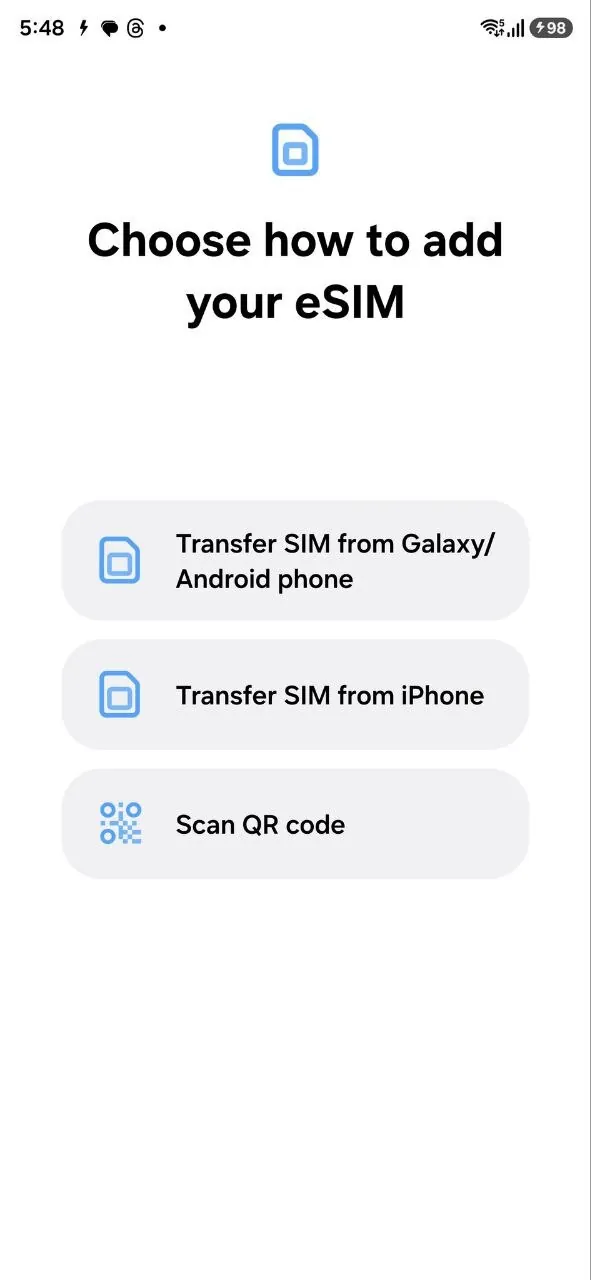
But it seems that Samsung is working on a new feature that could make this task significantly easier for Galaxy users.
In a recent leak of One UI 8.5, Android Authority discovered some intriguing code that suggests Samsung is planning to introduce a tool that will allow users to transfer their eSIM from an iPhone to a Galaxy phone directly, without needing to contact the carrier. This tool was also spotted in a screenshot showing a new onboarding workflow in One UI 8.5, hinting at a more streamlined experience for Samsung users.
The current One UI 8 setup allows users to transfer their eSIM from “another phone,” but the process only offers a generic option for transferring from any phone. In One UI 8.5, however, this feature will be split into two distinct options: one for transferring from Android devices and the other for transferring from iPhones. This added functionality could make it much easier for iPhone users to switch to Samsung’s Galaxy devices, particularly for those who rely on eSIM to manage their mobile plans.
Samsung has yet to officially confirm details about this feature, including whether it will be available in the upcoming beta program for One UI 8.5, which is expected to launch next month. If the feature is indeed included in the beta, it may become available for wider use with the final release of One UI 8.5, likely timed with the debut of the Galaxy S26 early next year. As of now, Samsung has remained tight-lipped about the feature, but given the growing trend of simplifying eSIM transfers, it seems likely that the company will follow in the footsteps of Google and others.
Google has already rolled out a similar feature for transferring eSIMs from iOS to its Pixel devices. However, it should be noted that this functionality currently only works with major carriers in the U.S. (Verizon, AT&T, and T-Mobile). Given the increasing prevalence of eSIM technology, it’s highly probable that Samsung’s feature will adopt similar compatibility with major carriers in various regions.
Although eSIM technology promises to simplify the process of managing your mobile plan, the reality has been a bit more complicated. The convenience of not needing to swap physical SIM cards is undeniable, but the current process of transferring an eSIM can still be cumbersome and involves contacting your carrier. Samsung and Google’s efforts to streamline the process are promising steps forward, and hopefully, other device makers and carriers will follow suit in making the transition to eSIMs even easier.
The introduction of such features could potentially redefine the way we switch devices in the future. By eliminating the need to contact a carrier for transferring an eSIM, users could save time and avoid the often frustrating process of dealing with customer service. With the possibility of faster transfers and a smoother transition, eSIM may truly live up to its promise of making mobile plans more flexible and accessible for users everywhere.
3 comments
Okay, but when’s the official release? I need this in my life! 😎
This is exactly what I need! Switching from iPhone to Galaxy has always been a pain with eSIM
Not really convinced. I’ve been burned by eSIM transfers before… hoping this is smoother