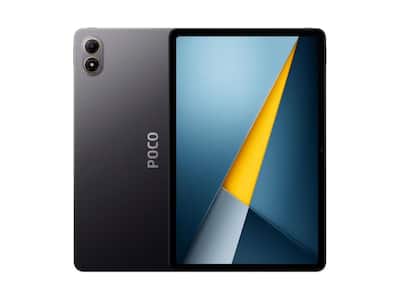
Poco Pad M1 unboxing and first impressions
Poco is expanding its tablet lineup again, and the newest arrival on our desk is the Poco Pad M1. If the silhouette looks familiar, that is because this is essentially a rebadged Redmi Pad 2 Pro, but with Poco’s own styling, pricing, and marketing spin. We have already spent some time with the Redmi version, so this unboxing is a great chance to see what Poco changes, what stays the same, and whether this affordable big screen tablet is worth grabbing at its early bird price.
What you get in the box
Cracking open the yellow and black retail box reveals a very straightforward bundle. You get the tablet, a USB A to USB C cable, and a 33W wired charger, so there is no need to go hunting for an extra brick in your drawers. At launch, Xiaomi lists the Poco Pad M1 at 329 dollars, but early buyers can snag it for 279 dollars, which pushes it firmly into budget productivity tablet territory rather than a premium indulgence. For students, casual gamers, or anyone who wants a large display without draining their savings, that starting price is immediately appealing.
Design, color and first feel
The first surprise is the color. Instead of Poco’s usual loud yellows or stark blacks, the Pad M1 comes in a muted blue that looks almost understated at first glance. Tilt it under direct light and the finish comes alive with gentle reflections, giving the tablet a cleaner, more mature look than many gaming styled Android slates. The chassis feels solid in the hand, with tight tolerances and a reassuring lack of creaks or flex, so it gives off the impression of a much more expensive device. The flat sides and rounded corners help the large body sit comfortably when you hold it in landscape to watch movies or in portrait to read.
Display built for entertainment
Up front, the Poco Pad M1 packs a 12.1 inch IPS LCD with a 1600 by 2560 pixel resolution and a smooth 120Hz refresh rate. It gets up to 600 nits of brightness, which is enough for comfortable indoor use and occasional work by a window, though bright summer sun will still push it to its limits. The sizeable panel, combined with slim bezels, makes the M1 well suited for binge watching series, split screen multitasking, or reading documents in landscape mode for long stretches without feeling cramped. The 120Hz refresh rate is not just a spec sheet flex either, as it helps scrolling through long articles and social feeds feel fluid and responsive in a way slower 60Hz tablets simply cannot match.
Hardware, performance and RAM
Inside, Poco fits Qualcomm’s 4 nanometer Snapdragon 7s Gen 4 chipset paired with 8GB of RAM. On paper this is not a flagship processor, but it is more than capable of handling everyday Android tasks, browsing with a dozen tabs open, and a bit of light gaming. The efficient 4 nanometer process should also help keep heat in check and extend battery life compared to older mid range chips built on larger manufacturing nodes, making this tablet feel smoother than its price tag suggests. With 8GB of RAM, apps are less likely to reload when you jump between a streaming app, a web browser and a note taking tool, which is exactly the kind of juggling act tablets are often used for.
Battery life and charging tricks
Speaking of longevity, battery capacity is one of the headline features. The Poco Pad M1 houses a chunky 12,000mAh cell, and Poco claims up to 83 days of standby. Proper testing will show how close it gets in real world use, but even if the number is optimistic, you can expect multiple days of mixed usage between charges, especially if you mostly stick to browsing, streaming and note taking. The tablet supports 33W wired charging out of the box, so topping up that big battery does not feel painfully slow. It can even act as a power bank, pushing up to 27W out of its USB C port to top up your phone, wireless earbuds or another gadget when you are away from a wall socket, which adds a very practical twist to an already generous battery.
Cases and accessories for productivity
Poco is also leaning on accessories to turn the Pad M1 into a budget productivity machine. There is a simple cover case that protects the back and lets you prop the tablet up for watching videos or taking video calls. It does not have the clever origami folding tricks of the pricier Poco Pad X1 cover, but it folds securely and does its job without fuss, which might be all many buyers really need. The cover is clearly designed as a no nonsense companion for everyday use, rather than a flashy statement piece.
More interesting is the dedicated keyboard case. Unlike the X1’s floating, magnetically attached design, the M1’s keyboard relies on a more traditional clip in frame. There is no built in trackpad either, so you will still be swiping on the touchscreen or pairing a separate mouse if you want a pointer. However, the keycaps have surprisingly generous travel and a satisfying tactile feel, making longer typing sessions, emails, notes or school assignments much more comfortable than poking at an on screen keyboard. The angle of the stand keeps the display fairly stable, and while it is not a premium floating design, it feels secure enough for a coffee shop table or a cramped desk.
Can the Poco Pad M1 replace a laptop?
With the tablet seated firmly in the case, the setup feels stable on a flat surface, even if it lacks the futuristic floating aesthetic of the X1. Combine that with the data and external storage capable USB C port, and the Poco Pad M1 starts to look like a realistic laptop or Chromebook stand in for light online work, streaming classes, or writing on the go. Plug in a USB C hub and you can attach flash drives or a keyboard and mouse combo, further stretching what this tablet can do for productivity. You will still want a full notebook for heavy creative workloads, large spreadsheets or serious gaming, but for many people the M1 could handle the everyday tasks they actually do, from email and browsing to watching lectures and editing simple documents.
Early verdict
These are just our early unboxing impressions, but the formula is already clear. You get a large 120Hz display, a massive 12,000mAh battery with reverse charging, modern mid range silicon, and a set of practical accessories, all at an aggressive price. The fact that it is based on the Redmi Pad 2 Pro gives us a good idea of what to expect, while Poco’s branding and pricing help it reach a different audience. If Poco nails the software experience, keeps updates flowing and avoids bloat, the Pad M1 has every chance to become one of the most compelling value Android tablets of the year for students, casual gamers and anyone who wants a big screen on a sensible budget.