Pixel Devices Get Icon Customization with Latest Android Update
Google has unveiled a new feature with the release of the Pixel 10, and it’s not just about the device itself. Alongside the highly anticipated launch, the company rolled out the August 2025 Android Canary update, which brings a long-requested feature to Pixel users: the ability to customize the shapes of icons on the home screen.
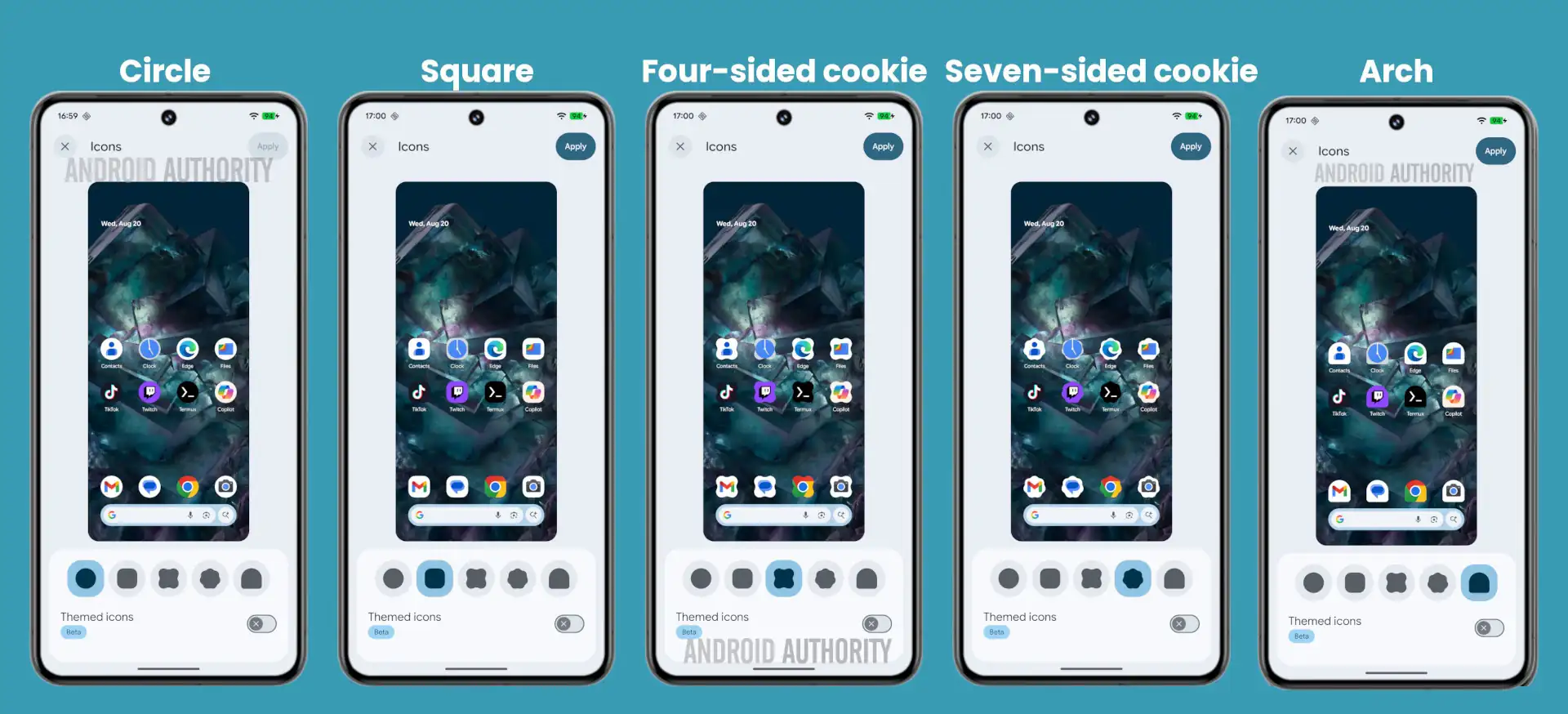
The update introduces a simple way to tweak the look of app icons, offering users the ability to switch from the default circular icon shape to one of five other preset shapes. These shapes include a square, a four-sided cookie, a seven-sided cookie, and an arch. To access this feature, users need to go to the Wallpaper & Style app, where they will find the updated ‘Icons’ menu that now supports icon theming.
For those who remember, this feature was briefly available on the Pixel Launcher with Android 12 but was removed in later updates. However, the idea resurfaced in Android 16 beta versions, and now it’s here to stay with a slightly refined set of options. While an additional clover-shaped icon was present in early beta versions, it’s no longer available in this update.
Icon customization, while seemingly a minor change, can drastically alter the look and feel of a Pixel home screen. Customization enthusiasts have long praised Android for its flexibility, especially when compared to the more rigid customization options of iOS. With this latest update, Google is giving users more control over how their home screens appear, ensuring that Pixel users can make their devices feel truly unique.
However, not everyone is excited about the change. While icon theming might appeal to some, others have expressed a preference for different types of customization. For instance, many users have long requested the option to increase the size of their icons and expand the icon grid size, as the current grid size of 4×5 feels limiting. Despite this, the move toward more home screen customization is an encouraging step for Pixel owners.
Although third-party launchers provide alternative ways to tweak home screen appearance, some users argue that these options often come with issues like laggy animations, especially when using gestures like swiping up to access home or recent apps. Until Google resolves such performance issues, this feature may only appeal to those who prefer a more aesthetically customized look rather than a functional overhaul.
2 comments
I like the idea of customizing my home screen, but I wish there was a way to fix the grid and make icons larger. It’s 2025, and I want to be able to do that without needing to use a janky launcher
Not really interested in the icon shapes. What I’d like is the ability to increase icon size and grid size. The current 4×5 grid is too small. 😤