Artificial intelligence has been creeping into our browsers for a while, but Opera is pushing especially hard to turn its apps into full AI companions. 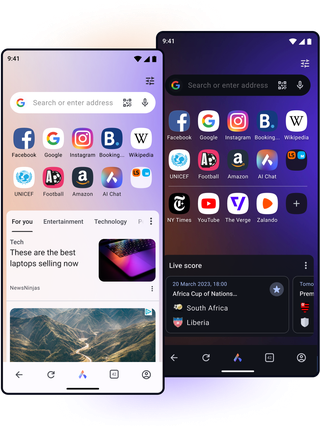
With its latest update to Opera for Android, the company is trying to close the gap between the mobile browser and its AI-centric desktop flagship, Opera One, giving you more ways to ask questions, translate content and summarize long pages without ever leaving the tab you are on.
The centerpiece of the update is a revamped Ask AI experience that now lives directly inside the browser’s main search and address bar. When you tap the bar at the top of Opera for Android, you can switch between a classic web search and an AI prompt simply by choosing the Ask AI entry. Instead of bouncing between a search engine, a chatbot app and your open tabs, everything is consolidated into one place, so you can decide whether a regular search or an AI answer is better for what you are doing in that moment.
Opera is also turning the AI box into a kind of universal inbox for your documents. From the Ask AI interface you can tap the plus icon and attach files that live on your Android phone. The browser can send PDFs, regular documents and even images to Opera’s AI back end so it can translate, summarize or explain them. That could mean getting a quick bullet-point digest of a 40-page report, turning a dense academic paper into plain language, or translating a restaurant menu you have just photographed while traveling. If you want, you can even snap a picture with your camera and use it immediately, without having to switch apps or copy anything.
The other big change is that Opera now lets the AI understand what you already have open. From any page, tap the three dots menu in the top-right corner and pick Ask AI. The browser attaches the current tab as context for your prompt, turning the chat into a page-aware assistant. You can ask it to explain technical jargon in an article, summarize a long review into a few key pros and cons, or translate the whole page into another language. Because the context is remembered in the ongoing conversation, you can keep asking follow-up questions about that same page without reloading or copying the link again.
In practice, it feels a bit like a modern reboot of the old Ask Jeeves era, except the butler now lives inside your browser and can read whatever you are looking at. For people who browse on a small screen during a commute or while multitasking, this kind of always-available explanation layer can make the difference between skimming and actually understanding what they are reading.
All of this naturally raises questions about privacy, and Opera is clearly aware of that. The company says that its AI features only receive the content of the active tab when you explicitly ask for help, not your full browsing history or any other background tabs. According to Opera, the prompts and page snippets it sends are encrypted, routed through its own servers and then forwarded to whatever AI model is most appropriate for the task. That data is stored for a limited time, up to 30 days, to keep your multi-step conversations intact and to make repeat queries faster, after which it is automatically deleted. Opera stresses that these snippets are not used to train models or to build advertising profiles.
Out in the real world, though, people do not agree on how much any of this matters. Some long-time Opera users say they have simply accepted that everyone is tracking them somewhere. For them, the deciding factor is convenience: a comfortable interface, a fast browser and a strong built-in ad blocker. Opera for Android and Opera Mini both deliver on that front with integrated ad blocking, customizable start pages and lots of power-user touches, so they stick with it and try not to overthink who is watching their clicks.
Others focus a lot more on who sits behind the product. Opera’s current ownership and the fact that many Chromium-based browsers share similar guts leads some people to argue that the real difference is just which company ends up selling or analyzing your data. That is why a vocal part of the browser community still swears by Firefox, which runs its own engine and has built a reputation around strong tracking protection. For these users, the idea of feeding yet more of their browsing to an AI service inside a Chromium browser makes them uneasy, no matter how clear the privacy policy sounds.
Then there are the people in the middle who view Opera as a kind of strange cult classic of the browser world. They hear warnings that it is shady or that its social media is a chaotic stream of memes, and yet they also see devoted fans calling it the most customizable browser they have ever used. The new AI features land right in the middle of that tension: a little bit experimental, a little bit ahead of rival mobile browsers, and just controversial enough to spark another round of arguments in the comments section.
On the mobile side, everyday experiences with Opera’s different variants also color how people perceive these AI upgrades. Opera Mini, for instance, is loved for its speed dial that can be neatly organized into folders, its ability to save pages for offline reading, and its bottom bar for quick tab switching that is harder to fumble than in some rival browsers. At the same time, some users complain about built-in ads that feel intrusive, speed-dial slots that mysteriously fill with betting sites, and downloads that slow to a crawl unless the app stays in the foreground. For them, the feeling is often a mix of frustration and reluctant loyalty: despite the quirks, no other browser replicates the exact blend of features they rely on.
Against that backdrop, bringing more capable AI tools to Opera for Android is a logical move. It plays to Opera’s strengths as a feature-packed alternative to the usual suspects, while addressing a real pain point on mobile: dealing with complex information on a small screen. If the privacy promises hold up in practice and the implementation stays fast and lightweight, Ask AI on Android could become a genuine reason to pick Opera over Chrome or the default browser that came with your phone.
The AI upgrades are rolling out now through the Google Play Store, so the only thing you need in order to try them is the latest version of Opera for Android. Whether you end up loving the new Ask AI or joking that the company has resurrected a smartphone-era Ask Jeeves, one thing is clear: the browser wars have entered their AI chapter, and Opera is determined not to be left out.
1 comment
Opera as a product is so weird. Half the internet says it is shady spyware, the other half calls it the best browser ever made. Then you open their Twitter and it is just cursed memes and chaos. These new AI tricks fit the vibe somehow 😅