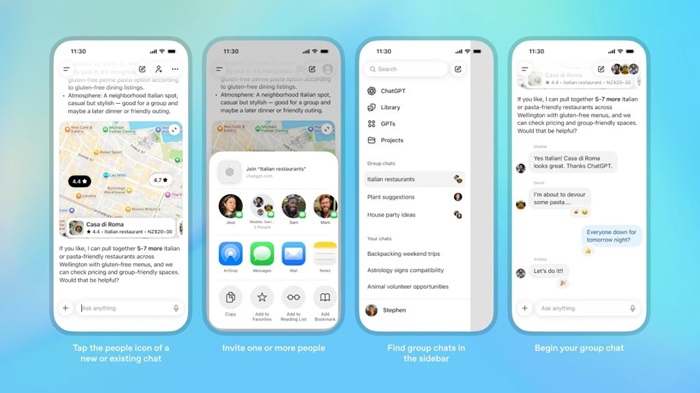
OpenAI rolls out ChatGPT group chats worldwide
OpenAI is turning ChatGPT from a one to one assistant into a shared space for teams, friends, and communities. After a short pilot phase, the company is now rolling out group chats for all logged in ChatGPT users around the globe on Free, Go, Plus, and Pro plans, bringing collaborative AI conversations to a much wider audience.
The feature was first tested in a handful of markets, including Japan, Taiwan, New Zealand, and South Korea. During that pilot, OpenAI collected feedback on how people actually used AI in group conversations, from study groups drafting essays together to small product teams brainstorming copy or outlining presentations. According to the company, the reaction was strong enough that it decided to accelerate a global launch and continue iterating on the design as usage grows.
At its core, ChatGPT group chat looks familiar: you create a room, invite people, and talk. Up to twenty participants can join a single group, making it useful for compact project teams, classrooms, clubs, or extended families who want a shared AI powered space instead of juggling separate one to one chats with the bot. Everyone sees the same thread, the same prompts, and the same AI answers, which turns ChatGPT into a kind of shared brainstorming partner sitting in the middle of the conversation.
The twist is how the AI participates. Answers in these rooms are powered by ChatGPT 5.1 Auto, a system that automatically selects the most appropriate model for each request based on the prompt and the models your account can access. That means a Pro subscriber can bring more capable models into the conversation, while Free, Go, and Plus users still get responses tuned to their own tier. The result is a flexible experience where the group does not have to constantly think about which model to pick before every question.
Because the assistant is embedded directly into the conversation, everyone in the room shares the same context. A remote team can ask the model to summarize a long back scroll, extract decisions and open questions, or generate action items after a heated debate. A language teacher can run a live practice session where students chat in their target language while ChatGPT corrects grammar and suggests better phrasing. Students working on a group assignment can divide research tasks between themselves while letting the AI handle rewrites, structure suggestions, or example problems that clarify tricky concepts.
OpenAI has also adjusted how usage limits work in this setting. Rate limits apply only when ChatGPT itself answers, not when humans talk to each other. In practice, that means you can keep chatting with your group without worrying that every short message is eating into your quota, and then bring in the assistant when its input is genuinely useful. It encourages people to treat ChatGPT as a powerful guest in the room rather than the only voice that matters.
For OpenAI, group chats are a strategic step. They turn ChatGPT from a solitary productivity tool into something closer to a collaborative workspace, competing not only with traditional messaging apps but also with digital whiteboards, shared note tools, and even parts of modern office suites. If enough people adopt it for everyday coordination, the AI assistant becomes a constant presence in how groups plan, learn, and make decisions together, from quick daily standups to deep planning sessions that stretch over weeks.
The rollout is still in progress, so the new feature may appear gradually in web and mobile apps as OpenAI scales up capacity and continues to refine the experience. But the direction is clear: ChatGPT is moving beyond simple question and answer exchanges toward a future where AI sits at the center of the group chat, ready to listen, summarize, rewrite, translate, and suggest the next step whenever the humans ask.