OpenAI is turning ChatGPT from a one-to-one assistant into a shared space by piloting group chats. Instead of copying answers into messaging apps or forwarding screenshots, you can now bring your whole crew into the same conversation with the AI. 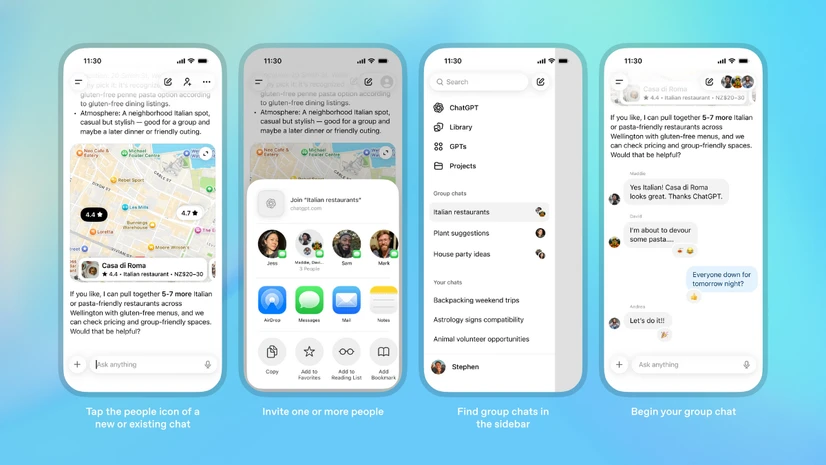
Friends planning a trip, colleagues discussing a project, or family members trying to decide where to eat can all think out loud together while ChatGPT quietly sits in the same thread, ready to step in when needed.
At its core, a ChatGPT group chat is a shared conversation where multiple human participants and the assistant all see the same history, prompts and replies. Group chats live alongside your existing private chats, but they are kept separate so your one-on-one conversations remain untouched. Every group has its own space, its own history and its own settings, which makes it feel less like a tacked-on feature and more like a new way to use the chatbot you already know.
How to start or join a ChatGPT group chat
Starting a group chat is built directly into the familiar ChatGPT interface. On web or mobile, open a new or existing conversation and tap the people icon in the top-right corner. From there you can spin up a fresh group or turn your current one-on-one thread into a shared conversation. When you add people to an existing chat, ChatGPT creates a copy of that conversation as a new group so that the original private exchange stays separate and visible under your usual chat list.
Inviting others is done through a shareable link. OpenAI currently allows you to bring in between one and twenty people, and anyone already in the group can share the link further until that limit is reached. When you join or create your first group chat, you will be asked to set up a short profile with your name, a unique username and a photo. That lightweight profile helps everyone quickly see who is who in a busy conversation, especially when messages start flying.
Once created, group chats gain their own home in the sidebar. They appear in a dedicated section so you can quickly reopen active groups without scrolling through all your one-on-one threads. From this view you can glance at profile photos to see who is inside each chat, jump back into recent conversations or tweak basic settings.
Managing members and roles
OpenAI has designed membership controls to feel familiar to anyone who has used modern messaging apps. Inside a group, every participant can see the current list of members and can leave whenever they like. Group members also have the ability to remove other participants if needed, with one important exception: the original creator cannot be kicked out and can only leave by choosing to exit the group themselves. This makes it harder for a group to accidentally lock itself away from the person who started it.
What ChatGPT actually does in a group
Under the hood, responses in group chats are powered by GPT-5.1 Auto. Instead of locking you to a single model, this setting chooses the best available model for the specific prompt and the plan of the person ChatGPT is responding to, whether they are on Free, Go, Plus or Pro. Search, image understanding and generation, file upload and other core capabilities carry over into group chats, so the assistant can still research, summarize or brainstorm just as it does in private conversations.
Rate limits are handled in a way that reflects who is getting help. Messages between human participants are unlimited, and only the moments when ChatGPT replies are counted. When the assistant responds, the usage is deducted from the quota of the person it is effectively helping at that moment. This means a group can talk as much as it wants, while the AI steps in selectively without burning through everyone’s limits at once.
To make this work socially, OpenAI has trained ChatGPT with new group-aware behavior. In these shared chats, the assistant does not jump in after every single message. Instead it follows the flow of the discussion, trying to infer when the group is actually asking for help and when it should stay out of the way. If you explicitly want a reply, you can simply mention ChatGPT by name in your message or respond directly to one of its previous answers to bring it back into the conversation.
Emojis, personalization and custom instructions
Group chats are not just about text walls. ChatGPT can now react to messages with emojis, making its presence feel more playful and less robotic. It can also reference the profile photos of people in the group. For example, if you ask it to generate a fun image or a playful description that includes members of the chat, it can use those photos as a reference to ground its response and make the result feel more personal to that specific group.
Each group can also have its own custom instructions. You might want the assistant to act like a strict project manager in a work-related group, but behave more like a laid-back trip planner in a travel group with friends. These group-level instructions sit alongside, but separate from, your general account-level settings, giving you a way to tune the assistant’s tone and priorities to match the people you are chatting with.
Privacy, memory and protection for younger users
Privacy is a central part of the design. OpenAI states that your personal ChatGPT memory is not used inside group chats, and the assistant does not create new memories from what happens there. In other words, those conversations are walled off from the long-term memory that can shape how ChatGPT interacts with you elsewhere. The company is also exploring more granular controls so that, in the future, users can explicitly choose if and how group conversations should interact with memory features.
There are extra protections when younger users are involved. If anyone under the age of eighteen participates in a group chat, the system automatically reduces exposure to sensitive content for everyone in that group. This approach treats safety as a shared responsibility: once a minor is present, the assistant’s behavior adapts to keep the entire conversation within stricter bounds.
Where ChatGPT group chats are available
For now, group chats are rolling out as a pilot in a limited set of regions. Logged-in users on ChatGPT Free, Go, Plus and Pro plans in Japan, Taiwan, New Zealand and South Korea can access the feature on both web and mobile. OpenAI describes this rollout as an early test and plans to expand to more countries and possibly additional plans after it learns from real-world usage and feedback.
Why this matters
Group chats hint at a future where ChatGPT is not just a private assistant that lives in your browser, but a shared tool that helps small groups think together. Whether you are co-writing a document, organizing an event, comparing options for a big purchase or simply debating movie choices with friends, having the assistant inside the conversation saves time and reduces confusion. Everyone sees the same suggestions, the same lists and the same clarifications at once, instead of relying on one person to copy and paste answers across apps.
As the pilot grows, features like richer group controls, deeper customization and more flexible memory options will determine how central this experience becomes. But even in its first iteration, ChatGPT group chats already feel like a significant step toward collaborative AI, where the assistant is not just your partner, but a participant in the conversations you have with the people around you.
1 comment
kinda love that memory is off by default in groups, feels less creepy tbh