OpenAI is no longer just shaping the future of AI – it’s coming for your browser. With the launch of ChatGPT Atlas, OpenAI steps directly into Google’s home turf, introducing an AI-powered browser designed to blend search, productivity, and conversation into a single intelligent experience. Available now on macOS, Atlas aims to redefine how users browse, learn, and complete everyday digital tasks.
A browser built for the AI era
At first glance, Atlas looks like any Chromium-based browser. 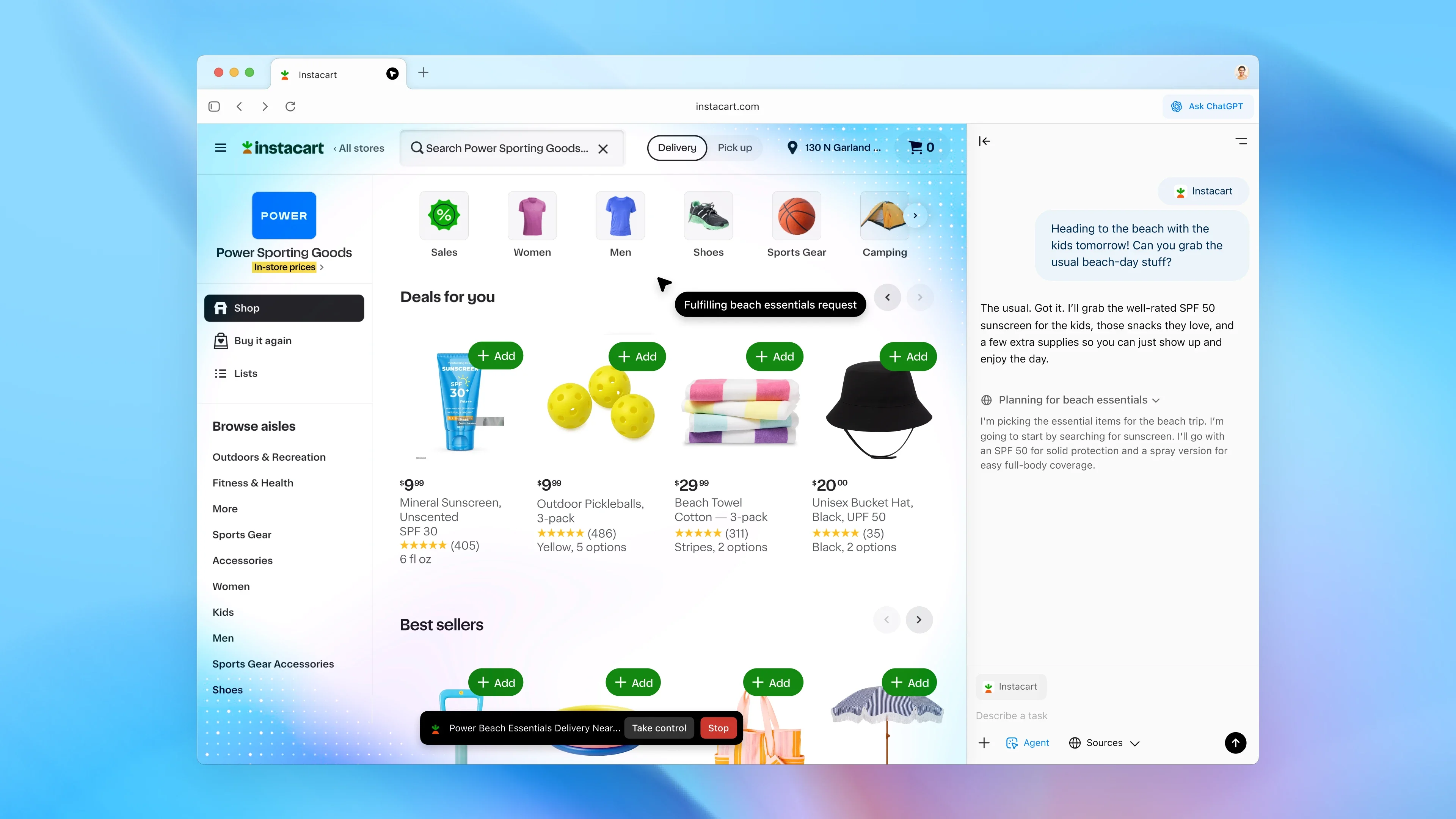
It supports tabs, bookmarks, incognito mode, autofill, and all the basics you’d expect from a modern browsing tool. But beneath its familiar surface lies OpenAI’s secret weapon: deep ChatGPT integration. Every element of the browsing experience has been infused with conversational intelligence, allowing users to interact with the web in new, more intuitive ways.
The standout innovation is browser memory. Unlike traditional browsers that simply store your history, Atlas uses memory to understand and contextualize your browsing patterns. You can, for instance, ask ChatGPT to summarize the job listings you viewed recently or compile a to-do list from your web searches. The memory is fully optional and erasable – delete your browsing history, and the AI forgets along with it.
Agent mode and autonomous browsing
OpenAI’s most futuristic addition is Agent Mode, a feature that allows ChatGPT to take temporary control of a browser tab to complete tasks autonomously. During its demo, the agent searched for recipe ingredients and added them to an Instacart cart without the user lifting a finger. It’s an early look at how AI might soon navigate the web for us – shopping, planning trips, or researching data in seconds.
Atlas also includes an Ask ChatGPT button, ever-present in the top-right corner. It opens a collapsible sidebar where users can ask contextual questions about the current webpage – without leaving it. Reading a dense research paper? Ask ChatGPT to summarize the findings. Looking at a complex product review? The bot can explain specs or highlight comparisons. And with the new Cursor feature, you can even rewrite or polish text directly in any input field – emails, blog posts, or forms – on the fly.
Coming to all platforms soon
Right now, Atlas is exclusive to macOS, but OpenAI has confirmed Windows, iOS, and Android versions are in development. Considering OpenAI’s rapid pace of rollouts, cross-platform support could arrive sooner than expected.
The AI browser wars begin
With Atlas, OpenAI officially enters the so-called “AI browser wars.” Google’s Chrome has dominated for years, but new players are emerging fast. Perplexity has launched its Comet browser, Arc by The Browser Company introduced Dia, and Opera is testing Neon, an experimental agent-driven browser. Even Microsoft’s Edge continues to evolve around Copilot. Meanwhile, Apple seems content to let others lead the AI charge – Safari remains largely untouched by the current wave of AI innovation.
Winning hearts, not just clicks
Still, conquering the browser market won’t be easy. People are fiercely loyal to their habits. Switching browsers can feel like changing homes – especially for users deeply invested in Chrome or Arc. Atlas may appeal instantly to ChatGPT enthusiasts, but mainstream adoption requires a delicate balance of trust, privacy, and utility. AI can make browsing faster and smarter, but users must believe it’s worth the leap.
Even with its promise, Atlas faces a skeptical audience. Early testers have praised its fluid ChatGPT integration but noted that its novelty alone won’t be enough. A powerful browser must also be reliable, lightweight, and respectful of privacy. If OpenAI gets that formula right, Chrome’s long reign might finally meet its first real challenger.
2 comments
If privacy is really optional, that’s a red flag for me
Imagine your browser literally doing your grocery shopping lol