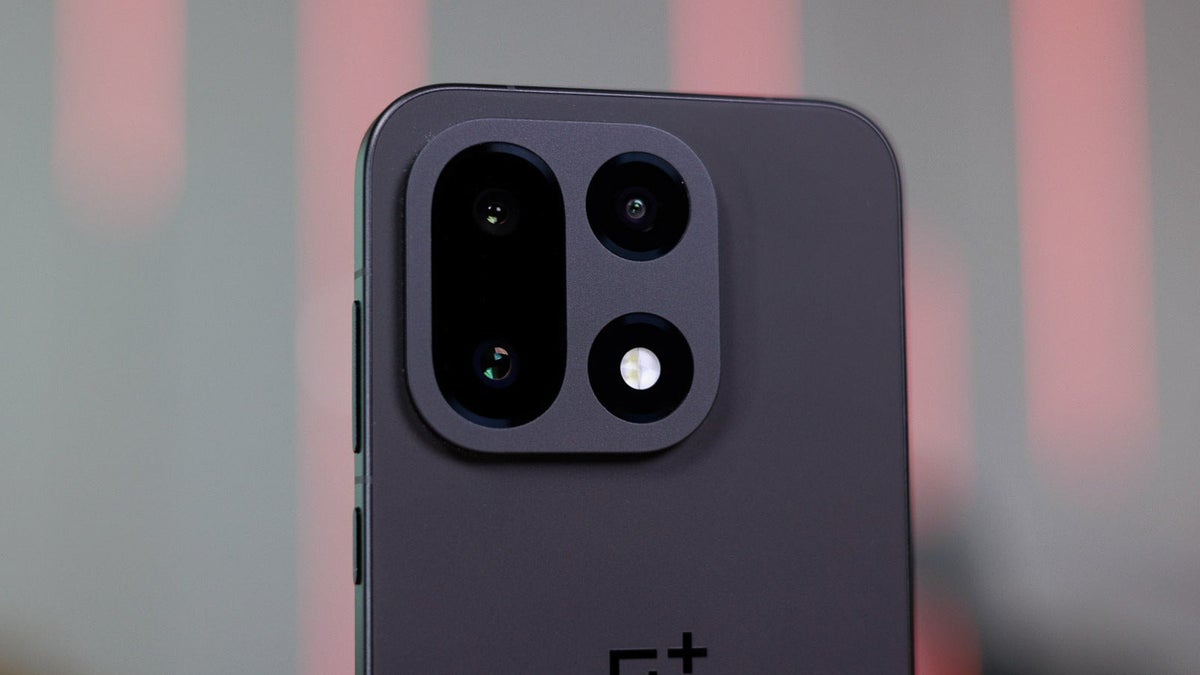
The real story behind the OnePlus 15 camera “downgrade” drama
The OnePlus 15 has barely hit shelves and it is already living a double life. On paper it is the most complete flagship OnePlus has shipped in years: excellent battery life, a refined design, fast and efficient performance, and a display that can go toe-to-toe with anything in its price range. Yet if you scroll through social media or the comments under early reviews, you would think the phone is a disaster – all because of its cameras.
The loudest criticism focuses on one thing: people claim that the OnePlus 15 takes “softer” photos than the OnePlus 13. Side-by-side samples quickly went viral, and the verdict from many readers was brutal: “OnePlus ruined the camera”, “massive downgrade”, “who approved this?”. Sharpness – or at least the appearance of it – has become the hill the internet wants to die on.
But the more you look at those samples, the more it becomes clear that the story is not as simple as “the OnePlus 13 is sharper, therefore it is better”. What we are really seeing is a philosophical shift in how OnePlus processes images on its phones. The new DetailMax engine inside the OnePlus 15 aims for a more natural, higher dynamic range look. Sometimes it absolutely nails it. Sometimes it stumbles. And that inconsistency is the real problem at the heart of the backlash.
Why the OnePlus 15 looks softer – and why that is not always bad
Let’s start with the most obvious comparison: the telephoto camera in daylight. In multiple scenes – including a colorful 3D cartoon figure indoors and a building shot outdoors – the OnePlus 13 undeniably produces a crisper image at first glance. Fine textures appear etched, lines are razor-like, and zooming in reveals more micro-contrast.
The catch is that much of this “extra detail” does not actually come from the optics or the sensor; it is created in software. The OnePlus 13 pushes aggressive sharpening in post-processing. Edges are outlined, textures get extra crunch, and noise is smoothed while contrast is added back on top. This is far from unique to OnePlus; nearly every smartphone does some version of this. But in the 13’s case you can really see the hand of the algorithm at work.
On the cartoon sample, the effect is pleasant. The scene is relatively flat and shot in ambient indoor light, so the added sharpness brings the image to life. Outlines on the character pop, the small letters and printed details stand out, and the result looks punchy and “ready for social media”. For this type of scene, the OnePlus 13’s punchier image can indeed feel more satisfying.
Move to the building shot, however, and the illusion starts to crack. Push in closer on the OnePlus 13 photo and straight lines begin to look jagged or pixelated, as if the photo has been over-compressed. Brick edges and window frames adopt that familiar “phone camera” harshness. At the same time, the phone has decided the scene should be high-contrast, so it drags the shadows down far more than necessary, despite the real-world lighting not being especially dramatic.
The result is a photo that impresses at thumbnail size, but falls apart when you examine it. You also start to notice other issues: blacks are crushed, a greenish cast creeps into the mid-tones, and white balance shifts away from reality. It is visually striking, but not particularly accurate.
The OnePlus 15, by contrast, is clearly doing less edge enhancement. Its telephoto images in the same scenes look softer, yes, but they also look more natural. Lines are smoother, gradients between light and shadow are less harsh, and the dynamic range is handled with a much lighter touch. Instead of forcing deep, dramatic shadows, the 15 keeps more information in darker areas and maintains a more believable separation between sky, building and foreground. It is the difference between an image that screams “look how sharp I am” and one that quietly resembles what your eyes actually saw.
Selfies: pleasing versus technically correct
Switch to the selfie camera and the picture gets even more complicated. In many situations, the selfie straight from the OnePlus 15 looks gorgeous. Skin tones are warm, the subject looks healthy and alive, and there is none of the over-processed, plastic face effect that plagued older phones.
Yet if we put on our technical hat, the OnePlus 13 still wins some points. In directly comparable shots, the 13 often produces a shallower depth of field, with a blurrier background that helps the subject pop more clearly. That is notable because the hardware – sensor size and aperture – has not meaningfully changed, so the difference is likely down to tweaks in the portrait segmentation and background blur algorithms rather than optics.
Color is the second big difference. Across virtually every sample, the OnePlus 15 leans into a warmer, slightly yellowish tone. It is clearly intentional – no camera drifts that consistently by accident – and it results in selfies that look cozy and flattering on many skin tones. But if you care about color accuracy and neutral white balance, the OnePlus 13 gets closer to reality. Whites look more like true white, and the overall tone doesn’t push as far into the “golden hour” aesthetic that the 15 loves.
So in selfies, we end up with a split verdict: the OnePlus 15 delivers pleasing, social-media-ready shots with a slightly stylized warmth, while the OnePlus 13 plays the role of the more technically faithful option with cleaner white balance and stronger subject separation.
Main camera in daylight: the DetailMax engine shows its hand
The most interesting comparisons happen on the main camera, where OnePlus is leaning heavily on its new DetailMax processing pipeline. The company’s goal here seems clear: capture more dynamic range, protect highlights like the sky, and avoid that harsh HDR look that older phones sometimes produced.
In many scenes, DetailMax earns its name. When we look at sunlit outdoor shots, the OnePlus 15 consistently exposes the sky better than the OnePlus 13. Instead of a blown-out white patch, you get a more controlled gradient with visible structure in the clouds. At the same time, brighter areas around tree leaves or building edges are not pushed so aggressively that they glow unnaturally. The overall balance feels more cinematic and less like a cartoon.
Color, however, remains a point of contention. The OnePlus 15 often renders scenes with both warmer tones and slightly boosted saturation. In landscapes full of greenery, that can look beautiful: foliage appears lush, blue skies are rich, and the whole image feels inviting. But if you are documenting reality rather than chasing Instagram aesthetics, you might prefer the more restrained palette of the OnePlus 13.
One particular sample – a dense wall of greenery – perfectly illustrates the trade-offs. The OnePlus 15 holds the sky’s exposure well and avoids clipping the highlights between leaves, but some detail in deep shadows disappears. Certain dark areas become inky, and subtle textures between overlapping branches are smoothed out. At the same time, a few brown leaves poking out against the sky are actually rendered with more accurate color on the 15, while they are harder to distinguish on the 13. You gain nuance in some places, lose it in others.
Then there is the tricky situation with a subject lit from directly above, the kind of lighting that often makes people look tired or even slightly creepy. Here the OnePlus 15 does something very smart: it lifts the shadows just enough to reveal detail in eye sockets and under the nose without turning the whole scene into a flat mush. The OnePlus 13, on the other hand, holds onto its contrast curve more stubbornly, plunging those same areas into near-black. Technically it is sharp, but it is not flattering; the image feels closer to a horror still than to a natural portrait.
Night mode: sharpening, haze control and when DetailMax falls short
Low-light photography is where software processing can make or break a camera, and again the OnePlus 15’s new approach has strengths and weaknesses.
On a cityscape at night, with bright restaurant signs and street lamps scattered across the frame, the OnePlus 15 appears to combine heavier sharpening with more aggressive haze reduction than its predecessor. Small point light sources look crisper and more clearly defined. Glow around neon signs is reduced, and the outlines of windows and tree branches retain structure instead of dissolving into a foggy blob. Because the scene is dominated by solid objects – a building, trees, hard-edged lights – this cleaner look works well. More perceived detail is a genuine advantage here.
Another night scene flips the script. In a softer, moodier setting, the 15’s photo is not as razor sharp as the 13’s, but it captures more detail in darker areas of the frame – things like shadowy corners, building facades further away from street lights, and ground texture. For many people, that extra information is worth more than micro-contrast alone. A slightly gentler image that lets you actually see what is happening in the shadows is often more useful than a crunchy one that buries half the scene in darkness.
Yet DetailMax is not infallible. In at least one demanding low-light scenario, the OnePlus 13 simply produces a more balanced, better-exposed image than the 15. Dynamic range is handled more gracefully, mid-tones are cleaner, and the new engine’s usually helpful processing either misfires or backs off too much. These “regression” cases are exactly what fuel the sense of inconsistency that so many early users are complaining about.
Ultra-wide and telephoto at night: warmth overload
When we move away from the main camera to the ultra-wide and telephoto at night, the OnePlus 15’s biggest quirk becomes unavoidable: its obsession with warmth.
On the ultra-wide, the OnePlus 15 often produces darker, deeper blacks and less haze than the OnePlus 13. Shadows lean towards true black instead of washed-out gray, and the halo around point light sources is more tightly controlled. That suggests the 13 may be using slightly longer exposures or higher ISO to pull up detail, leading to more perceived noise and glow. Depending on your taste, you might prefer the cleaner, more contrasty 15 image.
The problem is color temperature. The already warm bias of the main camera becomes almost exaggerated on the secondary lenses at night. Scenes take on a strong yellow tint, as if someone slid the white balance slider far to the right and forgot to stop. What could have been a cozy, amber street scene instead becomes an overly orange wash that disconnects from reality. Yes, you can correct this with editing or a bit of manual tweaking, and yes, it is the sort of thing a software update can dial back. But in out-of-the-box shots, it is simply too much.
The same story continues on the telephoto. In one example, curtains frame a window and a light source sits above the subject. The OnePlus 15 renders significantly more detail in the dim room behind the curtains, revealing objects that the 13 leaves in the dark. That is a clear win for its HDR logic: it preserves highlight detail while still reaching deeper into the shadows. If only the overall color temperature wasn’t so aggressively yellow, this would be an unquestionably better shot.
In another telephoto scene, the OnePlus 13 shows off higher apparent detail once again, but you can see how it gets there. Edges are pushed, micro-contrast is exaggerated, and the shot has that processed sheen you recognize after years of looking at phone photos. The 15 is not far behind in terms of real captured information – which is why it is reasonable to expect that OnePlus could, with a couple of firmware updates, give the 15’s telephoto output the same apparent crispness without going overboard.
The real issues: inconsistency and white balance, not raw sharpness
Looking across all these examples, a pattern emerges. The OnePlus 15 is not a “bad camera phone” and it is certainly not a catastrophe compared to the OnePlus 13. What it is, instead, is a camera system in the middle of a transition.
Instead of doubling down on the hyper-processed look that dominated older generations, OnePlus is experimenting with a more natural rendering, backed by a new DetailMax engine that prioritizes dynamic range and gentler tonal transitions. That is a bold move – and, when it works, the photos look more photographic and less like they have been run through three different filters.
However, two problems keep this from feeling like an unequivocal upgrade. First is inconsistency. Sometimes DetailMax delivers stunning results with balanced highlights, rich mid-tones and usable shadows. Other times it appears to misjudge the scene, either letting noise and haze creep in or flattening details it should have preserved. Users notice when a phone feels unpredictable, especially when they are comparing it against an older model that they already trust.
The second issue is the aggressively warm white balance. A slight tilt towards warmth can be flattering – many people prefer their selfies to look like they were taken at golden hour. But on the OnePlus 15, that warmth is not a subtle flavor; it is often the dominant characteristic of the frame, especially on secondary cameras at night. In the right scene it looks pleasant. In the wrong one, it pushes the image so far away from real-world colors that it becomes distracting.
Why obsessing over sharpness misses the bigger picture
As someone who has spent years shooting with professional cameras, I can tell you that real sharpness – the kind delivered by good glass and carefully tuned optics – looks very different from the artificial sharpness phone algorithms create. True lens sharpness keeps edges crisp but natural, with fine textures that remain detailed without shimmering. Digital sharpening, by contrast, tends to outline edges, exaggerate micro-contrast and sometimes introduce halos or pixelation.
On a small phone screen, that artificial sharpness can be seductive. Zoom in a little, and the 13’s photos can make you feel like you are getting “more camera for your money”. But as soon as you look closer, or view the shots on a larger display, the downsides begin to show. Skin can look harsh, foliage can turn into a noisy mess and architectural lines can develop jagged stair-step artifacts.
This is why the backlash against the OnePlus 15’s softer look is, in many ways, a symptom of how social media has trained us to evaluate photos. We swipe quickly, we compare at 100% crop for a few seconds, and we treat extra punch as inherently superior. Yet most people do not print posters from their phone shots or inspect them at extreme zoom. What matters more in the long run is believable color, stable exposure and a consistent camera behavior you can learn and rely on.
By that measure, the OnePlus 15 is closer to where it should be than angry comments suggest – it just has not fully arrived there yet.
Can OnePlus fix the 15’s camera problems?
The good news for anyone interested in the OnePlus 15 is that almost all of its weaknesses are software problems, not hardware ones. The cameras already capture plenty of data; it is the processing decisions on top that need refinement.
Dial back the white balance warmth a notch or two, especially on the ultra-wide and telephoto modules. Smooth out the DetailMax behavior so that it treats similar scenes in similar ways and does not unexpectedly crush shadows in some frames while lifting them beautifully in others. Slightly adjust sharpening levels so that fine detail looks crisp without crossing into the uncanny, over-processed territory of older generations.
These are exactly the type of issues that manufacturers routinely address through OTA camera updates in the first few months after launch. OnePlus, in particular, has a history of pushing multiple camera-tuning updates based on community feedback. And given how vocal the OnePlus 15 user base already is about the camera, it is hard to imagine the company ignoring that signal.
So, is the OnePlus 15 camera a downgrade?
Strip away the noise and the hot takes, and the truth is more nuanced. If your definition of a good camera phone is “the sharpest possible pictures at any cost”, then yes, in some scenarios the OnePlus 13 still looks more impressive thanks to its heavy-handed processing. If, however, you care about more natural rendering, better highlight control and the potential for a more photographic look, the OnePlus 15 is already capable of excellent results – it just does not deliver them as consistently as it should.
The backlash, then, is less about absolute image quality and more about expectations. People grew used to how the OnePlus 13 drew the world, and any deviation feels like a step back. In reality, the OnePlus 15 is the first chapter of a new approach. It is rough around the edges, and its warm bias will not be to everyone’s taste, but it is far from the disaster some commenters claim.
If OnePlus follows through with thoughtful software updates, the 15 could easily become the more desirable camera in the long run – the one that trades instant, crunchy impact for images you are happier to live with over time. Until then, it remains a fascinating case study in how much of smartphone photography comes down not to sensors and lenses, but to the invisible choices made by code after you press the shutter.