Nothing is widening the rollout of its Android 16-based Nothing OS 4.0 update, and this time the focus is on the more affordable side of the lineup. After debuting on the flagship Nothing Phone (3), the stable build is now reaching the Nothing Phone (3a) and Nothing Phone (3a) Pro, bringing a sizeable list of new AI tools, visual tweaks, camera upgrades, and quality-of-life changes for users who did not want to live on beta firmware.
The update is arriving as a classic staged rollout. 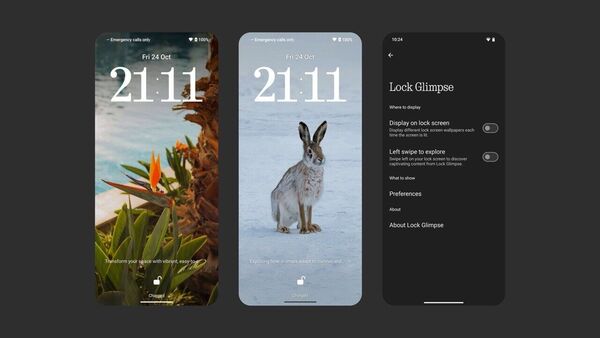
A small wave of Phone (3a) and Phone (3a) Pro owners will see the download first so that Nothing can monitor bugs, crashes, and user feedback before pushing the firmware to everyone. If you do not see the notification yet, you can still check manually in the Settings menu and be prepared for a fairly large package, because this is both a major Android generation jump and a full refresh of the Nothing OS skin.
At the heart of Nothing OS 4.0 is a renewed focus on AI and privacy. A new AI usage dashboard inside Essential Space keeps track of when apps and services tap into large AI models, giving you a clearer view of which tools are processing your data and how often. You will find it under Settings > Intelligence toolkit > AI usage. For anyone worried that on-device and cloud AI are turning into a black box, this extra layer of transparency is a welcome step, especially on a mid-range phone where every background process matters.
Essential Space itself keeps growing beyond a simple minimalist launcher. Flip to Record now lets you snap photos and attach short notes while recording, with everything neatly grouped inside Essential Space for later review. It is designed for people who like to capture meetings, lectures, or quick ideas without juggling separate apps. To make the ecosystem more playful, Nothing is also introducing Playground (still officially in Alpha), a hub where you can explore community-made Essential Apps, camera presets, and EQ profiles. These Essential Apps lean heavily on AI and user creativity, so expect some rough edges and a few experimental ideas that may change quickly as the community iterates.
Everyday navigation on the Phone (3a) series should feel more flexible after the update. You can now hide apps directly from both the home screen and the app drawer, tucking away rarely used or sensitive apps without uninstalling them. Hidden apps live in a dedicated Hidden icons section inside the drawer, which you can access when you need to. Search in the app drawer has also become smarter: you can define the search scope so that results are limited to apps, contacts, or broader device content, cutting down the noise when you know exactly what you are looking for.
Widgets and quick controls pick up several useful improvements. Weather, Pedometer, and Screen Time widgets now have more size options, making it easier to build a dashboard-style home screen that actually fits your layout instead of being dictated by fixed tiles. Most Quick Settings tiles now support a compact 2×2 layout, handy if you like to keep many toggles visible without turning the notification shade into an unreadable grid. Pop-up view multitasking adds support for two floating icons, making it much simpler to swap between mini-apps without jumping back to the full recent apps screen every time.
Under the hood, Nothing OS 4.0 includes an updated system upgrade engine that can automatically optimise your apps after installation to improve cold start times. The company points users to Settings > Apps > App optimisation if they want to dig deeper, but the idea is simple: faster launches and less stutter on day-to-day apps, even on the more modest Phone (3a) hardware. Combined with Android 16’s own efficiency work, this should help the phones feel snappier rather than weighed down by the new features.
Visually, the software is inching closer to a distinct Nothing identity instead of feeling like lightly modified stock Android. The default app icons have been redesigned with a fresher, more cohesive look, and the status bar now uses clearer, more legible symbols. Two new lock screen clock faces join the Customisation menu, adding options that better match the dot-matrix aesthetic the brand is known for. For late-night use, an Extra dark mode toggle appears under Settings > Display > Dark theme, deepening blacks and reducing eye strain on the OLED panels. Subtle animation tweaks across the interface try to make transitions smoother and more fluid, so the system feels more premium even on the cheaper models.
The signature Glyph Interface is not standing still either. A new option lets you decide whether Flip to Glyph should move the phone into Silent or Vibrate mode, giving you more control over how discrete you want your alerts to be when you place the phone face down. Glyph Progress now hooks into Android 16’s Live Update notifications, which should make progress bars and status indicators more consistent when third-party apps tap into the feature for downloads, ridesharing, or food delivery updates.
Photo and video shooters will notice a long list of camera improvements once they install the update. Nothing has refreshed the default preset list, highlighting new popular looks right out of the box so you do not have to dig through menus to get a good style. Filters gain an intensity slider for finer control, plus exclusive Stretch styles for more experimental edits that push perspective and contrast. Motion Photos can now capture longer clips with audio, blurring the line between a still and a short video and giving you more to work with when picking the perfect frame. Meanwhile, the new Nothing-branded watermarks and artistic frames let you stamp your shots with a more stylised identity, and the camera interface itself has been cleaned up with more logical controls and gestures for quicker, more intuitive operation.
Because this is a sizeable firmware change, Nothing strongly recommends updating Essential Space to the latest version before applying the system update so that features like the enhanced Flip to Record work properly. Backing up your important data, whether to the cloud or a local drive, is also sensible in case something goes wrong during the install. Early adopters of the beta build complained about promotional placements and ad-like suggestions in some parts of the interface, especially around AI features and Essential Space. On the current stable release for the Phone (3a) series, those surfaces appear toned down or absent for most users, but regional differences and future patches could still change the experience, so it is worth keeping an eye on community feedback if you are sensitive to that kind of monetisation.
For anyone considering buying into the ecosystem, the Phone (3a) and Phone (3a) Pro remain compelling mid-range entries, especially now that feature parity with the flagship model is much closer. Retailers are already listing aggressive deals for higher-memory 256 GB and 12 GB RAM versions, which makes the pair even more attractive to value-hunters. Crucially, nothing in this update seems to hurt performance or battery life in any obvious way based on early impressions, and the combination of deeper AI tools, visual polish, and camera upgrades means the Android 16-based Nothing OS 4.0 release feels like a genuinely meaningful upgrade rather than a routine security patch.