Nothing is finally switching the Nothing Phone (3) over to Nothing OS 4.0, its big Android 16-based update, and the rollout has officially begun. 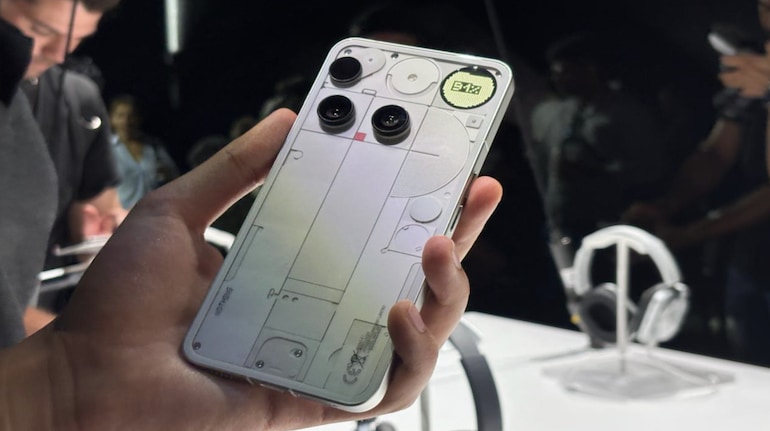
After weeks of public betas and small hotfixes, the company is confident enough to push the stable build to regular users, turning its most recognizable phone into a showcase for what Android 16 can look and feel like when it is wrapped in Nothing’s minimalist, glyph-first design language.
As usual, the newest hardware gets the love first. The update is currently arriving on the Nothing Phone (3), with the company promising that other Nothing and CMF devices will follow once final testing is complete. There is no firm calendar yet, and the rollout is staged, so not every Phone (3) owner will see the notification on day one. But if you own the device, Nothing OS 4.0 is now officially on the way.
Glyphs get smarter, not just brighter
Nothing built its brand around the Glyph Interface on the back of its phones, and OS 4.0 doubles down on that idea. The new update introduces deeper Flip to Glyph controls, letting you decide exactly how the rear lights behave when you place the phone face down. You can keep them subtle for meetings, more insistent for deliveries and ride-sharing updates, or turn them off entirely when you want your phone to disappear into the background.
There are also new Glyph Toys, including Hourglass and Lunar Cycle, which turn the LEDs into small ambient animations. They are not productivity features in the strict sense, but they add personality and make the Nothing Phone (3) feel more like a living gadget on your desk, subtly reacting to time and motion even when it is not actively buzzing with notifications.
Live Updates tie the lock screen and Glyphs together
The most meaningful change in Nothing OS 4.0 comes from Android 16’s Live Updates API. Any app that supports Live Updates can now plug into Nothing’s Glyph Progress feature. That means your delivery app, ride-hailing service, or countdown timer can show real-time progress both on the lock screen and via the rear LEDs, so you can glance at the phone from across the room and still know what is happening without opening anything.
This is a big step up from earlier Nothing builds, which only worked with a handful of handpicked apps. By piggybacking on Google’s Live Updates, Nothing instantly opens the door to far more services, removing one of the main complaints power users had about the Glyph system: cool idea, too few apps. With OS 4.0, the glyphs finally feel like a real information layer, not just a visual gimmick.
Darker, calmer, and easier on the battery
Extra Dark Mode also gets a serious upgrade. Blacks are deeper, contrast is higher, and the system trims energy use on OLED panels by dialing back unnecessary glow. Notifications, Quick Settings, and the App Drawer all adopt a calmer look that is easier on the eyes at night while still keeping icons and text readable.
Importantly, the new dark styling now extends into first-party apps like Essential Space and the launcher, with more Nothing apps expected to follow. It gives the software a more coherent identity, instead of the old mix of bright panels and dark menus that sometimes felt thrown together. Combined with the brand’s sparse typography, Nothing OS 4.0 manages to look both futuristic and understated.
Animation polish and tactile feedback
Nothing spent a lot of time on how the system feels in motion. Every swipe, scroll, and gesture now carries more depth and weight. Opening and closing apps gently scales the home screen background in and out, adding a sense of layers instead of flat panels sliding around. It is a subtle thing, but after a few minutes you notice that the phone simply feels more expensive.
Haptic feedback has been tuned too. When you hit the maximum or minimum volume, the phone now taps your finger with a small vibration, so you get a physical cue even if you are not staring at the slider. Notifications land with a more controlled buzz instead of a harsh rattle, and the whole interface feels less frantic and more deliberate.
Widgets, multitasking, and hidden apps
Power users get a few quality-of-life tweaks as well. New 1×1 and 2×1 widget sizes for Weather, Pedometer, and Screen Time help you build a home screen that surfaces the data you care about without stuffing every page with huge tiles. It is easier to glance at step counts or today’s forecast without sacrificing a clean layout.
Nothing OS 4.0 also improves the Pop-up View, letting you keep two floating apps open at once and switch between them with gestures. You can swipe up from the bottom to minimize a pop-up or pull it down to go full screen, making it feel more like a flexible desktop window than a rigid mobile overlay. For people who answer messages while watching video or tracking rides while browsing, this makes the Phone (3) a much better multitasking tool.
Finally, you can now hide icons from the App Drawer while still keeping them a gesture away. It is a simple way to keep your layout clean, stash away rarely used apps, or hide that one annoying preinstalled service you never touch. It is not a full-blown secure folder, but for many users it is enough.
What users still want from Nothing OS
Early community reactions are a mix of excitement and wish lists. Many users praise Nothing OS 4.0 as noticeably cleaner and less bloated than what Xiaomi or other Chinese brands ship, especially when it comes to lockscreen ads and background clutter. Others, however, keep reminding new owners to dig into settings and disable any promotional surfaces the moment they finish the update, just to be safe.
There are also repeated calls for an ultra or extreme battery saver mode, similar to what Xiaomi and other OEMs offer, that can strip the phone down to calls, texts, and a handful of apps for emergencies. Fans would also like to see Nothing-branded dialer, SMS, and file manager apps that fully match the visual language of the rest of the interface, rather than relying on the stock Google suite.
One of the most requested additions is discrete call recording baked into the phone app, without loud announcements, together with old-school screen-off gestures such as drawing letters to launch apps on a sleeping display. Some users tease Nothing for still lacking features that their five-year-old phones had, while others point out that the company’s small size means fewer resources than giants like Xiaomi or Samsung. For now, Nothing OS 4.0 is a clear visual and functional upgrade, but not yet the ultimate “everything included” power-user ROM.
Rollout and availability
As with most major updates, the rollout is staggered. Nothing Phone (3) owners will receive the OTA in waves, region by region, so it may take a few days before the notification hits your device. The company has confirmed that more Nothing and CMF hardware will join the Android 16-based firmware later, though exact timing remains vague.
That slow, careful rollout means very few people will experience Nothing OS 4.0 in its first hours, but it should help avoid the kind of show-stopping bugs that sometimes plague big Android releases. For now, Nothing Phone (3) users can look forward to a slicker UI, smarter Glyphs, a richer dark mode, and the feeling that their transparent phone is finally getting software as distinctive as its hardware.
2 comments
Using a CMF phone rn and I really miss ultra battery saver like on my old Xiaomi. Pls Nothing add some extreme saver mode, it saves my butt when travelling
Screen off gestures would be 🔥 My 5 year old OnePlus can still draw O for camera and V for flashlight, feels weird that a shiny new Phone (3) can’t do it