Sponsored content: This feature is presented in partnership with LocaChange. Editorial impressions, testing notes, and opinions are written independently.
LocaChange review: a smarter way to fake your GPS location on iPhone, Android, Windows and Mac
Most people who have ever tried to change their online location start with the same tool: a VPN. Pick a server in Japan, press connect, and suddenly websites and streaming platforms think you are sitting in Tokyo. That works well for unlocking a new anime catalogue or accessing a region-locked website, but there is a catch that many users discover only after installing the VPN and firing up their favourite location-based game: apps that rely on GPS do not care where your internet traffic goes. They care where your phone thinks it is.
Modern smartphones keep incredibly precise location data. Games such as Pokémon GO and Monster Hunter Now, fitness apps, dating platforms, family trackers like Life360, and navigation tools like Google Maps and Waze all read your GPS position directly from the operating system. Your traffic can bounce through half a dozen countries, but if the GPS chip reports that you are standing in your living room, then as far as those apps are concerned, that is exactly where you are.
LocaChange tackles this problem from a different angle. Instead of pretending that your connection is somewhere else, it changes what your device reports as its GPS location at the system level. When your phone itself is convinced that it is in another city – or on another continent – every app that relies on GPS simply follows along. Open Google Maps and it shows the streets of Vancouver. Ask Google Chrome for nearby restaurants and it suggests places in Mexico City. Launch Pokémon GO and your avatar appears in a park on the other side of the world, even if you are actually slouched on the couch at home.
The most impressive part is that LocaChange does all of this without asking you to jailbreak your iPhone, root your Android phone, or perform any risky hack that could void a warranty or destabilise your device. Everything happens at the operating system layer using legitimate developer hooks, and you can restore your real GPS position whenever you want with a single tap.
Why a VPN is not enough for real GPS spoofing
Before looking closer at how LocaChange works, it helps to understand why VPNs are only a partial solution for location spoofing. A VPN routes your internet traffic through a remote server. Streaming platforms, web services, and some apps use your IP address to guess your location, so to them you appear to be wherever your VPN server is located. This is perfect when you want to watch a show that is available only in another region or reach a site blocked in your country.
However, location-dependent games and many mobile apps have moved beyond that simple IP check. They rely on the GPS hardware inside your phone, combined with Wi-Fi and cell tower triangulation, to pinpoint your position in the real world. Pokémon GO needs to know which park you are walking through, not just which country your IP belongs to. A VPN does not overwrite those GPS readings, which means that for any app using your device’s true location, a VPN alone is practically invisible.
LocaChange goes after the data that really matters: the coordinates your system feeds to apps. By simulating GPS information at the operating system level, it effectively becomes the source of truth for every app that asks where you are. VPNs can still be useful in combination with it, but they are no longer the core tool – they become optional backup players.
System-level GPS simulation without jailbreak or root
The core appeal of LocaChange is that it behaves like a virtual GPS layer for your device. You pick a point on the map, confirm it inside the app, and LocaChange updates what the system reports as your current coordinates. Any app that queries the location APIs receives those spoofed coordinates instead of your real ones.
In practice, this looks surprisingly seamless. During testing, switching from one city to another took only a few seconds. One moment the device registered as being in the United States; a few taps later, it appeared to be in the middle of Mexico City. Even the system clock followed suit: time changed to match the new time zone, which helped create a convincing illusion for apps that cross-check time and location.
Because everything is done using built-in capabilities of the operating system, there is no need to break open your device. LocaChange does not require root access on Android or a jailbroken iPhone. That is more than just a convenience – it is a major safety benefit. Rooting and jailbreaking can weaken built-in protections, complicate updates, and invalidate your warranty. LocaChange sidesteps those risks while still offering deep control over location data.
The ability to reset your location back to reality is just as important. Inside the app, there is a dedicated control to restore real GPS readings. Once you use it, the phone goes back to behaving as if LocaChange was never installed, and apps start seeing your genuine coordinates again.
Designed from the ground up with gamers in mind
Although there are countless practical reasons to spoof your GPS – app testing, privacy, remote work, travel planning – it is clear that LocaChange has a special soft spot for gamers. Augmented reality titles that tie their core mechanics to real-world movement often become tedious once the novelty of walking around your city wears off. If you want to hunt a rare Pokémon that appears only in another region or participate in a raid halfway around the globe, the travel requirement can turn fun into a chore.
LocaChange’s teleport function feels built specifically for that situation. You type in a destination or drop a pin anywhere on the in-app map and tap the move button. Within moments, the operating system reports your new location, and your in-game character appears there as well. From the app’s point of view, you did not cheat; you simply walked or flew there very quickly.
Of course, game developers are not naive. Many AR titles include anti-cheat systems that flag behaviour no human could realistically replicate – instantly hopping from Europe to Asia, for example. LocaChange takes that into account by offering movement patterns that look far more natural.
Natural routes, realistic walking and joystick control
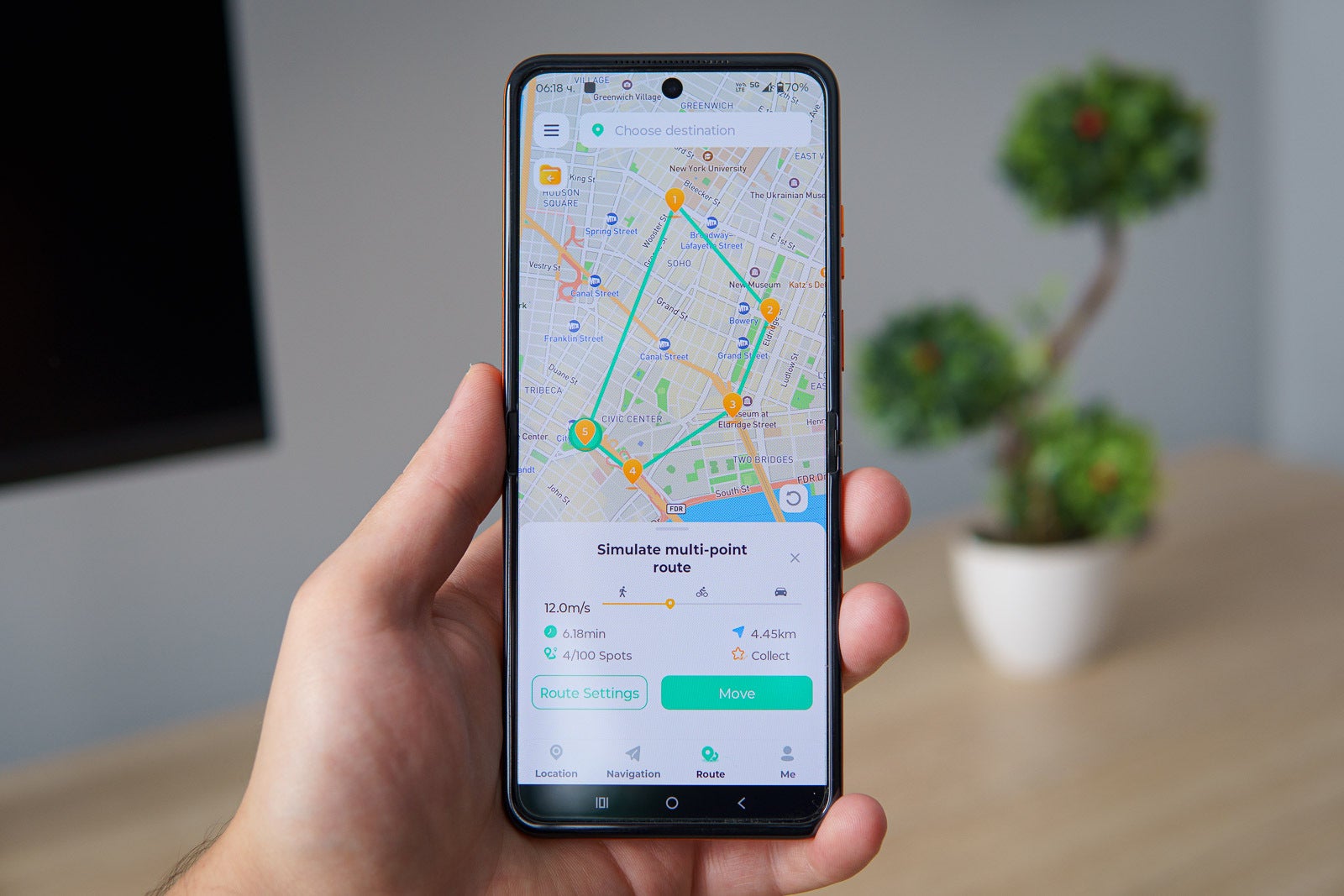
Instead of jumping randomly around the globe all day, you can create a two-point or multi-point route inside LocaChange. The app will then simulate your progress along that route at a speed you choose. Want to stroll at walking pace through a busy downtown area, cycle between several parks, or mimic driving along a highway? You can configure the speed slider to match typical walking, biking, or driving speeds. The app even estimates the distance and time needed to complete your chosen path.
For players, that makes a huge difference. Your character moves gradually across the map instead of teleporting in unnatural bursts, which better matches what anti-cheat systems expect from normal behaviour. You can still explore remote places or visit famous landmarks in another country, but you do so in a way that looks like a plausible journey rather than science-fiction teleportation.
If you want a more hands-on feeling without leaving your home, LocaChange includes an on-screen joystick. It appears as an overlay on the map and lets you nudge your character around in any direction in real time. Combined with the speed controls, this comes surprisingly close to walking around a town with your phone in your hand – except your legs remain firmly on the sofa.
Radar scanning: a secret weapon for AR hunters
LocaChange layers extra functionality on top of basic location spoofing. One standout feature is its radar-style scanning tool for AR games. With a single tap, the app analyses the surrounding area based on your spoofed location and highlights points of interest that matter to players: potential raids, rare creatures, valuable loot spots, and important in-game landmarks.
Instead of walking in random directions hoping to bump into something worthwhile, you immediately know whether there is a Gengar lurking nearby, a five-star raid within reach, or a PokéStop showering items such as Poké Balls and berries. The feature is equally useful in Monster Hunter Now, where it helps track down monsters and spots that would otherwise require a lot of physical wandering.
LocaChange can take things even further by automatically plotting a route that passes through every loot spot it finds. Your character then follows that path at a realistic pace, scooping up rewards while you focus on your real-world work, studies, or commute. During testing, this proved surprisingly addictive – it is hard to resist sending your avatar on an automatic walk to clear out nearby items while you answer email.
For full gaming functionality, there may be separate game-specific installation components to download, depending on where and how you use LocaChange. The app guides you through those steps when needed, but the end result is the same: you gain a powerful toolkit for playing location-dependent games on your own terms.
Cross-platform support: Android, iOS, Windows and Mac
LocaChange is not restricted to one ecosystem. There are dedicated versions for Android, iOS, Windows, and Mac, which means you can use it whether you live entirely in Apple’s world, are loyal to Android, or switch between both alongside a laptop or desktop computer.
On Android, the setup relies on a built-in system feature originally intended for developers: mock locations. After installing LocaChange, you enable Developer Options on your phone, assign LocaChange as the authorised mock location app, and you are ready to go. It sounds technical on paper, but the app walks you through the process with clear on-screen prompts, so even users who have never touched Developer Options before can complete the steps comfortably.
iOS naturally takes a stricter approach. Apple does not simply hand over direct GPS control to any app that asks. LocaChange solves this with a clever workaround that uses a computer for the initial setup only. The first time you use the iOS version, you connect your iPhone to your Windows PC or Mac and follow the installation guide to deploy the LocaChange iOS app. Once that initial link is established, the heavy lifting is done. You can then launch the app directly on your iPhone and change your GPS position whenever you want without reconnecting to a computer.
Desktop versions are especially handy for testers and power users. If you develop location-sensitive apps, manage multiple devices, or simply prefer to control things from a bigger screen, you can run LocaChange on Windows or Mac and manage connected phones from there. This makes it easier to script test routes, take screenshots for documentation, or run multiple scenarios quickly.
Real-world quirks: app caching and quick fixes
Changing your virtual position at the system level does not automatically refresh every app’s display. Some applications cache location data and maps to save bandwidth and battery. That means you might tell LocaChange to reset to your real GPS location, yet a particular app still shows old coordinates for a short while because it is using its existing cache.
During day-to-day use, this surfaced most clearly with navigation apps. There were moments when the phone had successfully reset back from a spoofed location in Mexico City, but Waze still insisted the car was sitting right in the middle of that city instead of on the drive home from the office. LocaChange reported that everything was back to normal; it was the app that had not caught up.
Fortunately, the solutions are straightforward. Closing and reopening the problematic app usually forces it to ask for fresh GPS data. If that still does not help, a quick reboot of the phone clears the confusion entirely. After a restart, Waze and other stubborn apps fall back in line and display your true location again.
Beyond gaming: privacy, testing and lifestyle use cases
While AR games are clearly a marquee use case, LocaChange has plenty of value for non-gamers as well. People who care about privacy can use it to mask their real movements from certain apps without having to uninstall them entirely. You might not want a social app, for example, to know exactly where you spend your evenings, yet still enjoy its messaging or media features. Spoofing your location to a generic city centre is an elegant compromise.
Developers and QA testers benefit too. When building a location-dependent app, testing in multiple cities or countries is usually a logistical nightmare. With LocaChange, you can simulate a user walking around Vancouver, then switch to New York, then London, all from your desk. Navigation, check-in flows, and region-specific features can be exercised thoroughly without buying plane tickets.
Then there are lifestyle and social apps that change behaviour based on location. Dating platforms adjust matches by region. Travel and restaurant apps showcase nearby experiences. Local weather and event tools emphasise what is happening around you. With LocaChange, you can preview what those apps will look like before you travel or explore what life might feel like in another city entirely, all while remaining in one place.
Safety tips: staying under the radar
Any time you tamper with location data in games, you run the risk of triggering anti-cheat protections. LocaChange cannot change those rules, but it can make it easier to behave in a way that looks natural. A few common-sense practices go a long way:
- Spoof before you launch the game, so there is no sudden jump mid-session from your real city to another country.
- Avoid extreme, rapid hops across continents. Use routes and realistic speeds instead of instant teleports whenever possible.
- Allow some time between large moves. Human players cannot be in Paris one minute and Sydney ten minutes later.
- Mix still periods with movement to mimic real-life behaviour.
LocaChange’s routing tools, joystick, and speed control exist precisely to support this kind of plausible movement. Used thoughtfully, they help reduce the risk of temporary restrictions or shadow bans that some games impose on obvious spoofing.
Ease of use and learning curve
Because GPS spoofing involves system-level changes, you might expect LocaChange to be complicated to set up. In reality, it feels closer to a step-by-step wizard than a developer-only utility. As you install it on Android or iOS, the app presents clear instructions, highlighting the settings you need to toggle and explaining what each permission does. There is no assumption that you are already comfortable with hidden menus or technical jargon.
Once configured, everyday usage is straightforward. You search for a destination, drop a pin, or paste in coordinates, then tap to move. Routes and joystick controls live in their own dedicated section. Resetting your location is always just one tap away. For those who want extra detail, online user guides – including a thorough iOS setup walkthrough – fill in every missing step without overwhelming less technical readers.
More than just a GPS faker
At first glance, LocaChange might look like just another location spoofing utility, but after spending time with it, it feels like a broader location management toolkit. It fakes your GPS when you want anonymity or remote access, but it also improves how you use location-based apps in general.
Competitive AR players gain a radar and routing system that reveals where the action is. Testers and developers can simulate complex user journeys through multiple cities without leaving the office. Ordinary users who value privacy or travel planning get an easy way to explore different regions digitally. All of this comes in a package that respects device integrity by avoiding jailbreaks and root access, supports the major platforms, and gives you full control over when to return to your real-world position.
In short, LocaChange is not about escaping reality; it is about reshaping how your device interprets it. If you have ever wished you could catch a rare Pokémon in Tokyo from your desk, test your app in Vancouver before launch, or simply keep certain apps from tracking your real movements, a system-level GPS spoofer like LocaChange turns those wishes into something you can configure with a few taps.
1 comment
Nice writeup, finally someone explains why VPN alone doesn’t do anything for gps games