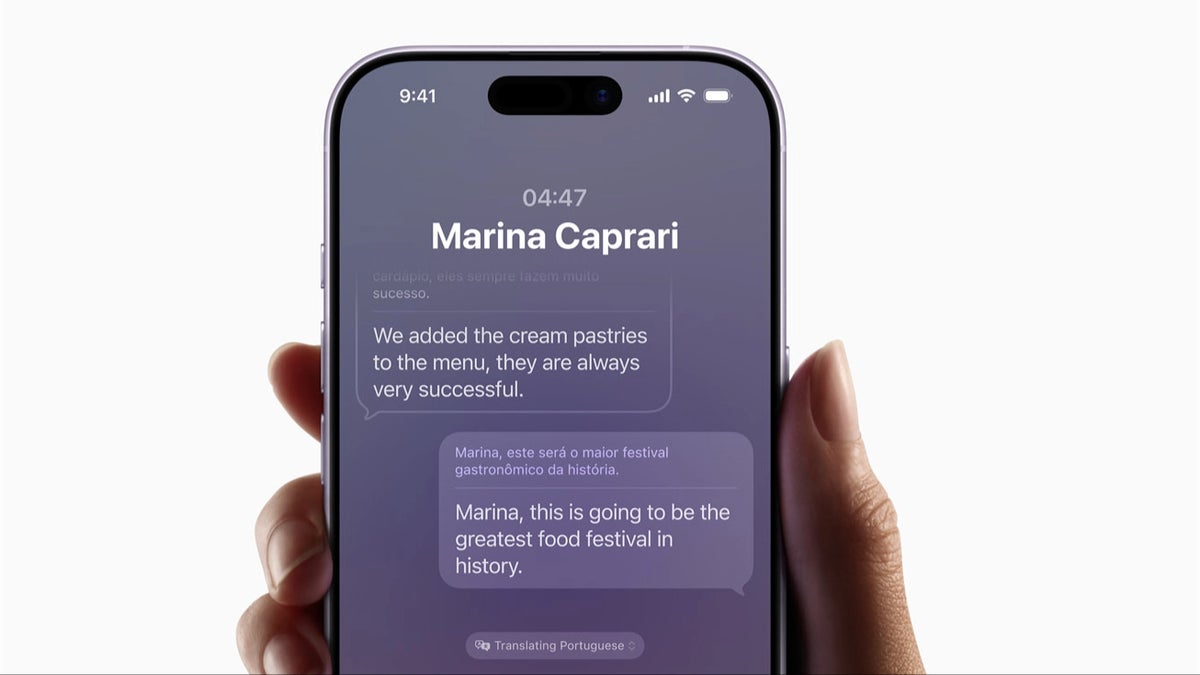
Anyone who has ever stood in a busy foreign café, desperately pointing at a menu and hoping they ordered food and not a surprise, knows that language barriers can turn even simple moments into stress tests. With Live Translation on iPhone, Apple is trying to remove a big part of that anxiety. This feature, built into Apple Intelligence and powered by on device generative models, turns your iPhone and a pair of AirPods into a personal interpreter that is always on hand yet never in the way.
Instead of frantically switching to a separate translation app, typing sentences word by word, and passing your phone across the table, Live Translation lets you communicate almost as naturally as if you shared a language. The system listens, translates, and plays back a voice in the other language, while your iPhone shows clearly formatted transcripts so both sides can double check what was said. Because the processing happens on the iPhone itself rather than on distant servers, the whole experience is designed around privacy and reliability rather than data harvesting.
What is iPhone Live Translation and where does it live
Live Translation is part of the broader Apple Intelligence push, a set of AI powered features that are tightly integrated into iOS rather than bolted on as add ons. On supported devices such as iPhone 15 Pro and later, Apple runs compact but powerful language models directly on the Neural Engine. Those models are trained to recognise speech, understand meaning, and generate a translation fast enough to keep up with normal human conversation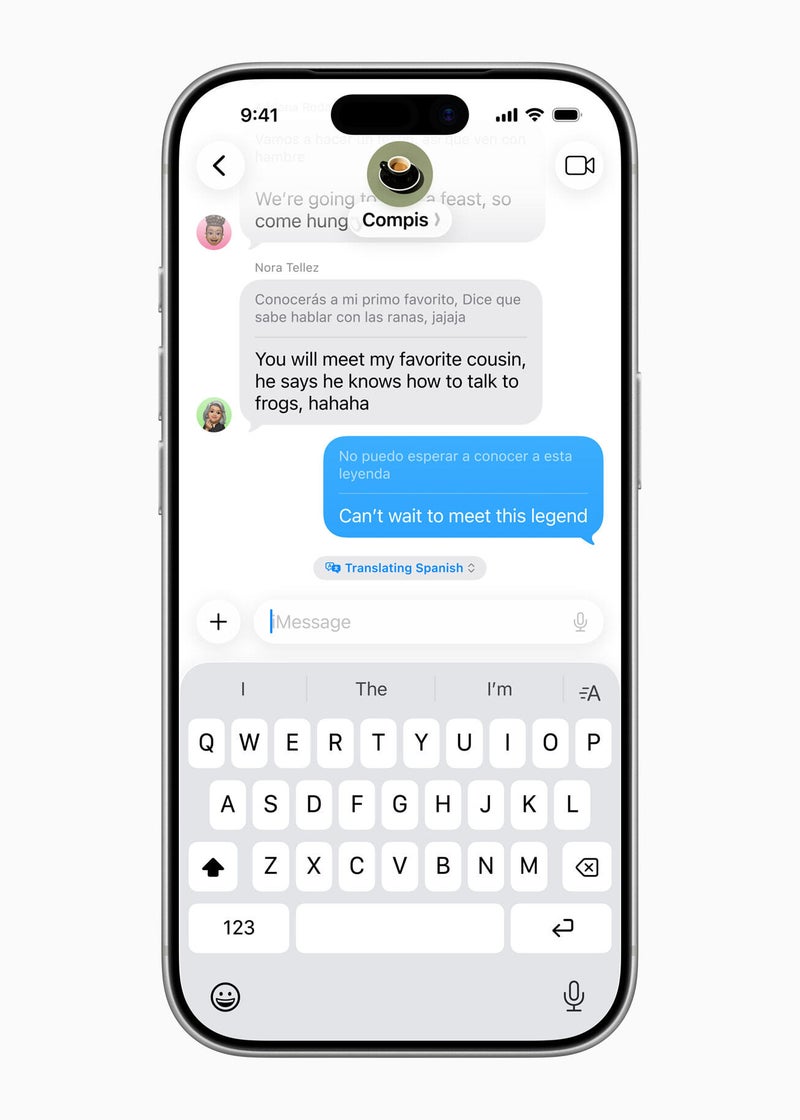
. The result is not a new app, but a layer of intelligence that quietly appears inside the communication tools you already use.
The fact that all of this happens on device is not just a technical talking point. Because your voice and the other person’s voice do not have to be uploaded and processed in the cloud, there is less risk of sensitive details leaking into logs or being reused to train remote models. If you are discussing health information with a doctor abroad, clarifying contract terms with a client, or sharing personal stories with someone new, that design choice matters. Live Translation is effectively a translator that never leaves your pocket and never needs to remember anything after the conversation ends.
Face to face conversations with AirPods as your interpreter
The most impressive demonstration of Live Translation is a simple one: two people standing in front of each other, each speaking their own language. You start the feature on an iPhone 15 Pro, drop in a pair of modern AirPods Pro, choose the two languages involved, and begin talking as you normally would. When the other person replies, the microphones in your AirPods capture their speech. Within a moment, a translated version is whispered into your ear, while your iPhone displays matching lines of text so you can glance down and see both the original and the translated wording.
Responding feels almost disarmingly normal. You do not have to slow your speech down to robotic chunks or over emphasise every syllable. You talk the way you usually do, in your own language, and the iPhone turns that into translated audio on the fly. That audio can be played through the iPhone speaker so the other person hears it, or, if they also have compatible AirPods and Live Translation enabled, your phone can route the translated voice straight into their ear. Instead of both of you crowding around a screen and taking turns pressing buttons, the phone becomes more like a backstage interpreter supporting a natural conversation.
This setup is particularly powerful while travelling. Imagine negotiating check out times with a hotel receptionist, asking a local for directions to a hidden viewpoint, or working through a restaurant menu that has no English version at all. Rather than juggling hand gestures, broken phrases, and search results, you keep eye contact, listen to the translation, glance at the transcript when needed, and carry on talking. The technology exists, but it does not dominate the moment.
Live Translation inside calls, FaceTime, and Messages
Apple has pushed Live Translation beyond in person chats and into the communication channels people rely on every day. In the Phone app, you can switch the feature on during a call and turn the conversation into something that feels like a live interpreter session. As the person on the other end speaks, you hear translated audio shortly after their words, allowing you to follow complex details such as booking numbers, legal clauses, or step by step instructions without the usual guesswork that comes with speaking a language you only half know.
On FaceTime, Live Translation hooks into Live Captions. Instead of only hearing a translated voice, you see subtitles appear on screen as the conversation flows, with the translated text overlaying the video. That combination of facial expressions, gestures, and readable captions makes long distance communication across languages much more comfortable, whether you are catching up with relatives abroad or collaborating with colleagues in another country.
In Messages, the feature becomes even more effortless. For any conversation where you regularly exchange texts in different languages, you can tell the system to translate automatically. You open the thread, tap the contact name at the top, enable the setting for automatic translation, and choose which language should be translated from. From then on, any incoming message written in that language appears in your own language right away, with minimal friction. You reply as usual, and Live Translation becomes a silent partner that removes the need for copying and pasting text into separate translation tools.
Where Apple’s approach shines
What makes iPhone Live Translation feel special is not just that it translates words, but that it lives exactly where you already communicate. Many translation apps are powerful, but they still require you to break the flow of a conversation, switch apps, paste text, and then show the result to the other person. Apple instead builds translation into the fabric of the operating system. Whether you are on a call, in a FaceTime window, or inside a chat thread, the translation layer is right there, ready to be toggled on without changing the way you normally use your phone.
The integration with AirPods is another clever piece of design. When both people have compatible hardware, Live Translation reduces the visible presence of technology to almost nothing. You do not need to hold the phone between you like a walkie talkie or point the microphone awkwardly back and forth. You just wear your earbuds, talk to each other, and let the hidden microphones and wireless audio channels do the heavy lifting. It feels more human, less like a tech demo, and more like a natural extension of speaking.
Privacy is a central advantage here. Because translation runs on device, the raw audio of your conversations is not constantly sent to a cloud service for analysis. For situations where confidentiality is important, from medical appointments to business deals, that distinction can be the difference between using a tool and avoiding it. The fact that Live Translation can support very personal conversations without demanding that you trust an external server is one of the reasons it stands out among other AI powered features.
Limitations, rough edges, and early adopter pain points
There are, however, real limitations that keep Live Translation from feeling completely universal. The most obvious one is language support. Because Apple has to craft and optimise each translation model so that it runs efficiently on the Neural Engine inside recent iPhones, the current list of supported languages is narrower than what long established cloud based tools provide. If you regularly need translation for less common languages or regional dialects, you may still find yourself falling back on traditional apps that rely on huge server side models.
Even within supported languages, nuance can be tricky. Slang, in jokes, emotional subtext, and very technical jargon can expose the limits of an automated system. Live Translation is generally good at conveying the overall meaning of a phrase, but it can still produce literal or slightly stiff wording that loses the flavour of what was said. Strong regional accents or very fast speech can also confuse the system, leading to occasional misheard words and awkward phrasing. It is an impressive interpreter for everyday life, but still not a perfect replacement for a trained human translator in high stakes negotiations or sensitive legal discussions.
Another practical issue is audio clutter. In a busy café or crowded street, you may hear the original speaker and the translated voice at roughly the same time, especially if you are not using noise cancelling earbuds. When several people join in or the pace of conversation speeds up, it can be challenging for your brain to juggle multiple voices layered on top of each other. Many users will find that glancing at the on screen transcript or taking turns speaking in a more structured way helps Live Translation keep its footing.
Hardware requirements are also part of the trade off. Because this feature leans on the power of the latest chips, it is currently limited to newer iPhone models, with the best experience on devices like iPhone 15 Pro paired with recent AirPods Pro. Owners of older phones and earphones are, at least for now, left out. There is also the simple matter of battery life: running live speech recognition and translation for extended periods is demanding work, and anyone using the feature for hours at a time will want to keep an eye on their remaining charge.
Why Live Translation actually matters for real people
With so many AI features competing for attention, it is easy to dismiss the category as a parade of gimmicks. Live Translation is different because it tackles a problem that virtually every traveller and many professionals have felt personally. You cannot realistically learn every language you might encounter, and yet modern life is full of situations where understanding another person clearly matters: booking accommodation, visiting a doctor abroad, signing paperwork, collaborating with an international team, or simply getting to know someone whose background is very different from your own.
In those moments, Live Translation lowers the emotional temperature. Instead of panicking, digging for half remembered phrases, or giving up on a conversation entirely, you have a tool that helps both sides feel heard. It does not magically turn you into a native speaker and it will not capture every nuance, but it dramatically reduces the friction of getting basic meaning across. That can be the difference between a stressful misunderstanding and a story you remember fondly when you get home.
Perhaps the most exciting part is that this feels like a first chapter rather than a finished story. As Apple refines its on device models, adds more languages, and brings Apple Intelligence features to more hardware, the idea of seamless translation baked into your phone will move from early adopters to the mainstream. A few years from now, slipping in your AirPods and talking to someone in another language may feel as ordinary as sending a message in a group chat today. Live Translation is not a flashy demo of artificial intelligence for its own sake. It is a quietly powerful feature that chips away at one of the biggest barriers between people and makes the world just a little easier to talk to.
1 comment
sounds awesome until your battery dies in the middle of arguing with a taxi driver lol