iOS 26: Apple’s Most Ambitious iPhone Update Yet
Apple has officially rolled out iOS 26, the next major software update for the iPhone, and it is far more than just a routine refresh. This update doesn’t simply tweak a few icons or add small hidden options; it introduces a fundamental redesign of the user experience, bringing with it a wave of smart new tools powered by Apple Intelligence. For iPhone owners, especially those with the iPhone 15 Pro and later, iOS 26 feels like a giant leap forward in how we use our devices day-to-day.
The update is now available for download on all supported iPhones, and it delivers a mix of visual polish, practical features, and ambitious experiments that hint at Apple’s future direction. Let’s explore the eleven standout features of iOS 26, how they work, and why they matter.
Liquid Glass: A Fresh Identity for iOS
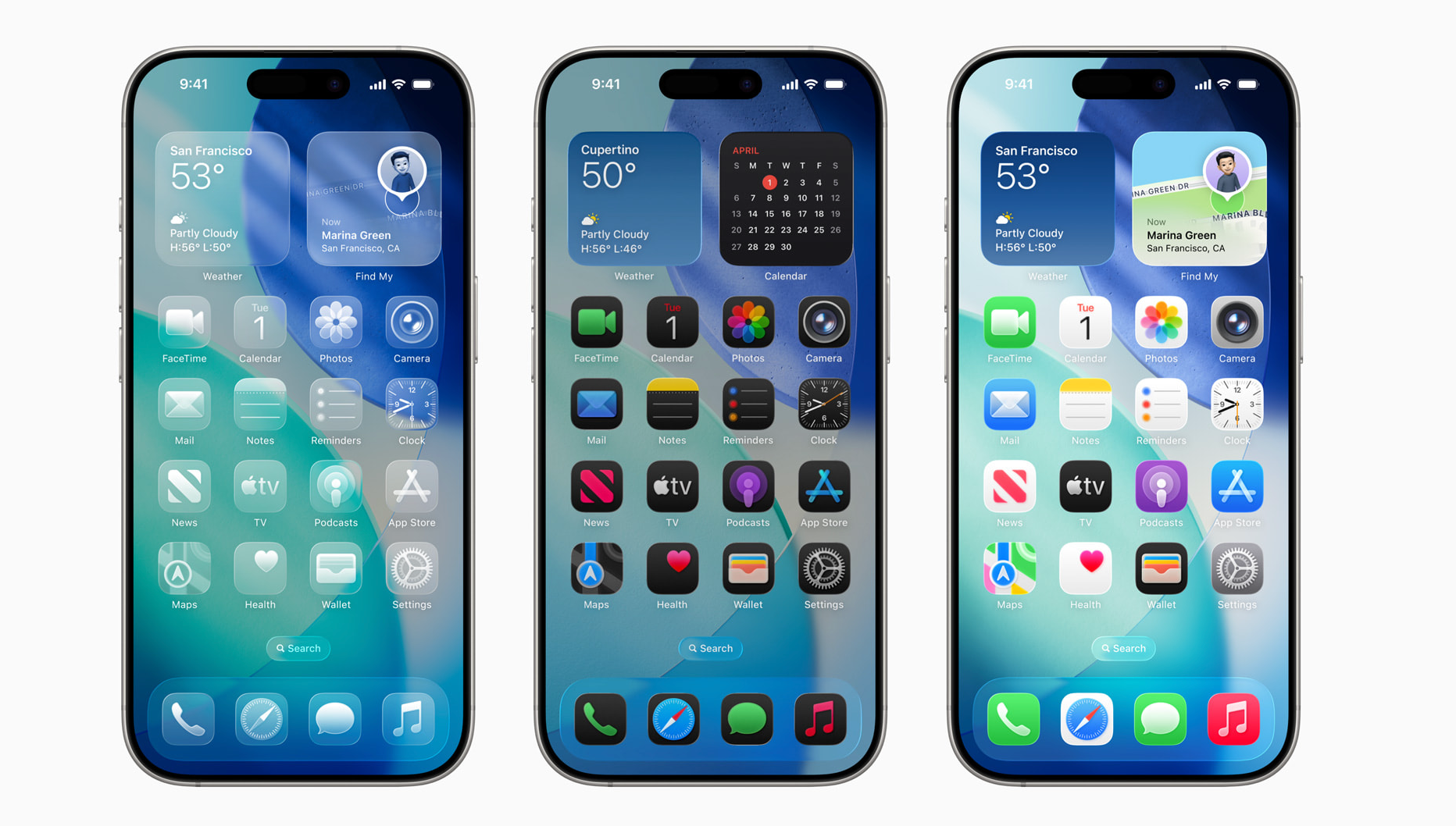
The most immediately noticeable change is the new design language Apple calls Liquid Glass. Once installed, your iPhone feels as though it’s been dipped in crystal. Menus shimmer with a transparent, glass-like finish. Icons, buttons, and animations react with a soft, liquid bounce. Even something as simple as scrolling through notifications feels different, with backgrounds now semi-transparent and more immersive.
Apple has even included customization options. If you want your screen to look like a glass sculpture, you can make app icons fully transparent. If the effect feels overwhelming or text becomes harder to read, accessibility tools let you tone down transparency or reduce motion for a calmer look. This is Apple’s boldest UI change since the leap from skeuomorphism to flat design a decade ago, and it instantly makes your phone feel new again.
A Smarter, Simpler Photos App
Apple’s Photos app has been a source of frustration in the past, but iOS 26 makes major strides. The interface now has two simple tabs at the bottom: Library and Collections. This change removes clutter and makes navigation more intuitive. Collections automatically group photos in meaningful ways, while Library remains the go-to place for browsing all images. For anyone who’s struggled to locate old memories, this rework is a welcome relief.
Adaptive Power Mode: Battery That Learns
One of the most exciting innovations is Adaptive Power Mode, available on iPhone 15 Pro and later. This feature uses Apple Intelligence to study your habits and stretch battery life intelligently. It can dynamically decide how much power each app should get, dim the screen when it makes sense, and prioritize efficiency without you lifting a finger. Instead of a simple on/off toggle like Low Power Mode, Adaptive Power Mode feels like a personal assistant optimizing your battery in real time.
Live Translation Everywhere
Language barriers have long been a challenge, but iOS 26 makes real-time translation a core part of the iPhone experience. Built into FaceTime, Messages, and even regular phone calls, Live Translation works locally on your device. In Messages, you can instantly translate received texts. In calls, you’ll not only see translated captions but also hear a synthesized voice relaying the other person’s words. It’s a remarkable step toward global communication, though still limited to a handful of major languages for now. While not perfect, it’s surprisingly natural – and something competitors like Samsung are still playing catch-up on.
Smarter Spam Protection
Spam calls and texts are one of modern life’s biggest irritations, and iOS 26 offers a powerful new weapon. With spam protection enabled, unknown texts are automatically filtered into a separate Messages section, while spam calls don’t even ring. Instead, callers are prompted to explain themselves, similar to Google’s AI call screening. It’s a small change that can dramatically cut daily annoyances.
Hold Assist: No More Endless Waits
We’ve all been stuck listening to hold music that feels like it will never end. Apple’s answer is Hold Assist. When activated, your iPhone monitors the call, and when the representative finally picks up, you get notified to rejoin. In the meantime, you’re free to put your phone down and do something else. It’s one of those quality-of-life features that makes you wonder why it didn’t exist years ago.
Colorful Backgrounds and Better Group Chats
Messages also gets some playful upgrades. You can now add backgrounds to chats, either using photos from your library or custom designs generated by Apple Intelligence. Group chats gain two long-requested features: polls and typing indicators. Polls are interactive and visually animated, while typing indicators make conversations feel more alive, catching up with popular apps like WhatsApp and Discord.
Visual Intelligence for Screenshots
Apple is slowly catching up to Google in terms of on-screen context recognition. With iOS 26, Visual Intelligence now works with screenshots. If you capture an event flyer with a date, your iPhone suggests adding it to Calendar. If there’s a phone number, you can dial it directly. While not as advanced as Google’s Circle to Search, it shows Apple’s gradual move toward more integrated AI experiences.
Password History: A Lifesaver
Another small but incredibly useful update is Password History in the Passwords app. How many times have you changed a password, only to forget which version actually works? Now, you can quickly view older passwords, saving you the hassle of endless resets.
Customizable Snooze for Alarms
Finally, a feature that fixes one of the odd quirks of iOS: snooze options. Until now, you could only snooze alarms for nine minutes, a bizarre limit rooted in old alarm clock design. With iOS 26, you can snooze for as little as one minute or as long as fifteen. It’s simple, but it gives you control over how your mornings unfold.
The Bigger Picture
Overall, iOS 26 isn’t just another update – it’s Apple signaling where the iPhone is headed. The Liquid Glass design makes your device feel futuristic, Apple Intelligence introduces adaptive features like battery management and live translation, and long-requested fixes finally land in everyday apps. For iPhone 15 Pro owners, the AI-powered tools are the biggest draw, but even older devices benefit from design polish and core improvements.
Is it flawless? No. Live Translation will stumble with slang or filler words, and Adaptive Power Mode may need fine-tuning. But as a whole, iOS 26 feels like Apple’s most ambitious iPhone update in years. It manages to balance eye-catching aesthetics with features that make a real difference in daily life. After years of smaller, incremental changes, this feels like a major moment for iOS.
2 comments
that liquid glass looks sick but ngl kinda hard to read sometimes
yo the hold assist is genius, why nobody thought of this b4?