Apple has just introduced iOS 26, and while updates to the iPhone’s operating system are nothing new, this one stands out for more than its unusual numbering. Alongside performance tweaks and stability improvements, Apple is debuting a fresh design concept called Liquid Glass, a visual layer that transforms how the iPhone looks and feels in your hand. 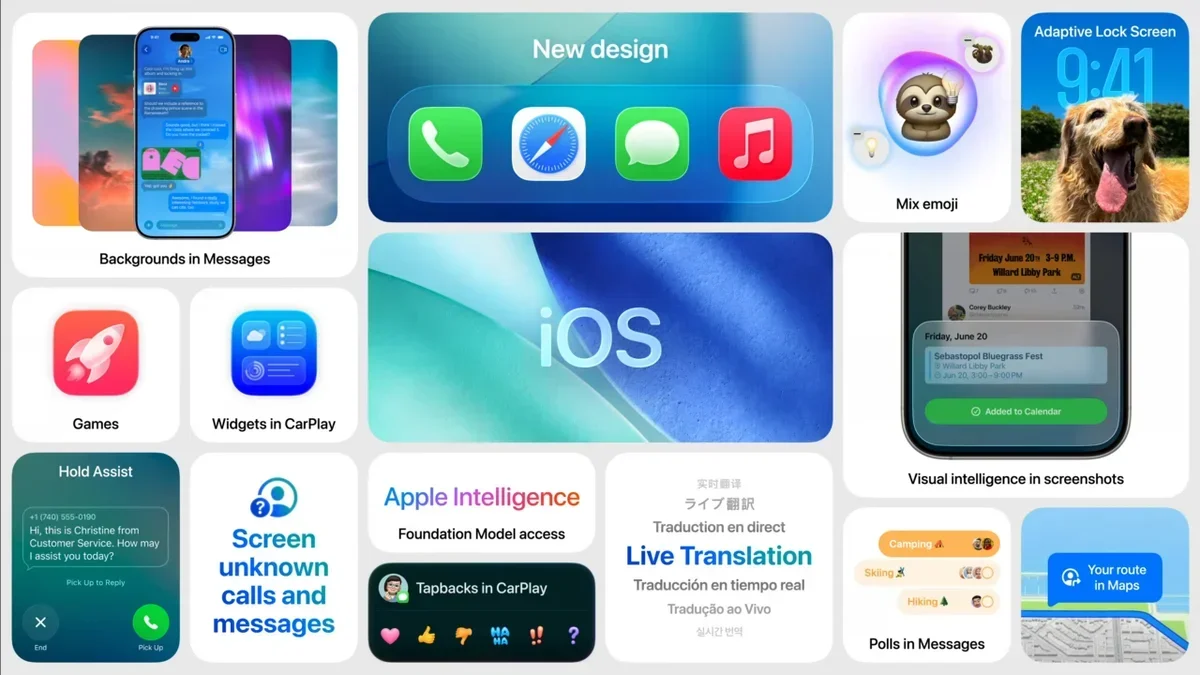
For many users, this feature is more than a cosmetic change – it marks a major step forward in Apple’s design philosophy.
Why iOS 26 and what’s new?
If you’re wondering why Apple suddenly jumped from iOS 18 to iOS 26, the reasoning is more about branding than technology. With the year 2026 on the horizon, Apple chose a symbolic number to align with its forward-looking vision. The rollout started only hours ago, and most iPhone owners with an iPhone 11 or newer should already see the update notification. Unfortunately, those with older models such as the iPhone XR won’t be able to join the Liquid Glass experience without upgrading their hardware.
How to install iOS 26
Updating to iOS 26 is simple and familiar. Head over to the Settings app, tap General, then select Software Update. Once you see iOS 26 available, follow the on-screen steps to complete the installation. Before you do, Apple strongly recommends taking precautions such as backing up your device and ensuring enough storage and battery life. A helpful checklist of seven must-do steps before updating has been published by Apple to avoid post-update headaches, so it’s worth reviewing that first.
Liquid Glass: a closer look
The centerpiece of iOS 26 is Liquid Glass, a design system that redefines the interface by layering translucent, dynamic surfaces across the iPhone’s software. Instead of flat, static icons and bars, Liquid Glass creates a subtle sense of depth, light refraction, and motion. The material adapts to both light and dark modes, shifting tones and highlights depending on the time of day and environment. Buttons, sliders, widgets, app icons, and even navigation bars now shimmer with reflective qualities that make the entire interface feel alive.
Apple hasn’t limited this new aesthetic to just the home screen. Built-in apps like Safari, Camera, Photos, Apple Music, Podcasts, and FaceTime have all been redesigned with concentric layouts that echo the iPhone’s rounded hardware corners. The result is a more harmonious, cohesive experience that feels premium without abandoning Apple’s trademark simplicity.
Customizing Liquid Glass
Liquid Glass isn’t just a default setting – you can fine-tune it to suit your style. By long-pressing on the home screen and tapping Edit and then Customize, you’ll find three core modes:
- Clear Dark – keeps icon colors but adds subtle depth.
- Clear Light – a purer glass effect that strips icons of most colors.
- Auto – automatically shifts between dark and light glass depending on the time of day.
From there, you can adjust font transparency, tweak lock screen widgets, or even refine wallpapers to maximize the reflective quality. Pro users are already experimenting with nature panoramas, neon cityscapes, and minimalist designs that play beautifully with the glass-like surfaces. For an even sleeker look, disabling icon and widget blur allows background images to interact directly with system elements, creating a more immersive appearance.
The bigger picture
Liquid Glass is more than just a style update – it represents Apple’s attempt to merge functional clarity with aesthetic delight. By making digital layers feel tactile and alive, the company is aiming to blur the line between hardware and software. This isn’t the first time Apple has pursued such a direction – skeuomorphic design in early iOS versions tried to mimic real-world textures – but Liquid Glass feels like a modern evolution, prioritizing depth and fluidity rather than imitation.
For everyday users, the benefit is immediate: a cleaner, more expressive interface that feels futuristic while still being familiar. For Apple, it reinforces the brand’s reputation as a design leader, one that continues to push the visual language of technology forward.
So, if you’re ready to refresh your iPhone and experience a new layer of visual polish, iOS 26 with Liquid Glass is waiting. Just don’t forget to prep your device first – and maybe pair it with a wallpaper that makes the most of Apple’s shimmering new interface.
2 comments
kinda laggy on my 12 mini tho
clear dark mode looks best imo