The long-awaited arrival of iOS 26 has finally reshaped Apple’s mobile ecosystem, marking one of the most dramatic updates since the radical redesign of iOS 7 in 2013. Released alongside the iPhone 17 series, Apple’s latest operating system is not simply another incremental update – it introduces a fresh design philosophy, an ambitious suite of features under the Apple Intelligence banner, and a vision that cements Apple’s unique identity in the smartphone market.
A bold new design with Liquid Glass
At the heart of iOS 26 lies the much-discussed Liquid Glass interface. 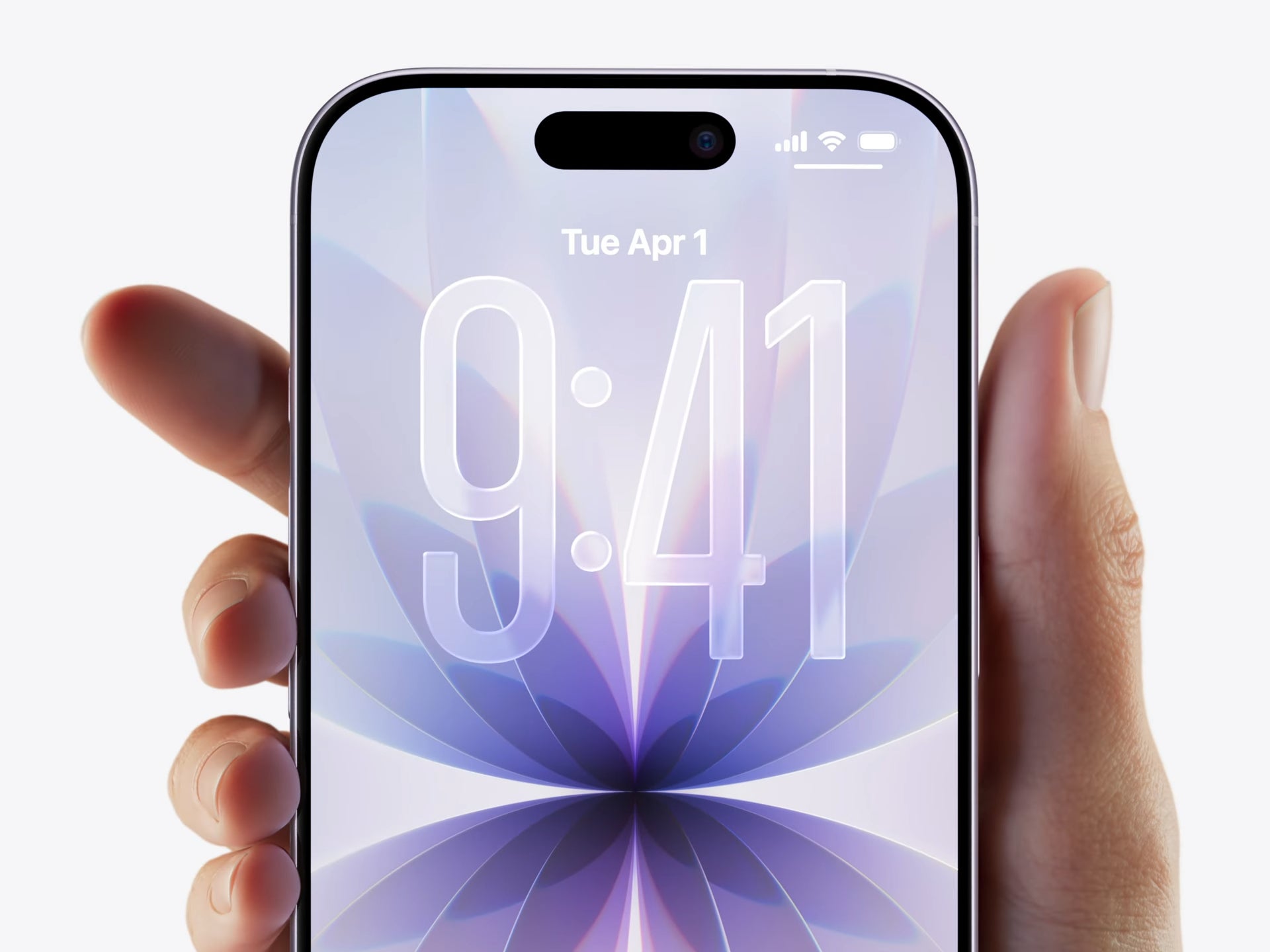
While at first glance it may appear to be just a more transparent take on menus, buttons, and widgets, Apple has gone far deeper. Designers and engineers actually studied how real glass bends and refracts light, creating virtual UI components that mimic the behavior of physical material in real time. Icons, notifications, and windows shimmer with depth, reacting to their digital environment in a way that feels both futuristic and tactile. This creates a more immersive, almost three-dimensional effect when navigating your phone.
Liquid Glass is not just cosmetic either. The new interface is designed to reinforce Apple’s philosophy of merging hardware and software seamlessly. It perfectly complements the sleek redesign of the iPhone 17 Pro, and fits into Apple’s broader three-year vision for its smartphone lineup. The only caveat is that this advanced visual layer demands more from the battery – something Apple anticipated and countered with another innovation.
Adaptive Power Mode: intelligent battery management
To offset the power draw of Liquid Glass and other advanced features, Apple has introduced Adaptive Power Mode. Unlike the traditional Low Power Mode, this intelligent system learns how you use your iPhone throughout the day. It dynamically adjusts how much processing power different apps receive, tunes display brightness, and moderates background activity to strike the perfect balance between performance and endurance. This is especially vital for the ultra-slim iPhone Air, which sacrifices battery size for thinness. For heavy users, it could mean hours of extra uptime, while for lighter users it ensures the phone always feels responsive when needed.
iMessage catches up to rivals
For years, Apple’s iMessage lagged behind rivals like WhatsApp and Telegram in terms of social and collaborative features. With iOS 26, that gap has finally narrowed. Users can now see who is typing in a group chat, add new contacts directly from conversations, create polls for quick decisions, and even decorate chats with custom backgrounds. Another small but practical tweak lets you copy just a portion of a message rather than the whole thing – a feature that sounds trivial until you need it. These updates don’t reinvent messaging, but they do make iMessage feel far less dated and much more social-media-ready.
Apple Intelligence: AI that actually feels useful
Beyond visual flair, Apple is doubling down on AI-driven utilities branded as Apple Intelligence. Two standout additions are Call Screening and Hold Assist. Call Screening uses AI to answer unknown numbers on your behalf, politely asking callers to identify themselves and state their purpose. This is a direct answer to the plague of spam calls that many users face daily. Hold Assist, meanwhile, takes over when you’re stuck waiting for a customer service agent, keeping the line open and alerting you once a human is ready. Both features blend convenience with relief, turning common annoyances into seamless experiences.
Preview and AutoMix: productivity and fun
Productivity fans will be pleased to see the Mac’s Preview app making its iPhone debut. This means iOS 26 users can now edit PDFs, annotate documents, and manage images without needing third-party apps. On the entertainment side, Apple Music gains AutoMix, a feature designed to transition songs with DJ-style smoothness. For casual listeners, it makes playlists sound curated and professional, while for parties it ensures the energy never dips between tracks.
CarPlay evolves into a true companion
CarPlay has quietly become one of Apple’s most beloved ecosystems, and iOS 26 upgrades it significantly. Responding to messages now feels more natural thanks to expanded Tapback support. Incoming calls appear in a less intrusive overlay, allowing navigation and media controls to remain in view. Live Activities can now be displayed, adding dynamic, real-time updates like sports scores or delivery tracking directly into your car’s interface. And when parked, CarPlay supports AirPlay video streaming, letting passengers watch content comfortably on the dashboard display.
How to get iOS 26
Apple is rolling out the update gradually, so not everyone will see it immediately. Eligible devices include all iPhones from the iPhone 11 onward. If the update doesn’t appear automatically, you can check manually by heading to Settings > General > Software Update. iPhone 17 owners, however, will find iOS 26 preinstalled straight out of the box.
A historic update
With iOS 26, Apple has delivered more than just a new operating system – it has set a new standard for how mobile platforms should evolve. From the striking Liquid Glass interface to smart AI utilities, from long-overdue iMessage improvements to deeper CarPlay integration, this update balances innovation with practicality. It feels like Apple has listened to years of user feedback while simultaneously pushing bold new ideas. For many, iOS 26 won’t just make their iPhone feel fresh again – it will make it feel like a completely new device.
2 comments
apple always late with chat features smh
update still not showing up on my phone