iOS 26.2 preview: the upgrades worth your time
I have been living with iOS 26.2 Developer Beta 1 on an iPhone 13 Pro Max for several days, long enough to sift the novelty from the stuff that genuinely makes daily use nicer. This build is not a flashbang of headline features. Instead, it is a careful tune-up that tightens the feel of the lock screen, supercharges Apple Podcasts for both listeners and creators, quietly empowers Reminders, and raises the bar on how Apple Watch sleep is graded. If you are wondering what actually matters, here is the practical tour, plus a few tips and caveats learned the hard way.
Liquid Glass on the lock screen: now you set the mood
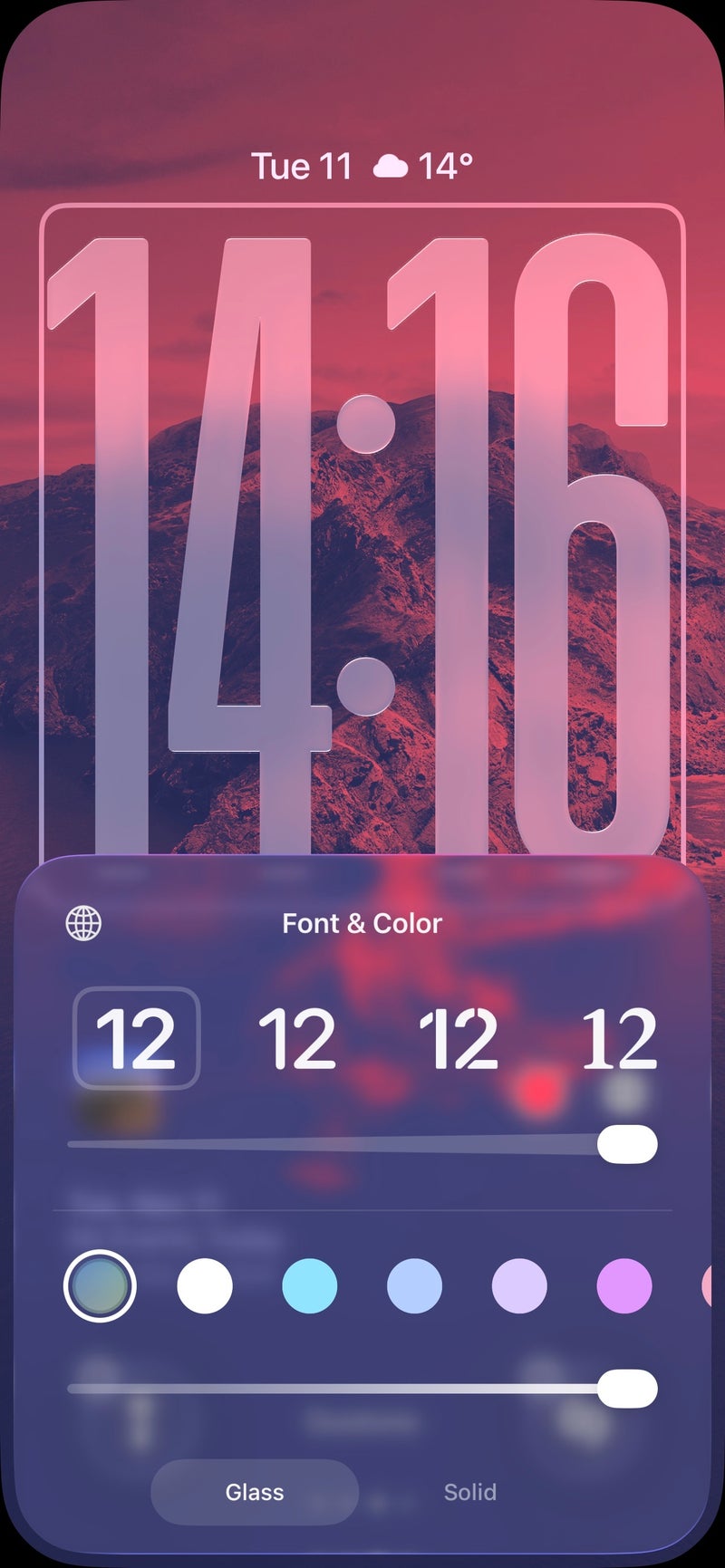
Apple’s Liquid Glass aesthetic has been gradually threaded through iOS, but until now the lock screen clock was a one-size-fits-all treatment. In iOS 26.2, a new intensity slider hands control back to you. Slide left for a whisper-thin, translucent look that melts into your wallpaper; slide right for a bold, opaque clock that stands out at a glance. The spectrum is broad, and the transitions feel deliberate rather than jumpy.
There is a practical side to the prettiness. If you favor monochrome wallpapers or subdued palettes, the translucent glass effect pops with tasteful depth; push the slider higher on busier or high-saturation backgrounds to keep legibility in check. And if Liquid Glass simply is not your style, the solid clock option is still there, unchanged. This is not Apple abandoning the design so much as acknowledging that taste and visibility are personal, and that one dial can serve both expression and accessibility.
Pro tip: when you experiment with the slider, test in different ambient light. A clock that looks airy indoors can fade outdoors. Keep an eye on complications and notification previews too; the right intensity balances elegance with at-a-glance clarity.
Apple Podcasts: chapters, transcripts, and smarter jumping
Podcasts is the stealth star of this beta. Three upgrades combine to make long episodes friendlier. First, the app now analyzes an episode and splits it into logical chapters automatically. No more endless scrub-and-guess. Whether you are hunting for the interview segment or the news recap, chapter markers get you there with intent, not luck.
Second, live transcripts turn audio into a readable map. Missed a line on a noisy bus or want to skim before committing an hour to a topic? The transcript lays the conversation out in text so you can browse, search, and jump. Tap any sentence or paragraph and playback resumes right from that line. That tiny interaction shift is huge: instead of dragging a timeline, you navigate ideas.
Third, the app now makes links shared in an episode easier to follow. When a host mentions a study, product page, or newsletter, you can move from hearing to exploring without awkward detours. For listeners, that means less friction. For creators, it means referenced material actually gets the attention it deserves.
Together, these changes make Podcasts feel less like a passive player and more like a structured reading app wedded to audio. Commuters benefit, students benefit, and anyone who treats podcasts as learning material benefits most of all. Expect your listening to become more intentional: dip into the meat, re-listen to key minutes, and share precise moments with friends who do not have an hour to spare.
Reminders grows teeth: create real alarms from a to-do
Reminders has been maturing for a few iOS cycles, but iOS 26.2 adds the feature that makes it feel like a true task anchor: alarms you can set from inside Reminders. When you create a reminder and set a time, an Urgent option appears; toggle it, and iOS generates an alarm tied to that reminder. It is the difference between hoping you will see a notification and guaranteeing you will hear one.
The detail that matters most: alarms created this way can override Focus modes. If you have a strict Do Not Disturb routine or a deep-work Focus that silences most alerts, an urgent reminder still gets through. That is perfect for medication, time-critical calls, pick-ups, or short sprints where forgetting has a real cost. The flow is intuitive, and it saves the awkward dance of hopping to Clock, crafting a separate alarm, and then remembering why you created it.
Workflow tip: adopt a two-tier system. Use standard Reminders for flexible tasks and reserve Urgent for hard deadlines where sound matters. Your future self will thank you for the signal-to-noise balance.
Sleep Score gets tougher: same math, higher standards
If you sleep with an Apple Watch, your nightly score now has a stricter curve. The underlying weighting is unchanged: duration contributes up to 50 points, bedtime consistency up to 30, and interruptions up to 20. What changed is the grading scale applied to the total. Previously, an Excellent badge kicked in at 90 and above. In iOS 26.2, the top label becomes Very High and does not appear until 96–100. The tiers shift upward across the board:
- New tiers: Very Low 0–40, Low 41–60, OK 61–80, High 81–95, Very High 96–100.
- Previous tiers: Very Low 0–29, Low 30–49, OK 50–69, High 70–89, Excellent 90–100.
The consequence is simple: nights that used to look great now look merely good, and average nights may sink a notch. That sting is intentional. A stricter curve gamifies improvement without changing the math, nudging you to guard bedtime, stretch duration, and reduce wake-ups. If your regular 7 hours with a scattered schedule slipped from High to OK, the scoreboard makes the cost visible. Many users will hate that at first; some will quietly start protecting their evenings.
Practical advice: treat the new scale as feedback, not judgment. If you want quick gains, target bedtime consistency first; the 30-point slice moves faster than duration for many people. And remember that wrist-based scoring is a coach, not a clinician.
Quality-of-life polish across the system
Beyond the headline changes, this beta feels intent on control. The lock screen slider respects taste and readability. Podcasts respects time and curiosity. Reminders respects urgency in a Focus-heavy world. Sleep scoring respects the difference between good and truly restorative. None of these are gimmicks. They are small levers that reduce friction you notice every single day.
Who should install the developer beta
This is a developer beta, which means rough edges are part of the deal and features can evolve before public release. If your iPhone is mission-critical, wait for the public beta or the stable build. If you do install, back up first, and keep expectations calibrated: battery behavior can shift for a few cycles, and third-party apps may lag behind.
Early impressions and verdict
iOS 26.2 is not a reinvention; it is a refinement pass that lands where it counts. The Liquid Glass slider lets you pair style with legibility instead of picking one. Apple Podcasts finally behaves like a research-friendly player: chapters for structure, transcripts for recall, and tappable lines for precision. Reminders evolves from a polite nudge into a system that can actually wake you up when it matters, Focus or not. And the tougher Sleep Score reframes what a great night really looks like without changing the underlying metrics. After a few days, I am left with a phone that feels more personal, more deliberate, and a touch more honest.
If this is the direction for the rest of the 26.x cycle, sign me up. Give users dials, not diktats. Give tools that respect context. Give scores that motivate better habits. That is what turns a point release into a daily upgrade.
2 comments
liquid glass slider looks great on dark wallpapers, mid on neon ones tbh
urgent alarms from reminders is the sleeper feature here (pun intended)