Google’s Pixel lineup has often been the first to showcase bold Android features, and among the most practical additions in recent years has been Live Caption. This accessibility tool generates subtitles in real time, automatically transcribing spoken audio from calls, videos, podcasts, and even voice messages. 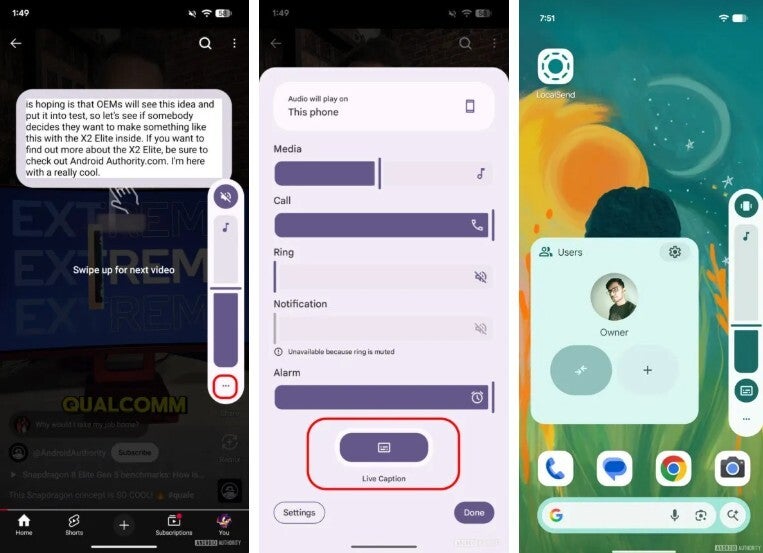
For people who are hard of hearing, it’s an invaluable lifeline. For others, it’s just as handy when they find themselves in loud public spaces or when they don’t want to disturb people around them by playing sound aloud.
Originally, Google placed Live Caption exactly where users wanted it: a single tap away under the volume slider. If you pressed the volume button on your Pixel, a neat little toggle would appear. Switching it on meant instant subtitles with virtually no delay, making accessibility as frictionless as possible. Unfortunately, in what many users felt was a misguided decision, Google changed that design last year during the Android 15 beta phase.
The controversial change that upset Pixel owners
Instead of a direct shortcut, enabling Live Caption suddenly became an obstacle course. Users now had to press a volume key, tap a three-dot icon, navigate to a hidden settings screen, scroll to the audio section, find the Live Caption line, and finally toggle it. What was once a single gesture became a five-step process. The impact wasn’t just mild inconvenience – it actively undermined accessibility for people who relied on the feature daily.
Pixel owners voiced their frustration loudly on platforms like Reddit. One user pointed out that, while technically “just a couple more steps,” the change led to them using the feature far less often. Another user, who is hard of hearing, described the decision as downright hostile to accessibility, saying it felt like Google had buried a tool that made life easier. The sentiment was widespread: what used to be a quick and empowering option now demanded extra taps that slowed down access at the moments when speed mattered most.
Google reconsiders and restores sanity
Now, it seems Google has heard the criticism. In the latest Android Canary build 2509, the Live Caption toggle has returned to its rightful place under the volume slider. A small icon resembling a text box reappears the moment you press the volume buttons, letting you activate captions instantly again. For users who missed the simplicity of the old layout, this feels like a long-awaited correction of a misstep.
It’s worth noting that Canary builds are bleeding-edge releases aimed at developers and enthusiasts who don’t mind bugs or instability. They serve as an early glimpse of where Android is headed, and though not guaranteed, they often foreshadow changes that will later arrive in stable releases. Installation requires flashing via desktop tools the first time, but after that, updates can arrive over the air like normal Android updates.
When can everyday Pixel users expect it?
Right now, the restored toggle is limited to Canary testers. Those running stable Android 16 builds – including quarterly platform release (QPR) betas – don’t yet see the toggle back. That means Pixel owners eager for a one-tap Live Caption shortcut may need to wait for a future QPR update or Android 16 feature drop. Still, the fact that Google has reintroduced the option in pre-release software strongly suggests it will return broadly, perhaps sooner rather than later.
Once the feature officially lands, users will still retain control. If the toggle clutters your volume panel, you can disable it by heading to Settings > Accessibility > Live Caption and turning off the option labeled “Live Caption in volume control.” This flexibility ensures that users who rely on captions can access them immediately, while those who don’t need the feature can keep their interface streamlined.
More than a minor tweak
At first glance, the placement of a toggle might sound trivial, but for accessibility features, design choices are everything. Accessibility is only as good as the convenience it offers. By hiding Live Caption behind multiple layers of menus, Google inadvertently signaled that accessibility wasn’t a priority. By reversing course, it demonstrates responsiveness and a recognition of user needs. In a way, this update is about more than captions – it’s about trust between a company and its community.
Pixel phones have long been about early access to Android’s evolving design language. Some users even enjoy being test subjects for interface experiments, knowing Google will sometimes try bold ideas. But when a change undermines a core accessibility function, the backlash is immediate and justified. Restoring the Live Caption toggle shows Google can admit when it took the wrong turn, and it may serve as a reminder for future UI experiments: don’t sacrifice accessibility for aesthetics or menu tidiness.
As of today, the Live Caption shortcut is back where it belongs – at least for Canary testers. For the broader Pixel audience, it’s only a matter of time before they too regain the simplicity of one-tap captions, making Android a little friendlier and a lot more inclusive again.