Edit Photos on Android Using Your Voice with Google’s AI-Powered Google Photos
Google is redefining how we interact with photo editing on smartphones. In a recent blog post titled “10 Ways You Can Ask Google Photos to Edit Your Photos for You”, the company unveiled a major leap forward in intuitive AI-assisted editing. Certain Android phones can now modify photos simply by listening to your voice. No sliders, no confusing menus – just natural language commands like, “Remove the reflection on the window,” or “Add studio lighting to make me stand out.”
To begin, open the Google Photos app, select an image, and tap on the new “Help me edit” button. This feature allows you to either speak or type what you want changed. Google’s AI interprets your request, understands the context, and executes the appropriate edits automatically. It’s not just a small update – it’s the beginning of conversational editing, where users don’t need to know photography terminology or advanced techniques to get stunning results.
Editing in Plain English
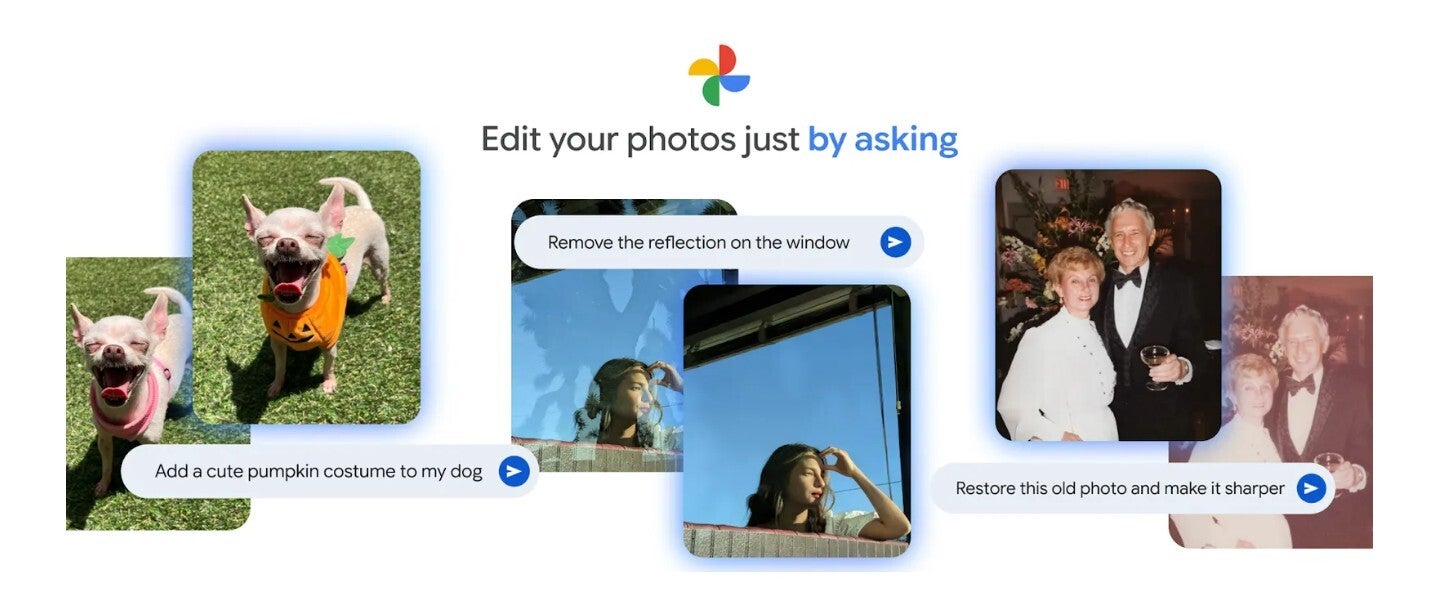
For years, photo editing apps have relied on complicated toolsets that required technical knowledge. Google is changing that by enabling users to describe their desired edits naturally. Imagine you took a picture through a window and ended up with unwanted reflections. Instead of tweaking brightness or contrast manually, you can just say, “Remove the reflection on the window.” Within seconds, the reflection disappears, leaving a clean, professional-looking image. The process feels less like editing and more like having a personal assistant who understands your visual goals.
Another example Google showcased involves a child standing in front of an unattractive metal fence with a dull pier in the background. Traditionally, fixing such an image would require painstaking retouching. But here, you can simply write, “Erase the text and the fence in the bottom, zoom out, and sharpen.” The AI cleans up the scene, widens the frame, and adds clarity, transforming an ordinary snapshot into a picture-perfect memory. The best part? You don’t need to memorize photography jargon – Google’s AI does the heavy lifting through context understanding.
Bring Creativity to Life
The possibilities don’t stop at basic corrections. You can add artistic touches that previously required advanced tools. Want to make your selfie look like it was taken in a professional studio? Tap “Help me edit” and say, “Add studio lighting to make me stand out.” Instantly, Google Photos enhances facial highlights and adjusts shadows for a polished, magazine-style look.
Feeling adventurous? Try expanding the photo’s composition by saying, “Expand the composition and make it better.” The AI intelligently fills in new background elements to give your picture more depth. Or imagine you snapped an empty room and want to redesign it – say, “Reimagine this room with a bookshelf and lights.” Google’s AI re-creates the environment with surprising realism. It’s like having a creative studio in your pocket.
Your Imagination Sets the Limits
From landscapes to pets, you can now bring imagination-driven edits to life. Google demonstrates the power of this with fun examples: “Fill the grass with beautiful sunflowers,” turns a plain meadow into a vibrant field, and “Add a cute pumpkin costume to my dog,” instantly gives your pet a Halloween makeover. You can also perform restoration tasks, such as “Restore this old photo and make it sharper,” or subtle adjustments like “Straighten the photo, fix the shadows, and make the grass greener.”
This isn’t just photo editing – it’s visual storytelling powered by artificial intelligence. Google Photos understands what you mean when you describe your idea conversationally. It interprets tone, context, and visual cues to deliver results that often look like they were created by professional editors.
How to Use the Feature
Currently, this feature is available in the U.S. on select Android devices. To try it, open Google Photos, choose any picture, and tap the edit icon at the bottom. You’ll notice a pill-shaped button on the lower left labeled “Help me edit.” Once you type or say your request in simple English, hit Enter and watch the AI work its magic. The process is seamless and fast – within seconds, you get an enhanced photo that matches your exact request.
According to early testers, the feature works flawlessly on devices like the Pixel 6 Pro running Android 16 QPR2 Beta 2. But Google is expected to expand access soon, making this conversational editing capability a new norm across Android devices. Whether you’re touching up selfies, removing unwanted objects, or creating dream-like scenes, the feature lets you interact with your photos the same way you’d talk to a friend.
Google Photos’ new conversational editing feature symbolizes a shift in how we think about creativity. Instead of learning software, users can now focus entirely on imagination and storytelling. The camera may capture the moment, but with Google’s AI, your words can now redefine it.
2 comments
bro I told it to make my dog a dragon and it did lol
tried it on my pixel, works crazy good!