Google’s Phone app, widely known as Phone by Google, has quietly become one of the most feature-rich dialer applications in the Android ecosystem. It is pre-installed on all Pixel devices, comes on select Motorola and OnePlus models, and is also available through the Google Play Store for other compatible Android phones. On the surface, it seems like just another dialer, but Google has packed it with a growing list of advanced features designed to make calling less of a chore. 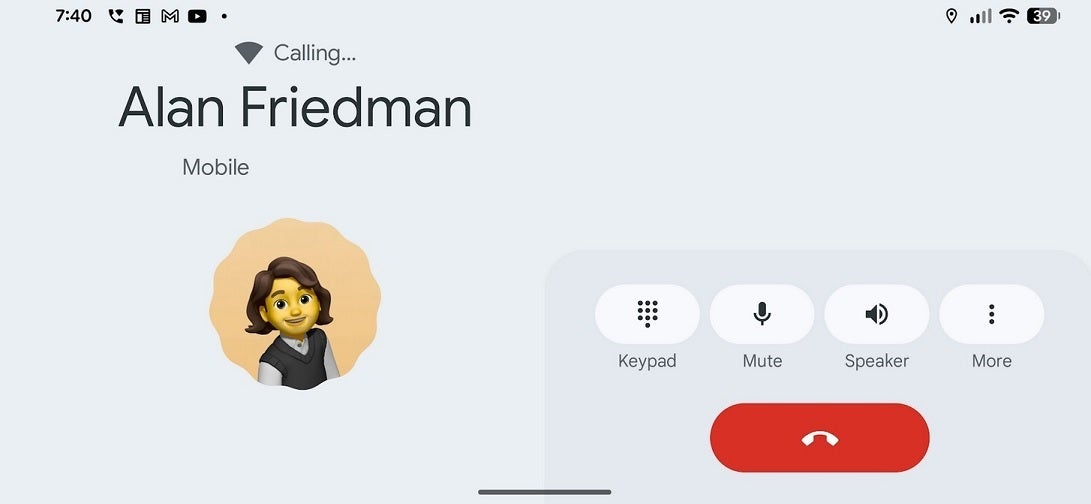
These include built-in caller ID, the ability to screen suspicious calls, automatic robocall filtering, and even a function that will wait on hold for you and alert you when the representative finally picks up.
Despite these practical additions, one specific design choice has been stirring up confusion and frustration among Pixel users. The issue isn’t about call quality or caller ID – it’s about screen rotation. Pixel fans may remember that back in 2017, Android 7.1.2 gave them the option to rotate the home screen into landscape mode. Found under Home Settings > Allow Home screen rotation, this toggle let users flip not only the home screen but also the app drawer and overview screen into landscape. It was a small but useful customization that some users loved. However, starting with Android 10, Google began phasing it out, and by Android 12, the feature had disappeared entirely from the stock Pixel Launcher.
That’s why many Pixel owners were caught off guard when they noticed that the Phone app itself still rotates into landscape mode during calls. Unlike the home screen feature that users could manually toggle on or off, this behavior isn’t optional. Tilt your device sideways before or during a call, and the Phone app follows suit, automatically shifting into landscape. For some, this flexibility is welcome. For others, it’s a serious annoyance – especially in the middle of a conversation when the interface suddenly moves, forcing buttons like End Call into unexpected places.
On Reddit, one user named whappenow explained the problem in blunt terms: “How do I turn this off? … I don’t want to turn it off system-wide in quick settings, but recently the application has been turning itself to landscape mode, and it’s annoying when on the phone.” The frustration comes from the practical experience of using the app. Imagine holding your phone to your ear during a call, only to see the screen flip sideways, and then struggling to hit the red End Call button, which has now shifted to the side of the screen. For something as basic as a phone call, the disruption feels unnecessary.
So, what does the Phone app actually look like in landscape mode? The layout shifts significantly. The numeric keypad appears on the right, with the familiar green call button tucked at the bottom. To its left, the app displays suggested contacts you may want to call. A vertical navigation rail anchors the far left side, featuring icons for your call log, keypad, and voicemail. The call log itself is fairly comprehensive, showing missed calls, spam, non-spam, and all call history. Voicemail also remains easily accessible with its reel-to-reel tape recorder-style icon.
During an active call, the layout changes again. The top section displays connectivity details such as whether you’re using Wi-Fi calling, followed by the contact’s name and number. Below that sits the contact’s avatar or profile photo, and alongside it are four elongated buttons that let you quickly access the keypad, mute the microphone, activate the speaker, or expand further options. It’s a clean, functional design, but the forced rotation adds a layer of unpredictability.
This raises a broader question: should Google keep landscape mode in the Phone app at all? Some users argue that it offers flexibility – useful if you’re multitasking, driving with the phone mounted horizontally, or if you simply prefer that view. Others say it creates more headaches than convenience, especially when it triggers unintentionally during routine calls. A small adjustment, such as adding a toggle to enable or disable rotation specifically within the Phone app, could satisfy both camps.
Interestingly, reports vary. While some users say their Phone app consistently flips to landscape mid-call, others claim it stays locked in portrait. This suggests differences in device behavior depending on software version, settings, or even subtle updates Google may have rolled out quietly. Regardless, the lack of control remains the central issue: users don’t want the system making assumptions about how they should hold their phones.
For now, there’s no dedicated setting in the app to stop the automatic rotation. Users who truly dislike it must disable rotation system-wide through Quick Settings – a blunt fix that removes rotation across all apps, not just the dialer. For people who rely on landscape in other apps, such as YouTube or Chrome, this isn’t an appealing compromise. That’s why many users are calling for Google to build a more nuanced solution.
Ultimately, the debate reflects Google’s evolving approach to software design. The company has a history of experimenting with features, quietly testing them, and sometimes removing them entirely without explanation. The Phone app’s landscape mode is a perfect example: a seemingly minor design choice that has sparked outsized debate among users. As Pixel continues to serve as Google’s showcase for Android innovation, it may be time to balance innovation with user choice by giving people more direct control over these small but impactful features.
Until then, Pixel owners will need to either tolerate the rotation or turn it off altogether for the entire phone. But one thing is clear: even the most basic tools – like a dialer app – can become flashpoints in the ongoing tug-of-war between convenience, usability, and user control.
5 comments
honestly i like landscape, good when phone’s on car mount
pixel software always removing stuff ppl like 🤦
why cant google just add a toggle, problem solved
idk feels like a beta test they forgot to finish
phone by google is otherwise awesome, but this rotation is dumb