Google is once again polishing the Android experience, this time focusing on making photo sharing through Google Messages smoother and more secure. For years, Android users have been able to attach images to messages via the familiar “+” icon beside the text field. Tapping it brings up a carousel of eight icons – Gallery, Camera, GIFs, Stickers, Files, Location, Contacts, and Schedule Send – letting users pull content directly from their phone. 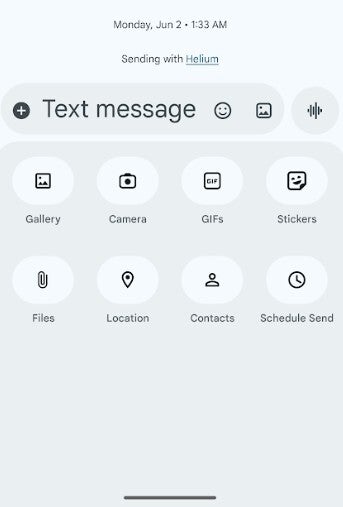
But until now, anyone wanting to reach into Google Photos for cloud-stored pictures has had to take an extra step: hitting the Folders button at the bottom of the screen. That one additional tap may sound trivial, yet it hides a bigger issue about convenience and, more importantly, user privacy.
Here’s the problem: Google’s custom media picker, which powers the Gallery option in Messages, requests access to your entire device gallery. In contrast, the Android system’s photo picker – a newer, more privacy-conscious alternative – lets apps see only the photos you specifically choose. This distinction matters. Granting broad access to all your media can feel invasive, especially when simple tasks like attaching one image don’t need full gallery permissions. Recognizing this, Google is rolling out a new solution that blends seamless access with stronger security – the embedded photo picker debuting with Android 16.
This upgraded picker integrates directly into Google Messages and other apps through new Android APIs. It effectively replaces the custom picker with a built-in experience that looks and feels native but operates under the privacy protections of the Android system picker. In practice, this means you’ll be able to browse both your local and cloud-stored photos from one unified interface, without that redundant tap – and without handing over full gallery access to the app.
Tech journalist Mishaal Rahman from Android Authority spotted the feature live on a OnePlus 13 running OxygenOS 16, confirming that Android 16’s embedded photo picker neatly merges cloud-hosted images and videos with those stored on the phone. Previously, users had to tap the Folders button to switch from local to cloud media, but that friction will soon vanish. The update aligns with Google’s broader strategy of reducing permission requests while improving usability and consistency across Android’s ecosystem.
Once this feature goes live, the Google Messages app will no longer need the “Photos and videos” permission at all. You’ll be free to revoke it, confident that your images remain under your control. The embedded picker will handle all media access through its secure, selective interface. Although Android 14 technically supports the framework for this picker, it won’t become visible to users until Android 16 arrives. That means the smooth, permission-light experience is still a few updates away for most people – but it’s a clear sign of where Android is heading.
Ultimately, this isn’t just about trimming one extra tap. It’s a step toward a future where convenience and privacy coexist instead of competing. By merging the flexibility of Google Photos with the guardrails of Android’s security model, the embedded photo picker represents a quiet but meaningful evolution in how we share moments from our devices. The days of over-sharing permissions for simple actions may soon be behind us – and that’s good news for everyone who values both efficiency and data protection.
3 comments
why do they always test new stuff on OnePlus first??
hope this doesn’t break anything lol, google updates are hit or miss
this sounds cool but bet it’ll take ages to roll out 😒