Google is quietly rolling out one of the most interesting changes to Google Maps in years – the integration of its advanced AI assistant, Gemini. This marks another step in Google’s steady replacement of the traditional Google Assistant across Android devices with a more powerful, context-aware AI that can handle complex tasks and conversations. 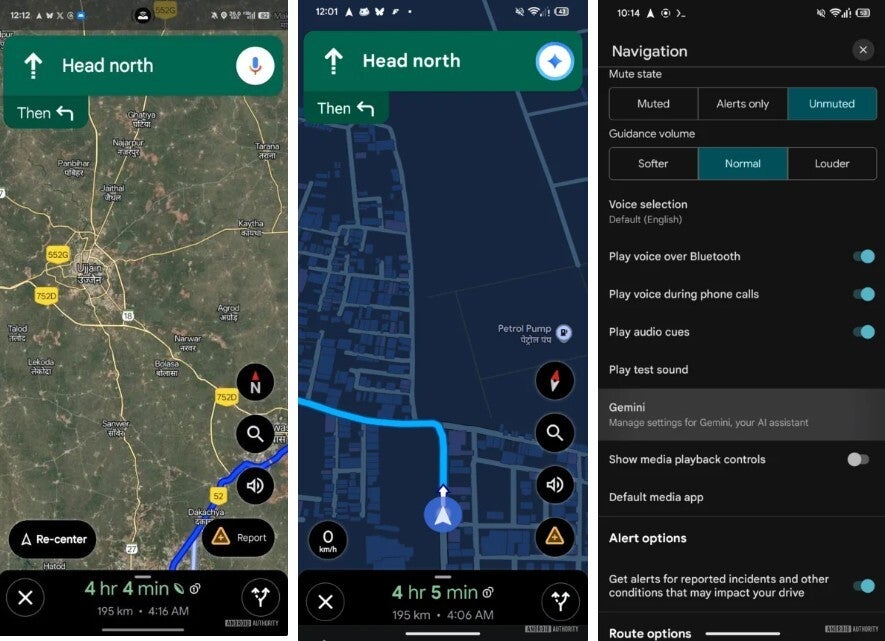
The discovery was first reported by Android Authority, which found the feature live in the beta version 25.41.03.815390258 of the Google Maps app.
With this new update, the familiar microphone icon in the top-right corner of Maps’ navigation interface now triggers Gemini instead of Google Assistant. Once enabled, the traditional mic icon morphs into the Gemini sparkle – a clear visual hint that Google’s next-gen AI has taken over navigation duties. While the transition might look minor, the implications are big: Gemini can understand more natural language, make decisions faster, and handle contextual queries that previously stumped the Assistant.
So what exactly can Gemini do that Google Assistant couldn’t? For starters, you no longer need to dig through multiple menus to tweak your route. Just ask Gemini to avoid highways, toll roads, or specific areas, and it will instantly reroute you without requiring any manual navigation. The AI can also answer real-time questions about your journey – like the weather ahead, nearby gas stations, or even restaurants along your route – all while keeping you focused on driving. In short, it’s a smarter, faster, and far more intuitive way to interact with Google Maps.
Beyond navigation, Gemini’s integration means that the Maps app now becomes a gateway to the broader Gemini ecosystem. You can access the full Gemini app directly from Maps to manage your digital assistant settings or ask follow-up questions that go beyond navigation. For example, you might start by asking for the fastest route to the airport, then seamlessly transition to checking your flight status – all within the same conversational thread.
Currently, the integration has only been spotted in testing, and Google hasn’t made an official announcement. However, based on Google’s recent trend of phasing out Assistant in favor of Gemini across Android devices, it’s safe to assume that this feature will soon reach the public version of Maps through a future update. And given the pace at which Gemini has been expanding into apps like Gmail, YouTube Music, and Google Messages, its arrival in Maps feels like a natural next move.
Switching from Google Assistant to Gemini on Android is also surprisingly easy. Here’s how you can do it: open the Gemini app on your Android device (or install it from the Play Store if you don’t already have it), tap your profile picture in the top-right corner, go to Settings → Digital assistants from Google, and select Gemini from the list. Follow the on-screen instructions to confirm the switch. You can also perform this setup through the Settings app by navigating to Apps → Default apps → Digital assistant app and selecting Gemini. From that point forward, any action that used to summon Google Assistant – such as saying “Hey Google” or long-pressing the power button – will now launch Gemini instead.
If you decide Gemini isn’t for you, switching back is equally simple. Just open the Gemini app again, head to Settings → Digital assistants from Google, and pick Google Assistant from the list. This flexibility ensures users can experiment without risk, which is helpful since Gemini’s conversational style and deep integration with Google services can feel quite different from the more robotic Assistant many Android users are used to.
While there’s no official confirmation yet about similar functionality coming to iOS, the integration currently remains exclusive to Android. This makes sense, given that Apple’s iOS environment limits system-level assistant replacements. Still, if Gemini continues to evolve as quickly as it has, Google may eventually find a way to bring at least partial integration to iPhone users through its standalone Gemini app or future Maps updates.
In essence, this change underscores Google’s broader ambition: to unify its ecosystem under Gemini’s AI umbrella. By making Gemini the voice that guides you while driving, answering your questions, and handling contextual tasks across multiple apps, Google is quietly reimagining how users interact with Android. Whether you’re checking traffic, setting alarms, or asking for travel advice, Gemini is positioning itself as the all-knowing companion for the next era of mobile computing.
For Android users, this shift may not only make navigation easier but also bring a touch of futuristic intelligence to their daily commutes – and that’s something worth getting excited about.
4 comments
hope it comes to iphone too, kinda jealous rn 😅
assistant who? Gemini is way smarter and smoother tbh
wonder how long till siri copies this 😂
ngl i miss old assistant voice tho 😢