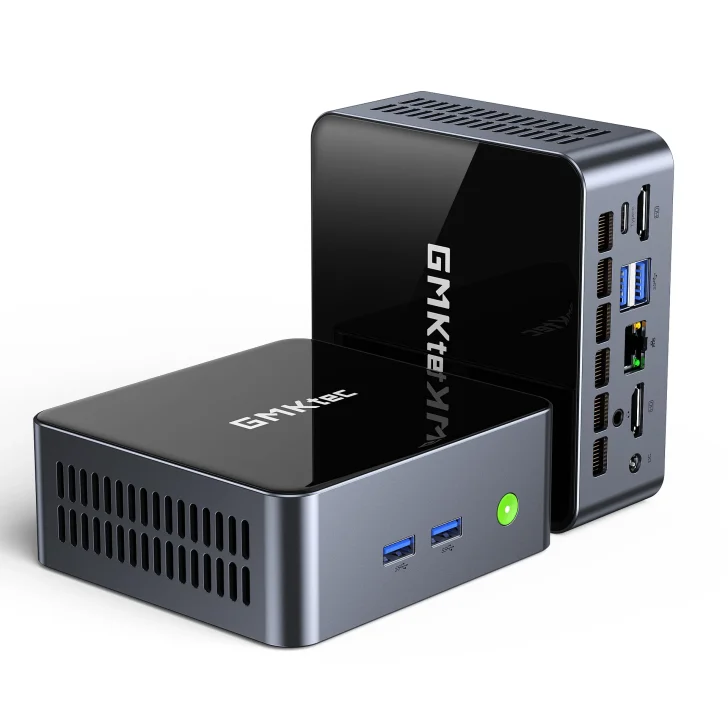
GMKtec M3 Ultra mini PC review: a palm-sized workhorse built around Intel’s Core i7-12700H
Mini PCs have moved from curious gadgets to serious desktop replacements over the last few years. On one side you have ultra-low-power boxes that are barely faster than a laptop from a decade ago, and on the other you find tiny machines that can genuinely stand in for a full-tower PC. GMKtec has quietly become one of the more interesting players in this space. Operating out of Shenzhen, the company has been shipping compact systems based on both AMD and Intel mobile chips, usually aiming to squeeze as much performance as possible into a hand-sized chassis. The GMKtec M3 Ultra is one of the latest entries in that lineup: a compact, silver-and-black mini PC that pairs Intel’s 12th Gen Core i7-12700H processor with up to 64 GB of DDR4 memory and dual M.2 slots, all starting at around the 300-dollar mark for the barebone configuration.
On paper, the positioning is clear. GMKtec is not trying to compete with the newest Core Ultra or Ryzen 8000 APUs here; instead, the M3 Ultra leans on a proven Alder Lake-H CPU that still offers excellent multithreaded performance, but is now old enough to show up in aggressively priced systems. That combination makes the M3 Ultra especially interesting for anyone who cares more about productivity, multitasking, or light content creation than about pushing the latest AAA games at ultra settings. At the same time, the integrated Iris Xe graphics baked into the i7-12700H are far from cutting edge in 2025, and that reality colors the entire experience: this is, first and foremost, a desktop workhorse that can game in a pinch, not a stealth gaming rig.
Before diving into benchmarks and thermals, it is worth laying out what exactly GMKtec is offering. The M3 Ultra uses Intel’s Core i7-12700H, a 14-core, 20-thread mobile chip with six performance cores (P-cores) and eight efficiency cores (E-cores), backed by 24 MB of L3 cache and boost clocks that can reach up to 4.7 GHz under the right conditions. GMKtec configures the chip at a 45 W TDP in its balanced profile, with short turbo bursts allowed to pull substantially more power when cooling headroom is available. That E-core heavy design, originally introduced with Alder Lake, is particularly well suited to desktop-style workloads where dozens of background tasks, browser tabs, and productivity apps all need CPU time without stutter.
Graphics duties fall to Intel’s integrated Iris Xe GPU inside the same i7-12700H package. In this configuration, you get 96 execution units clocked up to around 1.4 GHz. That iGPU supports modern APIs such as DirectX 12.1, OpenGL 4.6, and OpenCL 3.0, and it can tap into the system’s dual-channel DDR4 memory as its VRAM pool. However, it is important to temper expectations. Since the launch of Intel’s Arc-based integrated graphics within the Core Ultra series and AMD’s wildly capable RDNA 3 iGPUs like the Radeon 780M and 890M, the older Iris Xe architecture now sits a tier or two below the current state of the art. You still get hardware decoding for the usual video formats and enough horsepower for esports and older titles at 1080p, but this is not the GPU that will make you forget about discrete graphics cards.
Memory and storage configurations are generous by mini PC standards. GMKtec offers the M3 Ultra in 16 GB and 32 GB DDR4-3200 configurations, using two SO-DIMM slots to keep things in dual-channel mode. Enthusiasts can upgrade to 64 GB later, which is especially appealing for developers running multiple containers, photographers dealing with huge RAW catalogs, or anyone planning to use this box as a compact virtualization host. For storage, the system includes two M.2 2280 slots wired for PCIe Gen 3 x4, each officially supporting up to 8 TB drives. One of these slots is populated from the factory with an NVMe SSD – most commonly a 1 TB model – leaving the second slot open for easy expansion. While PCIe Gen 4 drives are becoming the norm in high-end systems, Gen 3 x4 still offers more than enough throughput for desktop workloads, and it keeps costs and heat output in check.
The physical presentation of the M3 Ultra is understated in the best way. GMKtec ships the mini PC in a compact silver cardboard box with simple branding, a quick-start booklet, warranty leaflet, power brick, power cord, and HDMI cable. It is not a luxury unboxing experience, but everything is tidy and well protected. The mini PC itself embraces a dual-tone aesthetic: a glossy black front panel that catches the light, wrapped by a brushed-style silver shroud that covers the top and sides. The enclosure is palm-sized, with a footprint not much larger than a stack of coasters, and it looks perfectly at home next to a monitor or tucked under a TV.
Ventilation is clearly a priority. Large perforated vents run along the sides of the chassis, acting as exhaust paths for the internal blower-style cooler. Additional openings at the bottom allow fresh air to be drawn in, ensuring that the CPU and VRM components receive a steady intake during sustained loads. Mini PCs live or die by their thermal design; push too much power through too small a heatsink, and performance tanks once the system hits its temperature limits. GMKtec’s design is not as extravagant as some vapor-chamber solutions we see in more expensive boxes, but the layout is sensible and the attached 120 W power adapter hints that the company expects users to put this machine under real, sustained work.
Front-facing I/O is where usability starts, and the M3 Ultra does well here. On the front panel you will find two USB-A 3.2 Gen 2 ports rated at 10 Gbps, ideal for fast external SSDs, card readers, or audio interfaces, plus the power button with a subtle status LED. There is also a 3.5 mm combo audio jack for headphones or headsets, handy if the machine is sitting on a desk within arm’s reach. These might sound like basic inclusions, but many compact systems still tuck most of their high-speed ports on the rear, forcing users to reach around the back of the unit every time they want to plug in a drive or dongle. In day-to-day use, having two fast ports on the front proves surprisingly valuable.
Spin the system around and the back panel reveals the rest of the connectivity. Here you get two HDMI outputs capable of driving dual 4K displays, a USB-C port, one additional USB-A 3.2 Gen 2 port, a legacy USB 2.0 port for low-bandwidth peripherals, a 2.5 GbE Ethernet jack, and the DC-in barrel connector for the 120 W power brick. The inclusion of 2.5 GbE is especially notable at this price point, since many budget mini PCs still ship with plain gigabit Ethernet. If you have a multi-gigabit switch or NAS, you can actually take advantage of faster local transfers, which makes a huge difference when you are pulling large project files or backing up photos and videos over the network.
Wireless connectivity is handled by an M.2 Wi-Fi card, typically offering Wi-Fi 6 or 6E and Bluetooth support, depending on region and exact configuration. While hardcore network users will still prefer the wired 2.5 GbE jack for stability and latency, the wireless stack makes the M3 Ultra perfectly usable as a cable-free office or living-room PC. Hook it to a TV, pair a Bluetooth gamepad and keyboard, and you have a clean setup with nothing more than a single power cable and one HDMI cable running from the box.
Servicing and upgrading the GMKtec M3 Ultra is refreshingly simple. Flip the unit upside down, remove the four screws on the bottom plate, and the internal layout is immediately accessible. Two SO-DIMM slots sit on one side, and two M.2 2280 slots are arranged along the board, one already filled with the bundled NVMe SSD. There is no need to peel off warranty-void-if-removed stickers to reach these components, and the whole process can be completed in a few minutes with a basic screwdriver. Compared with ultra-compact desktops that solder RAM and storage to the motherboard, this level of upgradeability dramatically extends the usable lifespan of the machine.
So how does the Core i7-12700H actually perform in this chassis? In synthetic CPU benchmarks such as Cinebench R23, Geekbench 6, and 3DMark’s CPU Profile, the M3 Ultra’s 45 W configuration lands roughly where you would expect: behind 65 W Core i9-13900H and Core Ultra 9 systems, but often nipping at the heels of those same chips when they are constrained to similar power levels. The 14-core design provides robust multithreaded throughput, with multi-core scores that comfortably outpace older Ryzen 5000 and 11th Gen Intel parts and remain competitive against many 12th and 13th Gen processors still being sold in laptops today. Single-core numbers are strong enough that day-to-day responsiveness feels snappy, and compiled workloads like code builds or 3D rendering scale nicely with all 20 threads engaged.
In real-world productivity scenarios, that performance translates into a machine that feels far more muscular than its size suggests. With 32 GB of RAM installed, it is trivial to keep a Chromium-based browser full of tabs, a couple of Electron apps, a code editor, Slack or Teams, and a music player all running without bringing the system to its knees. CPU utilization tends to hover at modest levels until you load something truly demanding, such as a lengthy 4K transcode or a complex Lightroom export. Office work, document editing, and general multitasking barely make the fans spin up. This is the sort of box you can drop on a desk as a family PC or a dedicated work terminal and expect it to stay responsive for years.
Content creators on a budget will also find plenty to like, within reason. The i7-12700H’s P-cores chew through photo editing workloads, and even timeline-based video editing is feasible at 1080p and lightly compressed 4K, especially if your software leverages Intel’s Quick Sync video engine for hardware acceleration. It is no replacement for a high-end desktop with a discrete GPU when you are dealing with multiple 10-bit 4K streams and heavy color grading, but for YouTube-style content, screencasts, or social-media videos, the M3 Ultra pulls its weight surprisingly well, especially once you add a fast NVMe scratch disk in that second M.2 slot.
Developers and power users are another key audience. Spinning up local Docker containers, lightweight VMs, or a self-hosted lab of open-source services is where that 14-core CPU really stretches its legs. At 45 W, you can run several containers, a small PostgreSQL database, a reverse proxy, and assorted background services without saturating the processor, turning the M3 Ultra into a neat little home lab or self-hosted productivity hub. Pair the 2.5 GbE port with a reliable switch, and it will happily sit in a corner acting as a micro server, sipping tens of watts instead of the triple-digit draw of a larger tower.
Where reality checks begin is gaming performance. The Iris Xe graphics inside the i7-12700H were never designed to compete with discrete GPUs, and today they also sit behind AMD’s latest integrated solutions and Intel’s own Arc-based iGPUs. In esports titles and older games, the M3 Ultra still holds its own. Popular titles such as DOTA 2, League of Legends, CS2, and Valorant are playable at 1080p with medium settings, often hovering in the 70–100 frames per second range in the lighter titles. Civilization VI at medium settings, for example, runs around the mid-60 fps mark. For casual gaming or a quick match after work, the experience is perfectly acceptable.
Push into graphically intense AAA territory, however, and the limitations of the architecture become obvious. In games such as Cyberpunk 2077 or Resident Evil 4 Remake, even with FSR on quality or balanced modes and settings dialed down, frame rates tend to sit in the mid-20s to mid-30s at 1080p, and you often need to drop resolution or accept aggressive upscaling to keep things smooth. The comparison charts make the situation crystal clear: AMD’s newer Radeon 780M and 890M integrated GPUs, as found in premium mini PCs and handheld consoles, routinely deliver double or even triple the performance in these titles, while Intel’s Arc-based integrated graphics in the Core Ultra 7 and 9 lineup also push clearly ahead.
That disparity is where some frustrated user comments originate, the kind that label a system like this as "slow trash". From a pure gaming perspective, someone jumping in with expectations shaped by RDNA 3 iGPUs or marketing around Core Ultra might indeed find the M3 Ultra underwhelming. But context matters. The M3 Ultra’s primary pitch is not that it can replace a gaming rig; it is that you can get a competent 14-core productivity machine with ample memory and storage options in a tiny box for substantially less money than most of those flashier systems. If gaming is your number-one priority, there are clearly better options. If gaming is an occasional hobby and you mostly live in code editors, browsers, and creative apps, the trade-off suddenly looks much more reasonable.
Interestingly, there is a silver lining to the more modest GPU capability: power consumption and thermals stay under better control. Under the M3 Ultra’s 45 W balanced profile, total system draw at the wall typically hovers around 10 W at idle and roughly 60 W under heavy CPU-bound load. Mixed CPU-plus-GPU workloads can spike a little higher but still remain within the comfort zone of the 120 W power adapter. That puts the M3 Ultra on the more efficient side of the mini PC landscape, especially compared with 65 W or higher configurations of flagship mobile CPUs that routinely blast past 100 W system draw under extended boosts.
Thermal behavior during extended benchmarks is generally solid. The cooler ramps up audibly when all cores are loaded, but the pitch is more of a broadband whoosh than a high-pitched whine, and in an office or living-room environment it quickly blends into the background. Core temperatures will climb into the high 80s Celsius under synthetic stress tests, with occasional brief trips to around 90–92 °C as the chip bursts to higher clocks, but the system is able to sustain its rated 45 W package power without collapsing into aggressive throttling. During real-world workloads such as video exports or long compile jobs, temperatures remain a little lower and fan noise is less intrusive.
Noise levels at idle and low loads are particularly important for a mini PC that might live on a desk or under a TV. Here the M3 Ultra performs well. With the system sitting at the Windows desktop, streaming video, or handling routine office tasks, the fan either spins very slowly or cycles on and off at a low speed. In a quiet room you can hear a faint murmur if you listen for it, but it is far from distracting. Compared to some small form factor systems that aggressively chase boost clocks and keep their fans constantly spinning, the M3 Ultra feels well tuned for mixed home and office use.
All of this performance and efficiency would not matter much if the pricing were off, but GMKtec has positioned the M3 Ultra pragmatically. The barebone configuration – which includes the Core i7-12700H board and chassis but leaves RAM and storage for you to add – often lands around the 299-dollar mark. Fully populated models with 16 GB of DDR4 and a 1 TB SSD, or 32 GB paired with a 1 TB or 2 TB drive, climb into the 300- to mid-400-dollar range depending on retailer and ongoing discounts. When you account for the cost of separately buying quality SO-DIMMs and an NVMe SSD, these preconfigured kits are usually only marginally more expensive than the barebone plus do-it-yourself route, which is appealing for people who just want to plug in a box and get to work.
Against the broader mini PC market, the value proposition becomes clearer. Systems based on AMD’s latest Ryzen 7 8845HS or Ryzen 9 8945HS, or Intel’s Core Ultra 7 and 9 chips, typically command a significant premium, especially when equipped with fast LPDDR5X memory soldered directly to the board. Those platforms undeniably deliver stronger integrated graphics and slightly higher CPU performance, but they also limit future memory upgrades and can push total system cost well above that of the M3 Ultra. For users who know they will benefit more from 64 GB of upgradable RAM and plentiful storage than from extra frames per second in Cyberpunk, the GMKtec box strikes a more sensible balance.
Build quality is another part of the equation. While the M3 Ultra is largely constructed from plastic and lightweight metal, the chassis feels rigid, with no creaks when you squeeze it and no sharp edges around the vent cutouts. The rubber feet at the bottom hold the box in place on a desk, and GMKtec includes a basic VESA mount in some bundles, allowing you to attach the PC to the back of a monitor and create a pseudo-all-in-one setup. That is particularly attractive for minimalist home offices or small businesses trying to keep workspaces tidy.
From a software perspective, GMKtec typically ships the M3 Ultra with Windows 11 preinstalled, though barebone units might arrive without an OS depending on region. Drivers for Intel’s chipset, integrated graphics, and wireless module are all readily available through Windows Update, and GMKtec’s own support pages provide additional downloads if needed. There is no heavy bloatware layer here – mostly stock Windows with a few utilities. Enthusiasts who prefer Linux will also find the platform approachable; mainstream distributions boot without drama, and the combination of Intel CPU, iGPU, and network hardware generally ensures good out-of-the-box compatibility.
It is also worth considering how the GMKtec M3 Ultra compares to simply buying a used gaming desktop or laptop. On the second-hand market, you can sometimes find older desktops with discrete GPUs at similar prices, but they will be much larger, far louder, and substantially less efficient in terms of power draw. Laptops with a 12700H and an entry-level GPU also exist, yet they come with their own compromises: higher wear and tear, limited upgradability, and the need to live with a keyboard and screen you may not actually want. For many people, the appeal of a tiny, quiet box that disappears behind a monitor but still packs modern I/O and a capable 14-core CPU should not be underestimated.
To make the buying decision easier, it helps to think in concrete scenarios. Imagine a student in a small apartment who needs a dependable machine for coursework, light programming, and maybe the occasional weekend gaming session. With a modest monitor and peripherals, the M3 Ultra gives them desktop-class horsepower in a footprint smaller than many routers, all while staying quiet enough not to dominate a shared space. Swap that student for a freelance developer handling web projects and running a couple of local test servers, and the story is similar: the combination of CPU threads, 2.5 GbE networking, and affordable storage expansion makes far more of a difference than another 20 percent of GPU performance ever would.
Small offices and startups are another natural match. A stack of M3 Ultras can power a row of workstations, calling software, or point-of-sale terminals without turning the workspace into a nest of wires and bulky towers. IT departments will appreciate that RAM and storage are replaceable off the shelf, reducing e-waste and extending useful lifespans. For remote teams that occasionally ship hardware out to collaborators, the low weight and compact box are an added bonus: it is easy to pack, easy to insure, and easy to set up on the other side.
Home-theater enthusiasts might initially overlook the M3 Ultra because of its modest GPU, but for pure media playback it is better than it might seem from gaming benchmarks alone. Iris Xe handles 4K HDR streaming and local playback smoothly, including hardware decoding of modern codecs. With a decent media app and passthrough configured for your receiver, this little machine can anchor a living-room setup that doubles as a light gaming station for indie titles and retro emulation. The chassis is unobtrusive enough to live in a TV cabinet, and the low idle noise means it will not spoil quiet scenes in movies.
Of course, it is not just about what the M3 Ultra can do today, but how gracefully it will age. From that standpoint, its strengths lie in standard components and open upgrade paths. DDR4-3200 SO-DIMMs will remain easy to source for years. PCIe Gen 3 NVMe drives are plentiful and cheap, and the dual M.2 layout means you can migrate from an initial 1 TB boot drive to a two-drive setup with a dedicated project or media volume without reinstalling everything from scratch. Even if your workload grows significantly more demanding, the ability to drop in more RAM and storage buys meaningful extra time before a full platform replacement becomes necessary.
Performance-hungry users who are tempted by newer platforms might reasonably ask whether it is smarter to save a little longer for a Core Ultra or Ryzen 8000-based mini PC instead. That is a valid question, but the answer depends on precisely where your bottleneck lies. If you already know that integrated GPU performance is the weak link in your setup – for example, you rely heavily on GPU-accelerated effects or want modern AAA games at 60 fps – the premium for those newer chips is absolutely justified. If, however, your day normally ends with task manager showing CPU at 80–90 percent and GPU coasting along at 10–20 percent, then the GMKtec M3 Ultra’s cheaper, CPU-centric approach delivers most of the benefits you actually feel, for notably less money.
That said, buyers should set their expectations around firmware polish and long-term support. GMKtec has improved its BIOS interfaces and update cadence over the years, but it still cannot match the industrial-grade polish of tier-one OEMs. Enthusiasts may need to be comfortable tweaking a couple of power and fan options in the firmware to dial in their preferred balance of noise and performance. The upside is that the platform is fairly open: you are not fighting locked-down power profiles or proprietary software layers when you want to tune behavior.
That said, the M3 Ultra is not a universally perfect recommendation. If your primary interest is modern AAA gaming at high settings, you will likely join the chorus of critics calling Iris Xe slow once you see frame rates dipping in the latest blockbusters. If you are planning to rely heavily on GPU-accelerated creative workflows – 3D modeling, complex motion graphics, or AI-driven tools that expect CUDA or powerful compute units – you will also run into limitations. In those situations, either a mini PC with a much stronger integrated GPU or a small form factor desktop with a discrete graphics card remains the better choice.
On the other hand, if you are a student, home-office worker, developer, or content creator whose heaviest tasks revolve around CPU compute, the M3 Ultra makes a lot more sense. The ability to cheaply push the system to 64 GB of memory, drop in multiple terabytes of storage, and still keep the total package small, quiet, and relatively affordable is the core of its appeal. Paired with a decent monitor and peripherals, it becomes a capable productivity station that will likely outlast many slim laptops in terms of thermal comfort and long-term performance consistency.
Every mini PC is ultimately a bundle of trade-offs. GMKtec’s M3 Ultra chooses to invest its budget in a strong 14-core processor, generous expansion options, and solid connectivity, while accepting that the integrated graphics belong to an older generation. Calling it "trash" overlooks the nuance of that design choice. In the right hands and for the right workloads, the M3 Ultra is anything but slow: it is a compact productivity engine that happens to offer just enough gaming capability for casual sessions and lighter titles. In the wrong hands – those expecting handheld-console-class graphics in a mini desktop at a bargain price – it will inevitably disappoint.
Viewed through that lens, the GMKtec M3 Ultra ends up being a very easy device to recommend to a specific, but broad, audience. If your daily routine involves office suites, browsers, coding, light creative work, a few VMs or containers, and maybe the occasional evening of esports gaming, this little box will feel fast, efficient, and unobtrusive. If you want more frames in Cyberpunk than some consoles deliver, you are shopping in the wrong aisle. GMKtec has built a palm-sized workstation first and a casual gaming box second, and as long as you approach it with that expectation, the value you get for around 300 to 450 dollars is hard to argue with.
In a crowded mini PC market where spec sheets often chase the latest buzzwords, the M3 Ultra proves there is still room for a well-balanced configuration built on slightly older silicon. Alder Lake-H may no longer be the newest toy in Intel’s lineup, but paired with sensible cooling, dual M.2 storage, upgradable DDR4 memory, and a thoughtful mix of I/O, it remains an excellent foundation for a compact productivity rig. GMKtec’s execution is not flawless – gamers in particular have legitimate reasons to look elsewhere – but for the vast majority of users who simply want a reliable, quiet, and powerful tiny PC, the M3 Ultra deserves a spot near the top of the shortlist.