Gigabyte X870E AORUS Xtreme X3D AI TOP: the AM5 flagship for people who refuse to compromise
Gigabyte’s new X870E AORUS Xtreme X3D AI TOP is not a subtle motherboard, and that’s the point. On AMD’s AM5 platform it arrives as an unapologetically premium, E-ATX monument to excess – built for overclockers, workstation tinkerers, and anyone who wants front-row seating to the bleeding edge. It targets the same rarefied air as MSI’s MEG X870E GODLIKE X Edition, yet comes armed with a different philosophy: squeeze every watt, lane, and degree Celsius with layered cooling, abundant I/O, and quality-of-life touches that make extreme builds less of a chore and more of a playground.
Power delivery and thermals: 28 stages with armor to match
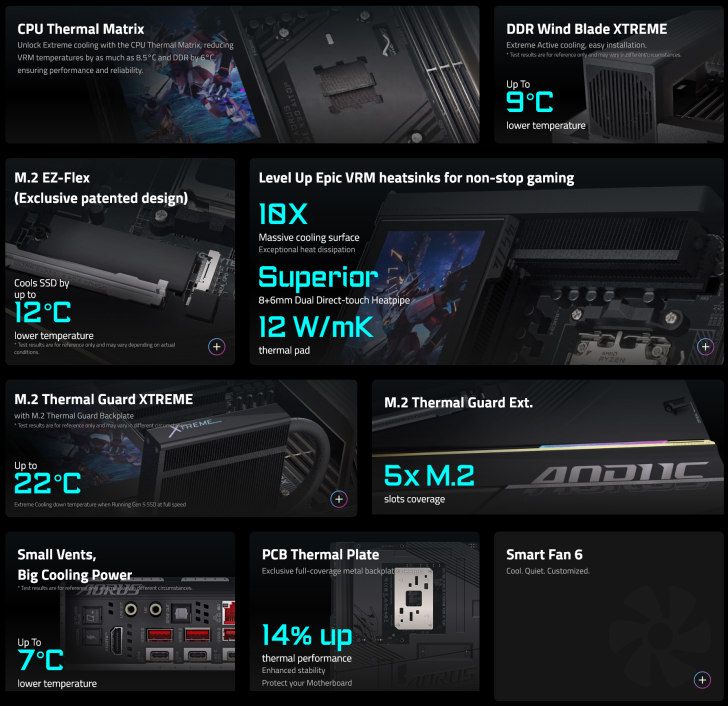
At the heart of the Xtreme is a 24+2+2 power stage design rated at 110A + 60A, effectively 28 total stages engineered to feed Ryzen 9000/8000/7000 series CPUs without blinking. Gigabyte wraps this in its VRM Thermal Armor Advanced assembly: dual 10 mm direct-touch heatpipes running through finned heatsinks, 12 W/m·K pads, and a chassis-length Thermal Matrix that bridges the CPU IHS, VRM, and memory zone. The idea is straightforward – remove hotspots, spread the load, and buy headroom for X3D workloads that can spike hard under bursty, cache-heavy threads.
Cooling extends beyond the socket. The board ships with multiple M.2 Thermal Guard solutions, including a primary heat-pipe and active fan variant for Gen5 drives. Gigabyte claims up to 22 °C reductions versus bare modules, which matters as PCIe 5.0 SSDs flirt with throttling. Over the DIMMs, DDR Wind Blade Xtreme adds a compact, targeted fan module that can trim temperatures by up to 9 °C during heavy memory stress or when pushing tight timings.
Memory and CPU features for X3D enthusiasts
Out of the box, the board is validated for DDR5-9000 overclocking across four slots (dual-channel, up to 256 GB with AMD EXPO support). The headline software feature is X3D Turbo Mode 2.0, a refined tuning layer built to extract performance from Ryzen X3D parts by juggling PPT/EDC/TDC, boost behavior, and per-CCD nuance without clobbering thermals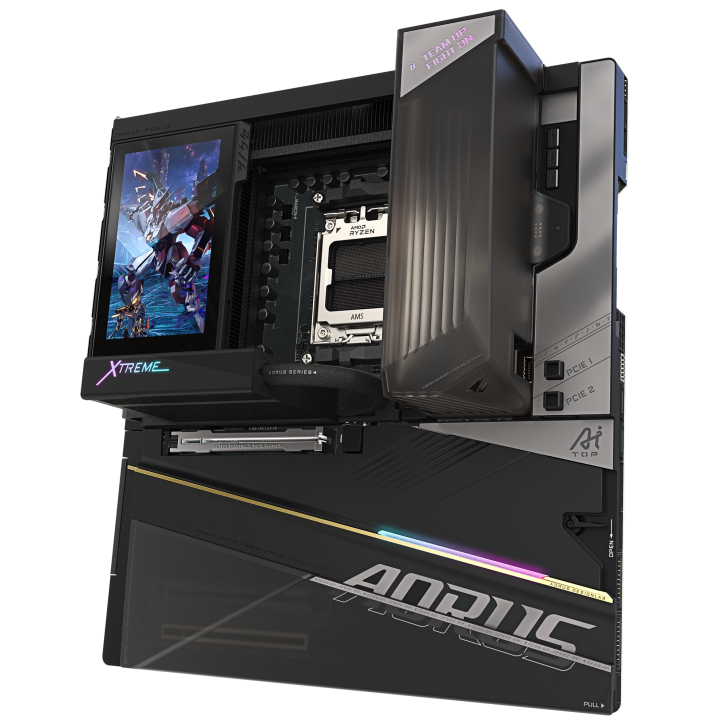
. Pair that with the marketing-cheeky promise of “training your own AI on your desk,” and you have a board expressly aimed at creators who run mixed CPU/GPU inference while compiling, encoding, or crunching datasets.
Slots, lanes, and storage
Expansion is similarly maximalist. You get three full-length PCIe slots: two wired for PCIe 5.0 (x16 / x8 depending on population) and a third running at PCIe 4.0 x4 for capture, storage, or high-bandwidth add-ins. Storage fans will find five M.2 slots – two Gen5 x4 and the remainder Gen4 (x4/x2) – plus a pair of SATA III headers for legacy drives or opticals. If your workflow juggles scratch, project, cache, and archive volumes, you can wire it all without resorting to bifurcation gymnastics.
USB, networking, and audio that read like a wish list
The rear panel and internal headers combine for a staggering 22 USB ports. Headliners include two USB4 Type-C ports with DisplayPort functionality, a rear USB-C 3.2 Gen2x2, and front-panel USB-C 3.2 Gen2x2 with up to 65 W PD 3.0/QC 4+ fast charging for phones and handhelds. You also get multiple USB-C 3.2 Gen2 and a spread of USB-A 3.2 Gen2/Gen1 plus USB 2.0 on internal headers for coolers, RGB hubs, and legacy gear. Networking is overkill in the best way: dual 10 GbE with two RJ-45 jacks for link aggregation or segregated LAN/SAN setups, and Wi-Fi 7 (2×2) with a directional high-gain antenna. For creators, low-latency multi-gig Ethernet plus modern wireless means one board can service both a fast NAS and a latency-sensitive stream.
Audio complements the premium bent: an ESS USB DAC solution with processing tuned for DTS:X Ultra spatial modes, dual front/rear paths, and the expected high-SNR amplification for demanding headsets. It’s the sort of implementation that pushes “good enough” onboard audio into “I could live with this” territory for most non-audiophile ears.
Quality-of-life: less screwdriver, more fun
Gigabyte sprinkles the PCB with builder-friendly touches: M.2 EZ-Latch Click for screwless heatsink removal, EZ-Latch Plus on the M.2 sockets themselves, PCIe EZ-Latch Plus Duo for quick GPU swaps, and a WIFI EZ-Plug that makes antenna installation less fiddly. There’s an EZ Debug Zone with onboard buttons and readouts, plus Q-Flash Plus and an OC Ignition button on the I/O so you can power ancillary gear without fully booting the system. In BIOS and Windows, a Friendly UI surfaces AIO fan control, multi-theme dashboards, and Q-Flash Auto Scan. The DriverBIOS workflow pre-loads Wi-Fi drivers at first power-on so the rig is online immediately.
A 5-inch edge LCD that’s more than decoration
An unmistakable design flourish is the bundled 5-inch LCD Edge View – a full inch larger than MSI’s GODLIKE X Edition panel. It’s not just for vanity shots. The screen can display real-time readouts (clocks, temps, voltages), memory timings, or animations and images for themed builds. Mounted along the edge, it stays visible even in dense dual-GPU or thick-radiator layouts. For test benches and open frames, it becomes a surprisingly practical glanceable monitor.
How it stacks up against MSI’s GODLIKE X Edition
MSI’s rival remains a powerhouse with its familiar Frozr thermal ecosystem, but the AORUS counters with its direct-touch CPU/VRM heatpath, the DDR Wind Blade Xtreme module, and that bigger 5-inch display. Both boards push similar memory ceilings (DDR5-9000) and expansive PCIe 5.0 topologies. Gigabyte leans harder into dual 10 GbE where many boards settle for 2.5G, and its active M.2 cooling gives Gen5 SSDs more runway before throttling. On paper, it’s a game of inches – yet in a halo class, inches are what you pay for.
Thermals, PPT, and the AM5 reality check
If you follow the enthusiast chatter, you’ve seen the same debate on repeat: Are AM5 temps a motherboard problem? The short answer is no – the IHS and heat density on modern Ryzen parts, combined with aggressive boost logic, mean you can hit temperature ceilings quickly under heavy multi-threaded bursts. Stock platform power (PPT) already pushes ~170 W on higher-core chips, and it’s common for tuners to raise that into the 200–220 W range. At ~300 W experiments (don’t try without serious cooling), the CPU will smack 95 °C almost instantly. That isn’t a failure of the VRM here – the Xtreme’s power delivery is coasting at those loads. It’s a physics problem at the silicon interface.
So where does this board help? First, the Thermal Matrix reduces delta spikes around the socket and memory, stabilizing boost behavior. Second, the DDR and M.2 active cooling reduces adjacent heat soak – helpful in compact cases. Third, X3D Turbo Mode 2.0 gives a saner way to chase performance per watt instead of simply elevating PPT until the room gets loud. You can still delid if that’s your sport, but the Xtreme makes not delidding less of a compromise.
Ports and panel recap
- Rear I/O: Q-Flash Plus, OC Ignition, HDMI, 2× USB4 Type-C with DP-Alt, USB-C 3.2 Gen2x2, USB-C 3.2 Gen2, 8× USB-A 3.2 Gen2, dual 10 GbE, Wi-Fi 7 antenna connectors, dual audio jacks, and optical S/PDIF.
- Internal: Front-panel USB-C 3.2 Gen2x2 with up to 65 W PD 3.0/QC4+, front-panel USB-C 3.2 Gen2, headers for 4× USB 3.2 Gen1 and 4× USB 2.0, five M.2 (two Gen5), and two SATA III.
Build experience and durability
Gigabyte reinforces the primary GPU slot as a Titanium PCIe UD Slot X to resist sag and torsion – useful with triple-slot, multi-kilogram GPUs. A PCB thermal plate claims a 14% improvement in heat spreading, adding rigidity that helps during transport or repeated part swaps. The combination of tool-less latches and the EZ Debug Zone makes this one of the rare flagships that feels designed by someone who actually swaps drives and GPUs every other day.
Price, availability, and audience
Nobody should pretend this board is affordable. Expect pricing well north of $1000 with limited production – classic halo playbook. It’s fitting, because the audience is narrow: multi-GPU content creators, overclockers who value stability and instrumentation, network die-hards who want dual 10G without an add-in NIC, and showcase builders for whom a 5-inch live telemetry panel is both practical and fun.
The verdict
The X870E AORUS Xtreme X3D AI TOP is a masterclass in “everything and the kitchen sink,” but it’s not ostentatious for its own sake. The layered cooling strategy is coherent; the USB4 plus 65 W front-panel charging solves real, everyday friction; and the dual 10G + Wi-Fi 7 stack is a genuine differentiator. Against MSI’s GODLIKE X Edition, the Xtreme doesn’t just trade blows – it tweaks the formula with smarter thermal coverage and a more useful LCD. If you want AM5 without limits and understand that AM5 thermals are a function of silicon physics more than motherboard magic, this board will feel like home.
For everyone else, a great B650E or X870 board will handle Ryzen just fine for far less money. But that’s not why the Xtreme exists. It exists so the top 1% of builds can be finished with a motherboard that’s as serious – and as overbuilt – as the rest of the rig.
3 comments
AI TOP cuz AI wasn’t enough lol. Next up: MAX+ Pro Ultra Infinity X3D? 😂
Dual 10GbE on a consumer board? Finally something my NAS addiction approves
AM5 temps are a brick wall. Raise PPT and you smack 95C fast unless you delid or tune volts