Google’s Gboard app for Android is going through a meaningful refresh, and this latest update brings both practical usability tweaks and a glimpse at how AI is transforming even everyday tools like keyboards. For many Android users, Gboard is more than just a way to type – it’s a hub for smart text suggestions, voice typing, GIFs, emojis, and seamless integration across apps. 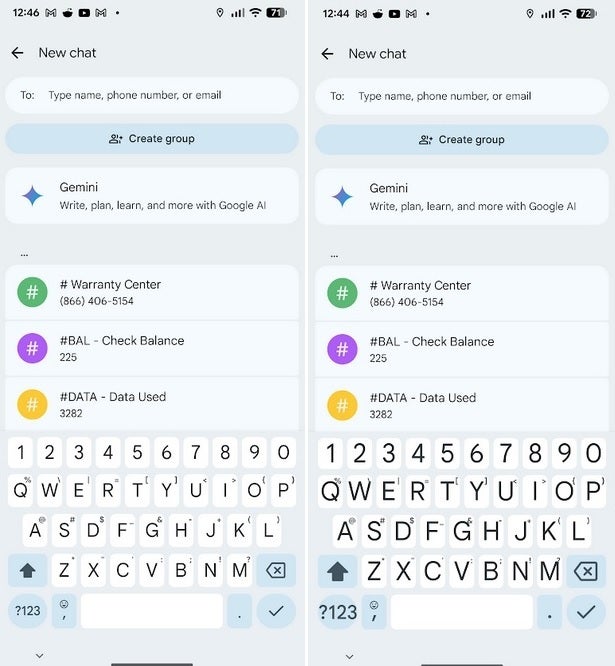
The newest set of features makes it not only more adaptable but also more intelligent.
The most immediately useful change is the new ability to adjust the keyboard’s font size directly within Gboard itself. Until now, users had to dive into system-level accessibility settings to make the keys larger or smaller. With the update, the process is simplified: open Google Messages, tap the compose button, and bring up the Gboard keyboard. If you don’t see a settings icon, long-press the comma key and slide to the gear symbol. Once inside, go to Preferences > Font Size. Here, a slider lets you scale the keyboard text from 85% to 200% of the default size. The range includes stops at 85%, 100%, 115%, 130%, 150%, 180%, and 200%. The icons on Gboard’s toolboard grow or shrink along with the text, so the whole interface adapts. For people with vision challenges or those who prefer a larger or more compact keyboard layout, this is a welcome quality-of-life improvement.
The feature was spotted on a Pixel 6 Pro running Android 16 QPR2 Beta, though it is expected to roll out more widely in the near future. Adjusting font size may seem like a small tweak, but it reflects Google’s larger push toward making its apps more customizable and accessible without forcing users through cumbersome settings menus. It’s also a reminder of how much we depend on these daily tools: small ergonomic improvements can have a major impact on comfort and speed when typing dozens of messages or emails a day.
Beyond interface flexibility, Gboard is also gaining more advanced AI-driven features – though these remain exclusive to the latest Pixel 10 series at the moment. The most visible change is a new icon in the suggestion bar: a pencil tipped with sparkles. This opens up what Google calls “Writing Tools.” Once activated, Gboard can automatically analyze the text you’ve written and provide real-time corrections for grammar, punctuation, and typos. That alone makes it an invaluable assistant for anyone rushing through messages, professional emails, or even social media posts.
But Writing Tools go far beyond basic proofreading. Users can ask Gboard to reframe their writing with a different tone or structure. Want your text to sound more formal? Ask it to “make it more professional.” Need a lighter, casual feel? Opt for “friendlier.” The assistant can also expand or shorten content, giving quick control over how concise or elaborate a message should be. Even better, these adjustments can be made hands-free using voice commands. Phrases like “Rephrase this,” “Make it longer,” or “Make it shorter” activate Smart Edit, allowing quick transformations without lifting a finger.
Smart Edit also supports precise modifications: users can say commands like “Change dog to cat,” “Add comma,” or “Insert word amazing” to instantly alter their message. This is a powerful showcase of how natural language processing is blending with productivity tools. It brings editing flexibility once reserved for dedicated software directly into the typing experience.
For those who don’t have Gboard installed, it can be easily downloaded from the Google Play Store. Once added, the app works seamlessly with Android’s system, allowing you to personalize it to your needs. While some of the AI functionality may remain limited to Pixel devices for now, the broader availability of font resizing shows that Google is steadily trickling down helpful improvements to a wider user base.
Taken together, these changes show Google’s two-pronged strategy with Gboard: improve accessibility and comfort for everyday use while also gradually introducing AI-powered productivity features. The font resize option caters to inclusivity, while Writing Tools illustrate how AI is being positioned as a natural assistant, not an add-on. As Android continues to evolve, Gboard is shaping up to be a proving ground for both small usability wins and bigger leaps in AI-assisted communication.
3 comments
ive been using smart edit on my pixel 10, its insane
ngl the font resize thing is actually super useful 😅
great for ppl with bad eyesight, nice move