Google is quietly transforming Android Auto into something more than just a simple phone-to-car interface. With its latest update, the Mountain View giant is focusing on making your time behind the wheel not only smarter but also safer. The spotlight this time is on two features: Call Screening and Call Notes, both designed to reduce distractions while driving and to help users manage important conversations more effectively.
Call Screening is a familiar tool for Pixel phone owners, but bringing it to Android Auto changes the game entirely. 
Imagine driving on a busy road and receiving a call from an unknown number. Instead of fumbling with your phone or being forced to decide whether to pick up blindly, the system automatically prompts the caller to identify themselves and explain the reason for their call. This information is then relayed to you, allowing you to make a safe, informed choice: answer, decline, or simply ignore. By cutting out spam calls, telemarketers, or needless interruptions, Call Screening creates a safer, more focused driving experience. It’s a feature that feels tailor-made for the car environment, arguably even more useful here than on the phone itself.
Meanwhile, Call Notes is another clever addition. First introduced with the Pixel 9 series, this feature automatically generates a text summary of a call. For business professionals or anyone who needs to remember details discussed during a conversation, this is a lifesaver. While you obviously shouldn’t be jotting down notes during a drive, having the call distilled into a neat summary that you can revisit later is invaluable. Whether it’s an address, an appointment time, or an important point from a work-related conversation, Call Notes ensures nothing gets lost in the shuffle.
The timing of these enhancements is strategic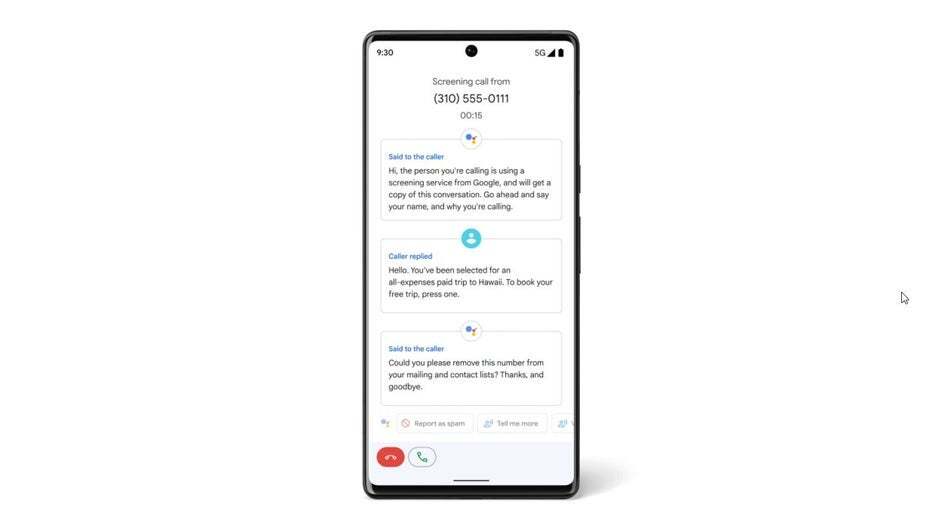
. Apple has already rolled out its own Call Screening tool as part of iOS 26, and it integrates with CarPlay. Google’s move ensures Android Auto remains competitive while also expanding on functionality in a way that feels natural for the car environment. While Apple and Google often mirror each other’s moves, this particular set of features highlights Google’s commitment to positioning Android Auto not just as an infotainment bridge, but as an assistant that actively improves safety and productivity on the road.
Beyond the marketing spin, the real value here is practical. Distracted driving remains one of the leading causes of accidents worldwide. Any tool that helps cut down on unnecessary interactions with your phone is a step in the right direction. Instead of making you more tethered to your device, these updates aim to reduce the burden of information overload while driving. Android Auto is slowly but surely shifting from a convenience app into an essential co-pilot for everyday commuters and long-distance drivers alike.
Of course, questions remain. Will Call Notes handle multi-speaker calls or conference calls effectively? Can Call Screening reliably distinguish between urgent personal calls and routine telemarketing? These are details that will matter to real-world users, and Google still has work to do to polish these tools. But even with potential quirks, the direction is promising: Android Auto is no longer just a projection of your phone’s screen – it’s evolving into an intelligent layer that filters and organizes your digital interactions in a way that makes sense when your hands are on the wheel.
For many Android users, this update will feel like a turning point. Android Auto is becoming more than a dashboard convenience – it’s increasingly about peace of mind and driving safely while staying connected. And that is exactly the balance modern drivers have been waiting for.
3 comments
ngl call notes sound kinda sick, i forget half my convos 😂
better late than never, android auto needed this
if it blocks spam calls im in!!