Albiriox: the new Android malware that turns your phone into a hacker’s remote control
Mobile banking, investing, and crypto trading have made our phones the closest thing we have to a digital wallet and ID card. That convenience comes at a price: cybercriminals now treat Android devices as a direct gateway to money. The latest proof is a sophisticated Android malware family called Albiriox, a tool that lets attackers handle a victim’s phone almost as comfortably as if it were in their hands.
First spotted in closed criminal circles in September 2025 and offered more widely from October, Albiriox is not a recycled banking trojan with a new name. It has been built from the ground up for so-called On-Device Fraud (ODF). Instead of simply stealing usernames and passwords and trying to log in from another machine, the malware stays on your phone and abuses your own active session, your own apps, and even your own security settings.
From underground testing to global fraud tool
Analysis of the control panels, documentation, and criminal forum posts tied to Albiriox suggests that Russian-speaking groups are behind the project. The language used in configuration files and the chatter around the beta strongly points in that direction, although attribution in cybercrime is never 100% certain.
During its initial private beta, the malware was rented only to a small circle of trusted operators. Once the authors were satisfied with its stability, they pivoted to a full Malware-as-a-Service (MaaS) model. For roughly 650 dollars a month, subscribers gain access to an infrastructure that handles the heavy lifting, from command-and-control servers to updates and support. In other words, you no longer need to be a skilled developer to run a cutting-edge fraud operation; you just pay a fee and plug Albiriox into your own campaigns.
The result is rapid spread. Current telemetry shows that Albiriox already targets more than 400 banking, trading, and cryptocurrency apps worldwide, with configurations tailored to different regions and financial institutions. That list can expand quickly as customers request support for new apps and countries.
How Albiriox actually takes over your device
At the heart of Albiriox is a powerful remote-access module that behaves like a Virtual Network Computing (VNC) client for Android. Once a victim has been infected and the necessary permissions granted, the attacker can view and control the phone’s screen in real time. The trick is that the malware leans heavily on Android’s Accessibility services, which were originally designed to help people with disabilities use their devices more easily.
By abusing Accessibility, Albiriox can simulate taps and swipes, read text on the screen, navigate menus, and press confirmation buttons inside banking or crypto apps. Because this all happens on the victim’s own device, fraud-detection systems that watch for unusual logins from new locations have a much harder time spotting anything suspicious. From the bank’s point of view, the customer is just using their phone as usual.
To hide this activity, Albiriox can overlay a fake screen or simply show a black display, so anyone who casually looks at the device will think it is idle or frozen while, behind the scenes, a criminal is moving money around. This black-screen masking, combined with deep Accessibility abuse, makes it an extremely dangerous tool in the fraud ecosystem.
How victims get lured in: fake apps and convincing links
Like most modern Android threats, Albiriox does not magically appear on a phone. Attackers still need to trick people into installing something. Campaigns observed so far rely heavily on social-engineering tactics: SMS messages that look like delivery notifications, urgent security alerts, or tempting promo offers, all containing links that imitate Google Play or well-known brands.
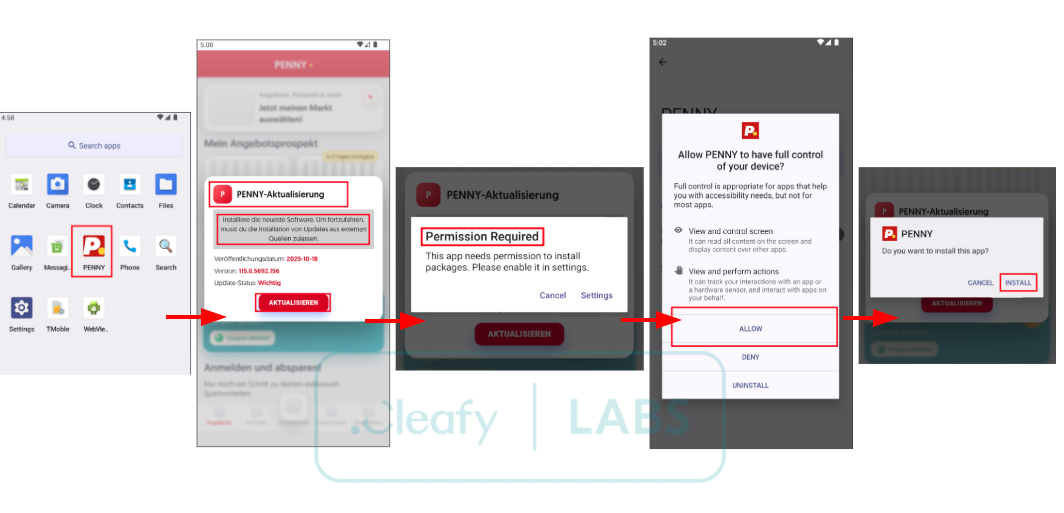
In one campaign aimed at Austrian users, criminals pushed a fake supermarket loyalty app that impersonated a popular discount chain. The landing page looked almost identical to a real Play Store listing, complete with logo and screenshots. Tapping the download button did not install the supermarket app at all, but rather a dropper that quietly fetched and executed the Albiriox payload in the background.
It is easy to imagine how this plays out in everyday life. Younger users may install every trendy cashback or investment app they see in group chats, while older, more cautious users might stick to a small set of banking and shopping apps from brands they already trust. The problem is that even the careful crowd can be targeted with cloned pages and fake update prompts. Once you are persuaded to tap install or grant Accessibility rights, the technical barriers fall quickly.
Why traditional protections are not enough
Google Play Protect and other built-in defenses do block many known malware families, and they remain an important safety net. But tools like Albiriox are explicitly designed to slip through this kind of perimeter security. Criminals constantly tweak the code, change package names, and use droppers so that the final malicious payload is delivered only after the initial app has passed a superficial check.
On-Device Fraud also undermines classic security advice that focuses on credentials. Even if you use long, unique passwords and avoid sharing one-time codes, an attacker who can see and tap on your screen can still initiate transfers, approve them, and even change security settings from inside your account. That is why this generation of Android malware feels more like remote hands on your phone than simple data theft.
Practical steps to protect your Android phone
The good news is that daily habits still make a huge difference. Start with where you get your apps: stick to official stores like Google Play or the manufacturer’s store, and treat unsolicited links in SMS, email, or messaging apps as toxic by default. If a message claims to be from your bank or a well-known supermarket and pushes you to install an app via a direct link, take a step back and search for that app manually in the store instead.
When you do find an app, take a moment to verify the developer name, the number of downloads, and recent reviews. Look out for newly published apps claiming to be from massive brands, or reviews that look copy-pasted. If something feels off, trust that instinct.
Permissions are another big red flag. A simple shopping or loyalty app should not need full Accessibility control, SMS access, or the ability to read your notifications. If an installer aggressively insists on powerful permissions that do not match its stated purpose, back out. Many people, especially those used to installing every new trend, tend to tap allow on autopilot, but slowing down at this step is one of the best defenses against Albiriox-style malware.
For financial and crypto apps, enable multi-factor authentication wherever possible, and prefer app-based or hardware-based authenticators over SMS codes. Even if an attacker manages to get on your device, having multiple independent checks makes large-scale fraud harder to automate.
Finally, keep your Android system, Google Play services, and your banking apps updated. Patches close security gaps that malware authors rely on. Combine that with a reputable mobile security app capable of scanning for known droppers and misconfigured Accessibility services, and you dramatically reduce your risk.
How to spot trouble and react quickly
Even careful users can slip up. If you notice a mysterious new security, optimizer, or investment app that you do not remember installing, treat it as suspicious. Run a full scan with trusted security software and, if anything is flagged, isolate the device from sensitive accounts: disable mobile banking, log out of critical services on other devices, and contact your bank’s support line using a verified number.
You should also regularly review which apps on your phone have Accessibility rights and the ability to draw over other apps. If you see an app you barely use holding those permissions, revoke them immediately. It only takes one overlooked setting to give a tool like Albiriox the access it needs.
Android security: reality check
Some people shrug and say that Android is just full of security issues and that this is business as usual. The truth is more nuanced. Android is a huge, open ecosystem with billions of devices, which naturally makes it a prime target for criminal innovation. At the same time, the platform has gained strong security layers over the years. The weakest point, again and again, is not the operating system but the combination of human curiosity, rushed taps, and carefully crafted lures.
If you limit yourself to official apps from companies you genuinely know, keep your phone updated, and treat unexpected links as suspect, you are already ahead of the vast majority of potential victims. Older, more conservative users who only rely on big-name apps are not being paranoid; they are quietly applying some of the best security hygiene you can have. Albiriox is a serious warning shot, but it is not an automatic death sentence for Android security. With a bit of skepticism and some healthier digital habits, your phone can remain a powerful tool rather than a liability in the hands of cybercrooks.
1 comment
would be nice if banks showed a huge warning when some weird app has accessibility on while you’re doing a transfer