From once a year releases to continuous Android 16 updates
Google is quietly but fundamentally reshaping how Android evolves, and the first big signal is a surprise Android 16 release that does more than bump the version number. For years, Android users have been trained to wait for one big annual system update, followed by a few security patches and the occasional feature drop. Now Google is moving toward a faster, feature-first model where important changes land as soon as they are ready, instead of being held back for a once-a-year rollout.
At the heart of this shift is a reimagined release schedule. Android 16 is not just the next stop on the usual roadmap; it marks what Google calls a new chapter for how Android updates work. The idea is simple but ambitious: decouple core experiences and features from the traditional monolithic system upgrade so that Android can evolve more like the apps and services people already use every day, with frequent, incremental improvements.
Faster rollouts beyond Pixel phones
This new approach also has big implications for how quickly features spread beyond Google’s own phones. Historically, Pixel devices have been the first to benefit from new Android tricks, while owners of Samsung, Xiaomi, OnePlus, and other handsets have had to wait months for full system updates, even when the underlying code was ready. With Android 16, Google plans to push many features through components that can be updated independently, narrowing the gap between Pixels and third-party devices.
The initial rollout still reflects Google’s usual pattern: Android 16 is arriving first on Pixel 6 and newer phones, before expanding to other manufacturers. Each OEM will still choose its own timeline, depending on how heavily it customizes Android, how fast it can test changes, and how much influence mobile carriers have in its markets. Even so, the promise is that once those OEMs ship Android 16 at least once, many future improvements will arrive far more quickly and with less drama.
Notifications get smarter and less noisy
A headline change in this release is a smarter, calmer notification experience. Over the years, Android’s flexibility has turned notifications into both a strength and a source of constant distraction. The new notification organizer aims to fix that by automatically clustering low-priority alerts into a quiet summary instead of letting every promo email, random news alert, and social media ping shout for your attention. You still get the information, but in a way that respects focus and mental space.
On top of that, Google is leaning heavily into artificial intelligence for its notification summaries. Rather than forcing you to scroll through long messages or chaotic group chats, the system can generate concise, readable overviews right in the shade. That makes it easier to quickly see what matters in a flood of updates, decide whether something needs an immediate reply, and avoid opening every single app just to stay caught up. It is a small convenience that could save a lot of time each day.
More personalization and a truly dark Android
Android 16 also doubles down on visual personalization, giving the home screen more character without sacrificing coherence. Users can now pick from five custom icon shapes, making it easier to match the look of their wallpaper, widgets, or overall theme. When themed icons are switched on, the system automatically applies the style consistently across supported apps so that your main screen finally looks less like a patchwork of different design languages and more like a unified interface.
Another quality-of-life improvement comes from a more aggressive take on dark theme. Until now, many Android users have enjoyed dark mode in system menus and popular apps, only to be jolted by the occasional app that insists on a bright white background. Android 16 introduces a broader darkening option that can dim apps even if they do not include their own dedicated dark theme. It is not just a cosmetic tweak; it can reduce eye strain at night and help OLED screens sip a bit less power.
Parental controls grow up in Android 16
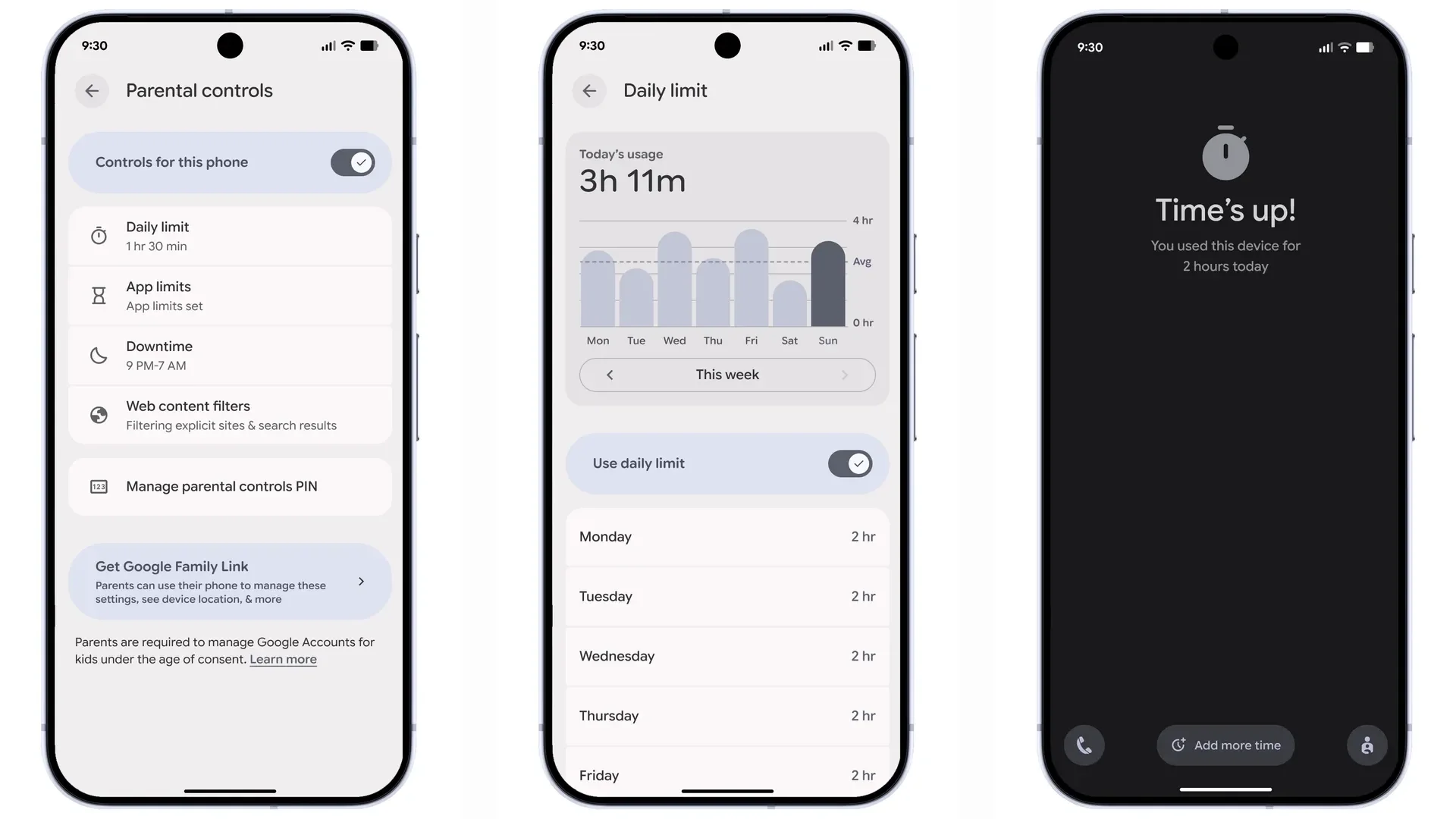
Families get special attention in this release as well. Google is rolling out a dedicated Parental Control area inside Settings, guarded by a PIN so that only adults can change restrictions. From that hub, parents can set overall daily screen time limits, stricter caps for specific apps, and full blocks for software that simply is not appropriate. Downtime schedules let families define tech free windows, like dinner or bedtime, without needing to negotiate every single evening.
When routines go off script, Android 16 tries to stay flexible. Parents can temporarily extend screen time or shorten a scheduled break without tearing down the entire ruleset they carefully created. There is also a tighter integration with Google Family Link, accessible directly from the same menu. That means adults can not only tune limits on the child’s device itself, but also oversee usage and adjust settings remotely from their own phone, turning Android into a more cooperative digital parenting tool.
A new challenge and opportunity for OEMs
As promising as all of this sounds, the new update rhythm will test smartphone manufacturers. Some brands have only just finished pushing their Android 16 builds out the door under the old yearly cadence. Now they face a world where important features might arrive in between those big milestones, and users will expect them to keep pace. For companies juggling custom skins, regional variations, and slow carrier approvals, the risk is an even more fragmented landscape if they cannot adapt quickly.
Yet the long term upside is hard to ignore. If Google succeeds, Android will feel less like a product that ages in year long jumps and more like a living platform that quietly improves every few weeks. With Android 16 as the starting point, users can look forward to smarter notifications, deeper personalization, more robust parental controls, and a faster path from Google’s labs to the phones in their hands, no matter which brand logo sits on the back of the device.
1 comment
love the idea of darkening every app, my eyes are tired of random white screens at night