For years, Google Pixel owners have lived with the At a Glance widget glued to the top of their home screen. For some, it is an essential control center that quietly surfaces the right information at the right time. For others, it is an immovable block that breaks carefully crafted home screen layouts. 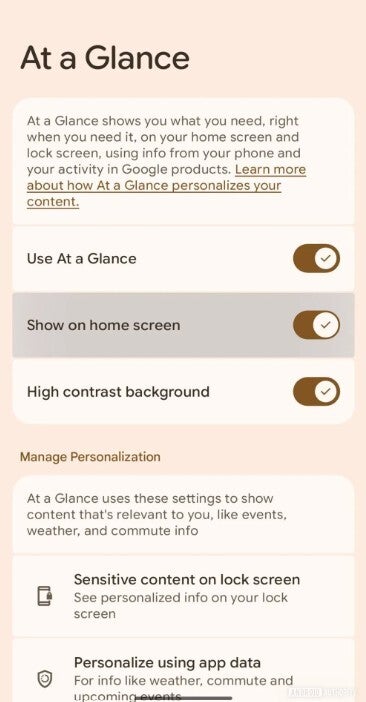
Now, buried inside a recent Android System Intelligence Canary build, Google is finally testing something Pixel fans have been requesting for ages: a simple toggle that can remove At a Glance from the home screen entirely.
At a Glance was originally designed as a sort of ambient assistant for Pixel phones. Instead of forcing you to open apps, it slides key snippets of information directly onto the lock screen and home screen. In a single glance you can see the current weather, an incoming calendar event, the status of your morning commute, or whether the next meeting is about to start. The widget can pop up severe weather alerts, earthquake warnings, and other time-sensitive notifications that actually matter, not just random app pings.
Over time, Google has expanded At a Glance into a surprisingly powerful hub. It can highlight air quality, show upcoming flights and boarding passes, remind you of package deliveries on the way, and surface food or grocery orders that are being prepared. When you are on the move, it can estimate travel time, show rideshare details, and nudge you when it is time to leave. At night it can tie into bedtime and fitness information, and during the day it can monitor timers, stopwatches, and safety check features. It even pulls in connected device status, like whether your earbuds are running low on battery.
Some of its tricks are charmingly practical. At a Glance can show snapshots from your smart doorbell, so you see who is at the door without opening a dedicated app. It can tell you whether your phone’s flashlight is on and offers a quick shortcut to turn it off, saving you from a mysteriously dying battery. It can mirror time information from other devices around your home, handy if you live across multiple time zones or travel frequently. All of this is woven into a narrow banner at the top of your Pixel screen.
The downside is that not everyone wants that banner. Many Pixel owners love ultra-clean setups with just a clock, a weather icon, and a row of carefully chosen apps. Others are fine with At a Glance in principle but wish they had much tighter control over what appears and when. One common sentiment from users is basically: they like the idea, but they get frustrated when the widget surfaces things that are irrelevant in the moment or pushes down the rest of the layout. Granular control has been a long-standing request.
That is where the new toggle comes in. In the latest Android Canary build with Android System Intelligence version B.17.playstore.pixel10.825046611, Android Authority spotted a fresh option hidden in the At a Glance settings. The control is labeled ‘Show on home screen’. Flip it off, and At a Glance should be removed from the home screen completely, instead of just being partially disabled. While the feature is not live for regular users yet and Google has not announced a rollout timeline, its presence in testing strongly suggests the company is preparing to hand more power back to Pixel owners.
Today, there is already a basic way to rein in At a Glance, but it is limited. If you long-press an empty space on your Pixel home screen, you will see a small menu with options like ‘Wallpapers & style’ and other customization entries. From there, you can dive into the At a Glance settings and toggle off specific types of information such as weather details, commute info, or events. You can even disable the main At a Glance option, but it still leaves behind a minimal strip showing only the date and time, so the widget never truly disappears.
Inside those settings you will find a long list of sources that can be turned on or off. Weather and air quality, severe weather alerts, earthquake warnings, upcoming events and work profile details are all configurable. You can decide whether you want to see food deliveries, household orders, and package tracking, or whether that clutter belongs inside individual apps. Commute traffic, travel times, ridesharing updates, flight and train information, bedtime reminders, fitness data, timers, and stopwatches can all be tuned. Even the status of connected devices, cross-device time information, doorbell snapshots, and flashlight status can be individually allowed or disabled.
For information junkies, this level of detail is fantastic: At a Glance becomes a personal dashboard that saves time throughout the day. But for minimalists, even a carefully customized widget still feels like an intrusive resident on the home screen. That is why a true on/off switch matters. A clean toggle such as ‘Show on home screen’ respects both camps. If you love At a Glance, leave it on and keep tweaking its content. If you do not, turn it off and reclaim a perfectly symmetrical grid of icons and widgets.
The user feedback behind this shift is easy to understand. Many people say they like At a Glance overall, but wish they had better control over what shows there and when it appears. Some want the widget visible only during work hours, or only when using certain focus modes. Others would be happy if it appeared on the lock screen but not on the home screen. The new toggle is a small but important step toward that vision of deeper, more flexible control over the Pixel experience.
For now, the toggle remains an experimental feature hiding in a Canary build, and as with all tests, there is no absolute guarantee it will reach stable releases in exactly its current form. Still, the direction is clear: Google is listening to customization-focused Pixel owners who want the ability to make At a Glance either a powerful assistant or a polite guest that can be asked to leave. If and when the option lands on regular Pixel phones, it will mark one more step toward a home screen that belongs fully to the user, whether they crave rich, contextual data or blissful simplicity.
1 comment
minimalist home screen gang here, I just want a clean wallpaper and a few icons, no extra widgets yelling about my commute at 11pm 🤦