Apple is getting ready to ship the stable iOS 26.2 update, and tucked between the usual bug fixes and tiny interface tweaks is a small switch that could have a big impact on how you notice notifications. The new Flash for Alerts option can make your entire iPhone display briefly flare up when something important comes in, acting like a modern version of the old notification LEDs many Android fans still miss. 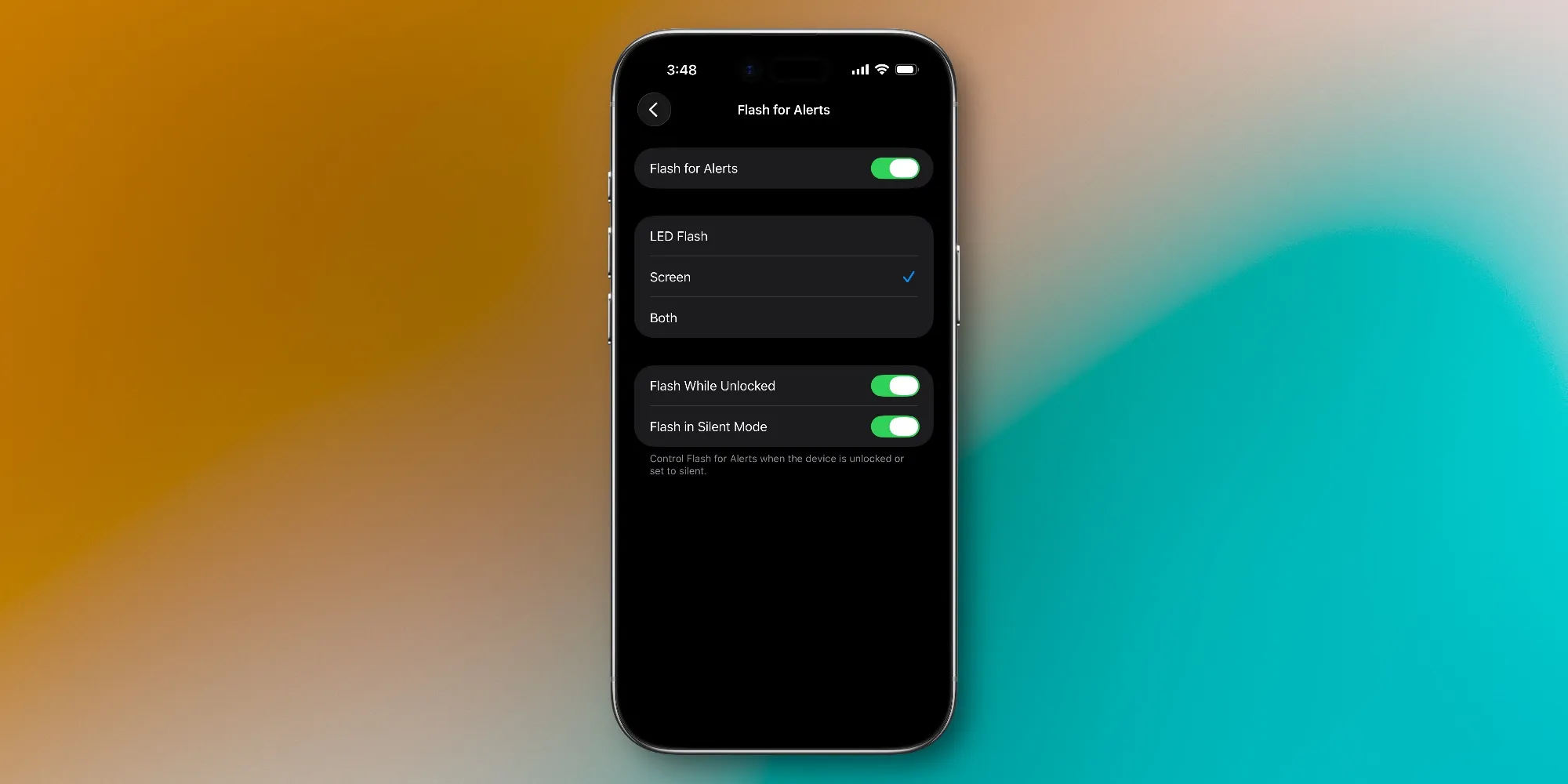
It is not a headline feature, but it quietly addresses a very real problem in the age of silent modes and overloaded lock screens.
Until now, iOS has offered an accessibility option that makes the rear camera LED blink for alerts, mainly aimed at people who are hard of hearing. In iOS 26.2, Apple is expanding that idea. You can still use the LED, but you can also ask the screen itself to flash at maximum brightness, or combine both for maximum visibility. If your iPhone is lying face up on a table or across the room, that sudden burst of light is almost impossible to ignore.
Finding the setting is not immediately obvious, because it lives deep in the Accessibility area rather than under Notifications. To enable Flash for Alerts in iOS 26.2, you need to follow a short path through the Settings app. Once you get there, the options are surprisingly flexible for something so hidden away.
How to enable Flash for Alerts in iOS 26.2
- Open the Settings app on your iPhone.
- Scroll down and tap Accessibility.
- Go to the Audio and Visual section.
- Tap Flash for Alerts.
- Toggle Flash for Alerts on, then choose LED Flash, Screen, or both.
From that moment on, every time a supported notification arrives, your iPhone will briefly crank the display up to full brightness, then smoothly drop back to your normal level. It is a short, sharp signal rather than a constant spotlight, but in a dark room you will definitely notice it. If you use both the LED and screen flash, your phone can feel like a tiny emergency beacon for calls, messages, and alarms you really cannot afford to miss.
A subtle but important accessibility upgrade
This feature is especially valuable for users who are hard of hearing, for whom visual cues are not just nice to have but critical. A quick, bright flash on the screen can be easier to see than a small LED buried next to the camera module, especially on a desk or bedside table. Flash for Alerts also helps in loud environments where even the strongest vibration can be drowned out by background noise, like busy offices, workshops, or crowded cafes.
There are trade offs, of course. A flash that pushes the display to maximum brightness will consume a little more battery than a regular notification, and if your phone is on your nightstand, the sudden light might wake up more than one person. That is why it is useful that Apple lets you decide whether to rely on the LED, the screen, or both, so you can balance visibility with discretion. For many people, the ideal setup will be screen flash only during the day and LED only at night.
More small but useful features in iOS 26.2
Flash for Alerts is only one piece of the iOS 26.2 puzzle. The update also adds new Urgent alarms for Reminders, letting time sensitive tasks cut through your usual notification noise. Apple Podcasts gains AI generated chapters that automatically split long shows into sections, which makes it easier to jump straight to the segment you care about. Apple Music gets offline lyrics so you can still follow along even when streaming is not an option, and Apple News receives a cleaner navigation layout.
On the visual side, Apple is also quietly responding to criticism of its bold Liquid Glass lock screen look introduced with iOS 26. A new slider lets you tweak the Liquid Glass intensity so the effect can be dialled down if you find it too glossy. Interestingly, the design direction is already echoing across the Android world. Samsung is rumored to be working on Galaxy S26 with One UI 8.5 that nods toward the same fluid style, while Vivo OriginOS 6 and Realme UI 7.0 on the Realme GT 8 Pro also lean into soft, flowing surfaces that feel like cousins of iOS 26 rather than distant rivals.
Remember when phones had tiny notification LEDs
For longtime Android users, the whole idea of a dedicated visual alert for notifications feels familiar. Many classic phones had a small LED that would blink in different colors depending on the type of alert. It was subtle, power efficient, and easy to spot without lighting up half the room. Apple never truly embraced that hardware approach on the iPhone, but with Flash for Alerts in iOS 26.2, it is essentially turning the entire display into a much bigger and more dramatic notification light.
Whether that is an improvement or a step backward depends on how you use your phone. Some people will love the visibility and the ability to pair it with vibration and sound. Others will find it intrusive and immediately turn it off. In an ideal world, Apple would offer even more granular control, such as separate flash profiles for different apps or a gentler pulse effect that does not always hit full brightness.
Cool features versus core performance
As always, not everyone is impressed by Apple prioritizing new tricks over deep system fixes. Some iPhone owners still complain about lag when swiping between screens, aggressive RAM management that kicks apps out of memory, and full reloads that burn extra battery just to reopen something you used a few minutes ago. From that perspective, a flashy new notification effect can feel like decoration on a house that still needs structural work underneath.
The reality is that both layers matter. Accessibility options like Flash for Alerts can genuinely improve how certain people use their iPhones every day, and for others they are handy extras that might prevent a missed call or deadline. At the same time, Apple has to keep refining performance, multitasking, and battery efficiency so these features do not add to the feeling of bloat. iOS 26.2 is not a dramatic reinvention of the platform, but it continues the slow evolution of iOS into a system that is more customizable, more expressive, and, hopefully, more reliable. Just remember to dive into the settings menu after you update, because some of the most useful changes are still hiding a few taps below the surface.