ChatGPT Is Joining Your Group Chats: How OpenAI’s New Feature Could Change Everyday Conversations
Group chats have become the modern living room: it’s where families organize weekends, friends plan trips, and teams brainstorm projects. Until now, AI assistants usually lived in separate apps or one-on-one conversations. OpenAI is changing that by bringing ChatGPT directly into shared group chats, turning your usual threads into smart, collaborative spaces where humans and AI talk side by side.
The company is testing a new group AI experience that lets you, your friends, family, or colleagues share a single conversation with ChatGPT right inside it. Instead of copying and pasting ideas into a separate chat with an AI, you can now keep everything in one place – jokes, arguments, planning, and AI-powered research all flowing together in real time.
How ChatGPT Group Chats Work
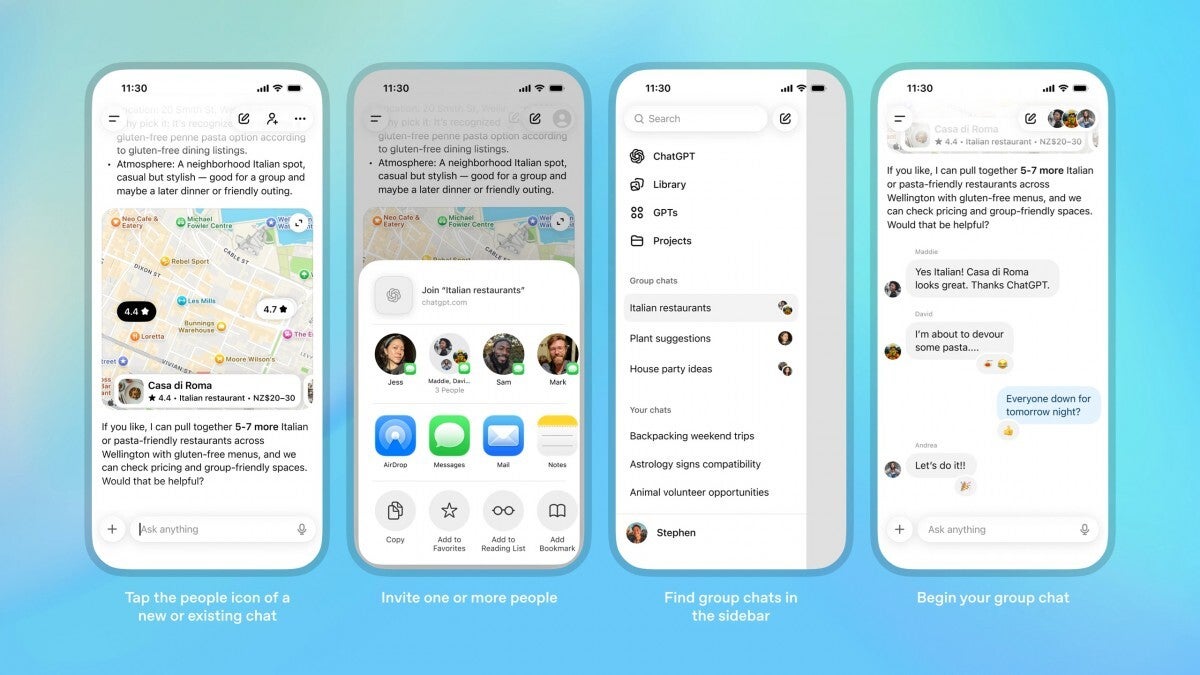
Starting a group chat with ChatGPT is designed to feel familiar. In a new or existing ChatGPT conversation, you tap the people icon in the top-right corner. From there, you can invite others to join. Once someone accepts your invitation, ChatGPT spins up a copy of that conversation as a brand-new group chat. The original one-to-one chat stays separate, so you don’t lose your previous private history.
You can invite up to 20 people by sharing a link. That link can be passed around by anyone in the group, meaning new participants can be added quickly without you manually inviting each person. To take part, everyone sets up a simple profile with a name, username, and photo, making the chat feel more like a social space than a faceless AI thread.
Once the group is created, it appears in the sidebar alongside your other ChatGPT conversations. All members can see who’s in the group, who has left, and, importantly, members can remove others from the chat if needed – except the original creator, who can’t be kicked out. This mirrors many messaging apps’ group controls and helps maintain a sense of ownership and safety.
Powered by ChatGPT 5.1 Auto Behind the Scenes
The brains of this new experience run on ChatGPT 5.1 Auto, which automatically decides which underlying model to use based on your prompt and your subscription plan. Whether you’re on Free, Go, Plus, or Pro, the system picks an appropriate model under the hood without you needing to think about it.
Rate limits still apply, but in a very specific way: they only apply when ChatGPT responds, not when humans are chatting with each other. Every AI response counts against the quota of the person whose prompt it is effectively answering. So if you’re the one constantly asking the bot to generate itineraries, summarize long threads, or draft emails, those AI messages will count toward your personal limit, not the group’s.
New “Social Skills” for the AI
The big question with any AI in a group setting is obvious: when should it talk, and to whom? OpenAI says it has trained ChatGPT with new social behaviors specifically for group chats so the bot doesn’t hijack the conversation or answer things no one asked.
In theory, ChatGPT will follow the flow of the discussion and decide whether to respond or remain silent based on context. It’s meant to behave more like that one helpful teammate who jumps in when needed, not the person who responds to every single message. If you explicitly mention ChatGPT by name in your message or direct a question at it, it should reply. Otherwise, it will try to infer from the conversation when its input is genuinely useful.
To make the experience more fun and natural, ChatGPT can react with emojis and even reference participants’ profile photos when relevant. That means you might see the bot drop a laughing emoji after a joke or refer visually to someone’s avatar when clarifying who suggested what. This small layer of personality could make AI in chat feel less robotic and more like a quirky digital participant.
On top of that, you can set custom instructions for ChatGPT in each group chat. Want it to act like a detail-obsessed project manager? A chill travel planner? A strict proofreader? You can fine-tune how it should respond for every group you create, tailoring the AI’s “role” to each context.
Privacy, Memory, and Safety in Group Chats
Any time AI shows up in a shared space, privacy concerns aren’t far behind. OpenAI emphasizes that your personal ChatGPT memory is not used in group chats, and the bot will not create new memories from group conversations either. That means your long-term, personalized AI profile won’t suddenly be influenced by what happens in group spaces.
This separation is important: if you’ve trained ChatGPT over time to remember your preferences, projects, or personal context, those details don’t automatically spill into group chats, and group chat content doesn’t secretly feed your personal memory. OpenAI also says it is working on more granular controls so that, in future updates, you might be able to decide if and how ChatGPT can use memory in these group contexts.
Safety for younger users is being handled at the group level. If anyone in the chat is under 18, ChatGPT will reduce exposure to sensitive content for the entire group. Instead of trying to filter messages for only one person, the bot simply shifts into a more cautious mode overall, aiming to keep the conversation age-appropriate for everyone.
Who Can Use ChatGPT Group Chats and Where?
Group chats are rolling out for all logged-in ChatGPT users across tiers – Free, Go, Plus, and Pro – so you don’t need a premium subscription just to try the feature. However, availability is being staged by region. The initial rollout is happening in Japan, Taiwan, New Zealand, and South Korea, with more countries expected to follow as OpenAI gathers feedback, fixes rough edges, and refines the experience.
This phased release strategy suggests that OpenAI is treating group chats as a living experiment. User feedback about how often the AI should speak up, how it handles fast-moving conversations, and how useful people find it in real scenarios will likely shape how the feature evolves over time.
Why Having ChatGPT in a Group Chat Might Be Surprisingly Fun
On paper, the feature sounds like a productivity tool, but there’s also something oddly fun and even a bit surreal about having an AI in your friend group’s chat. Imagine a thread where people are roasting each other, dropping memes, and then ChatGPT suddenly chimes in with the perfect reaction emoji or a witty one-liner. The blend of human chaos and AI structure could make group chats feel fresh again.
Beyond the novelty, there are very practical benefits. For group projects, ChatGPT can summarize long discussions, highlight key decisions, and turn a messy brainstorm into a clean action list. For trip planning, it can compare destinations, suggest itineraries that balance everyone’s preferences, and handle the boring research – best flight options, hotel filters, visa requirements – while the humans argue over dates and budgets.
You could use it to draft shared documents, generate ideas for events, plan study sessions, or even role-play scenarios for games and creative writing. Instead of one person always being the planner or note-taker, the AI can take over much of the routine work, freeing the group to focus on the fun parts.
A Glimpse of the Future of Chat
ChatGPT in group chats is more than just a new toggle in a settings menu. It hints at a future where AI isn’t a separate tool you consult occasionally but a constant presence embedded in the conversations and platforms you already use. If OpenAI gets the social dynamics right – helpful without being annoying, smart without being creepy – this experiment could reshape how we think about both messaging apps and AI assistants.
For now, the idea of an AI laughing at your jokes and helping organize your life inside the same chat might feel a bit weird. But give it a few trips planned, a few group projects rescued from chaos, and a few perfectly timed emojis, and that “weird” might quickly start to feel normal.
1 comment
pls tell me there’s a setting to make it only talk when tagged, I don’t need a robot replying to my memes 🤦