Google may have stopped sending regular monthly updates to the Pixel 6 and Pixel 7 families, but that does not mean these phones are done receiving new features. The company is quietly extending their life through the Android 16 Quarterly Platform Release (QPR) program, and the latest stop on that road is Android 16 QPR2 Beta 3.3. If you are willing to live on the beta channel, your Pixel 6 or Pixel 7 can still enjoy fresh features, bug fixes, and security improvements long after the standard support schedule has started to wind down.
Android QPR builds are essentially the technical backbone of what Google markets as the Pixel Feature Drops. 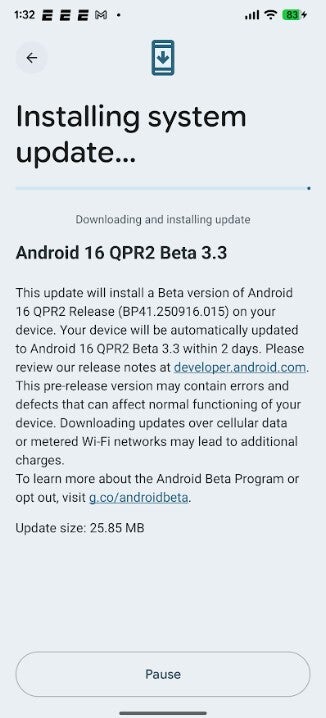
Instead of waiting for a big stable package at the end of the quarter, Beta testers get an early look at what is coming next, complete with incremental fixes along the way. That is exactly what QPR2 Beta 3.3 delivers: a mid-cycle update that keeps the October security patch in place while crushing a particularly nasty lock screen bug that has been freezing some Pixel phones at the worst possible moment.
The big headline is that QPR2 Beta 3.3 is available for a huge list of devices. On the older side, the Pixel 6, Pixel 6 Pro, and Pixel 6a are supported, which is particularly good news for owners worried their phones were being left behind. The Pixel 7 and Pixel 7 Pro, as well as the mid-range Pixel 7a, are also included. Foldable and tablet fans are not ignored either: the Pixel Fold and Pixel Tablet are on the list, giving larger-screen users a chance to test Android 16 tweaks early. Naturally, all of the newer phone lines are present too: Pixel 8, Pixel 8 Pro, Pixel 8a, the full Pixel 9 family (Pixel 9, Pixel 9 Pro, Pixel 9 Pro XL, Pixel 9 Pro Fold, and Pixel 9a), and the latest generation headliners, Pixel 10, Pixel 10 Pro, Pixel 10 Pro XL, and Pixel 10 Pro Fold.
Under the hood, there are a couple of important technical details. The Pixel 6 series receives build number BP41.250916.015, while the Pixel 7 series and all later models get BP41.250916.015.A1. Both builds carry the October security patch, so you are not jumping to some experimental security baseline by enrolling in this beta. The star fix in this release is a lock screen bug (filed as Issue 457527675) that could cause a Pixel to freeze and stop responding. For a device you rely on for payments, boarding passes, and two-factor authentication codes, a frozen lock screen is more than an annoyance, so this fix alone makes Beta 3.3 worth considering for affected users.
Installing the update itself is straightforward once your phone is enrolled. After joining the Android 16 QPR2 Beta program, you simply head to Settings > System > Software update > System update on your Pixel. The QPR2 Beta 3.3 package should appear like a normal over-the-air update. Download it, wait for the verification step, and then reboot when prompted. The process feels almost identical to a regular monthly patch, which means even non-technical users can usually handle it without trouble.
The more interesting part is getting into the Beta program in the first place. Google manages this through the Android Beta Program website. From a browser, you sign in with the same Google account that is set on your Pixel. Once you are logged in, the site will show a section highlighting your eligible devices. Tapping the relevant Pixel places it on the beta track, and after a short delay, the QPR update is pushed to your phone over the air. There is no need to flash images manually, no cables, and no command line; the whole process is designed to feel as user-friendly as possible for an early access channel.
For those already enrolled in the Android 16 QPR2 Beta, there is nothing else you need to do. As long as you have not opted out, your device will automatically receive QPR2 Beta 3 and any subsequent beta builds in this cycle, including the 3.3 point release. The stable version of Android 16 QPR2 is expected to land either later this month or, more realistically, next month. Once the stable build arrives, you will have a choice: you can jump off the beta train, or you can ride it straight into the next cycle of Feature Drops.
Crucially, Google has made it easier to leave the program once the stable QPR is out. After your phone has updated to the stable Android 16 QPR2 release, you can visit the Beta Program website again and opt out. At that stage, Google allows you to exit without wiping the device, so you keep your apps, photos, and conversations. If you prefer the cutting edge, you can stay enrolled and roll directly into testing the next big Pixel Feature Drop, scheduled for March 2026. That means your Pixel 6 or Pixel 7 could still be seeing new tricks and refinements years after launch, even as newer models take center stage.
Whether you should join the beta depends on how you use your Pixel. If your phone is mission-critical for work and travel, even a small chance of bugs may be too much risk, no matter how tempting new features are. On the other hand, if you enjoy exploring upcoming Android changes, have a backup device, or simply want to squeeze every last bit of value from your Pixel 6 or Pixel 7, QPR2 Beta 3.3 strikes a good balance. It delivers practical fixes like the lock screen freeze solution and keeps your device on a current security patch, while previewing features destined for the wider Pixel audience in the next Feature Drop.
One small but relevant side note for frequent travelers: many recent Pixels, including the 6, 7, 8, 9, and 10 series, work beautifully with eSIM services. Paired with a global data eSIM provider offering discounted roaming packs, your updated Pixel can pull double duty as both your main smartphone and your travel companion. While the Nomad eSIM promotion that often appears alongside update news is a separate offer, it underlines a bigger point: even as software support gradually shifts into QPRs and betas, the hardware you already own can still feel modern and flexible when you combine Android 16 refinements with smart connectivity options.
3 comments
Reading this on my Pixel Fold while it updates, feels good to be on the nerd train again
Still waiting for some big new features, so far it feels more like bugfix city but at least the phone is more stable
If you only have one phone do NOT do this, learned that the hard way last year 😭