Apple pauses iOS 26.2 beta 1 for select iPhones and iPads: what happened, what changed, and what to do now
Apple kicked off the week with the public release of iOS 26.1 and, almost on cue, opened the gates to the first developer build of iOS 26.2. Within hours, however, early adopters on specific hardware began reporting something odd: the update appeared in Settings, downloaded as usual, and then refused to install. The common thread was a C1 modem inside the device. That pattern has sparked a strong consensus among testers that Apple has paused, or at least quietly restricted, iOS 26.2 beta 1 for a subset of models until a fix is ready.
Which devices are affected?
Reports point to three headline products that ship with the C1 cellular modem: the iPhone Air, the mid-range iPhone 16e, and Apple’s M5-powered iPad Pro. Owners of these devices can often still see the iOS 26.2 (or iPadOS 26.2) developer beta listed as available. The snag arrives during installation, where the process fails and rolls back. That visible-but-not-installable state is consistent with Apple temporarily disabling an OTA for specific hardware identifiers while leaving catalog entries in place.
Why would Apple pull a beta selectively?
When a beta fails only on devices with a particular modem, the safe assumption is that the issue lives somewhere in the radio stack – modem firmware, carrier profiles, or interactions with features like eSIM activation, emergency calling, or network registration. Any glitch affecting cellular reliability is a hard stop for a beta rollout. Beta testers accept crashes, visual quirks, and the occasional app misbehavior; what they cannot accept is a phone that drops calls or a tablet that cannot find a network. Apple’s triage here suggests a preventative move while engineers validate a corrected build.
There is another reason to be careful: certification and compliance. Modem-level changes often pass through carrier testing pipelines. If a regression threatens that process, even a developer-only beta can be paused. The fact that users still see the update but cannot install it aligns with a server-side block keyed to the affected hardware.
What’s actually new in iOS 26.2?
Despite the minor version bump, iOS 26.2 is more than a housekeeping patch. It continues Apple’s iOS 26 design refresh by deepening personalization and trimming friction across default apps.
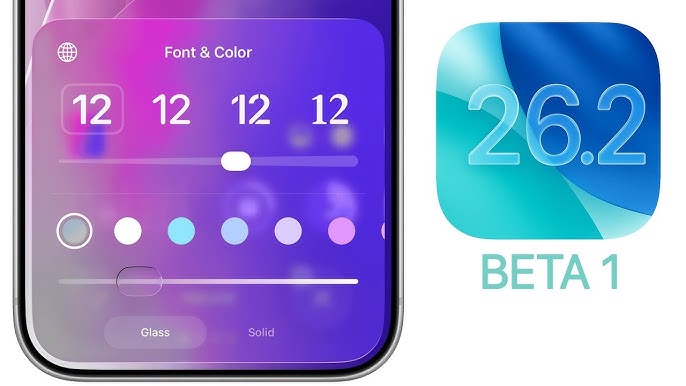
- Liquid Glass refinements: The new design language introduced in iOS 26 gets a meaningful tweak: a transparency slider for the Lock Screen clock. Rather than picking from a couple of presets, you can dial in the exact translucency you want, balancing legibility with aesthetic flair.
- Apple Podcasts auto-chapters: Long episodes become easier to navigate thanks to automatic chapter detection. It’s a small change with a big usability payoff for education, news, and multi-segment shows.
- A cleaner Apple News: The app gets a more streamlined layout to surface headlines faster and reduce visual clutter, making quick catch-ups feel less like digging and more like glancing.
- Reminders + Alarms, finally: Reminders can now trigger alongside system alarms. If you set a reminder for an important task, you can pair it with a wake-time alert so it rings exactly when you’re most likely to notice. It’s a thoughtful bridge between to-do lists and time-based nudges.
These are quality-of-life upgrades, not flashy headline features – and that’s the point. Iteration updates like 26.2 harden the foundation laid by a major release, smoothing edges that daily users feel more than they see.
Installation failure on C1 devices: what you can expect
Apple has not publicly detailed the specific cause or acknowledged the selective pause for C1-equipped hardware. However, Apple’s typical cadence suggests a quick turnaround: diagnose, patch, seed a follow-up beta, and only then re-enable installs for the blocked hardware set. In practice, that often looks like a fresh beta build landing within a short window and the installation flow quietly succeeding again on previously affected devices.
Until then, if you own an iPhone Air, iPhone 16e, or M5 iPad Pro, you may see iOS 26.2 beta 1 taunting you in Settings. Don’t attempt workarounds or sideload IPSW images you find floating around – if the OTA is blocked, there is usually a good reason, and local hacks rarely outsmart server-side gating. The safer play is to remain on iOS 26.1 (or your current stable beta) and wait for the next developer seed.
Opinion: the cautious call is the correct call
Is it frustrating to miss out on new toys for a week or two? Absolutely. But if the choice is between immediate access to granular Liquid Glass controls and the risk of unstable cellular, the latter is a deal-breaker. Apple’s decision protects both testers and carriers, and it ultimately accelerates a stable release for everyone. Features like Podcasts chapters or Reminders-with-Alarms are welcome, but they are not worth jeopardizing the basics – calls, data, and emergency services.
Practical tips for beta testers
- Back up first: Always keep a recent encrypted backup before joining a new beta. If something goes wrong, you can restore without data drama.
- Use a secondary device: If your livelihood depends on your phone, consider testing on a spare. Betas are fun until they break mission-critical habits.
- Watch the release notes: When the next iOS 26.2 beta drops, skim the known issues and modem notes. If Apple mentions carrier fixes or network reliability, you’ll know this incident prompted meaningful work.
- Don’t force it: Avoid third-party profiles or sketchy IPAs promising “unblocked” installs. Server-side restrictions exist to protect you (and your modem).
Will iOS 26.2 change again before it ships?
Almost certainly. Early betas shape the final product; Apple tunes features, adjusts UI polish, and resolves performance regressions on the way to a public release. Expect the transparency slider to get more thoughtful defaults, Podcasts chapters to improve on complex shows, and Reminders’ alarm pairing to gain small conveniences based on feedback from testers.
The bottom line
iOS 26.2 is a quietly ambitious follow-up to iOS 26, focused on control, clarity, and daily usefulness. A selective pause for C1-modem devices – impacting iPhone Air, iPhone 16e, and the M5 iPad Pro – indicates Apple found a network-level snag and acted quickly to contain it. If you are on one of those devices, hold off and let the next beta arrive. For everyone else in the developer program, 26.2 already looks like a smart, practical step forward – one that will feel invisible until the moment you realize your morning alarm and your most important reminder chimed together, exactly when you needed them.
2 comments
Anyone else getting the download loop on the M5 iPad Pro? same here
If it blocks emergency calling even once, pull it fast. Good call