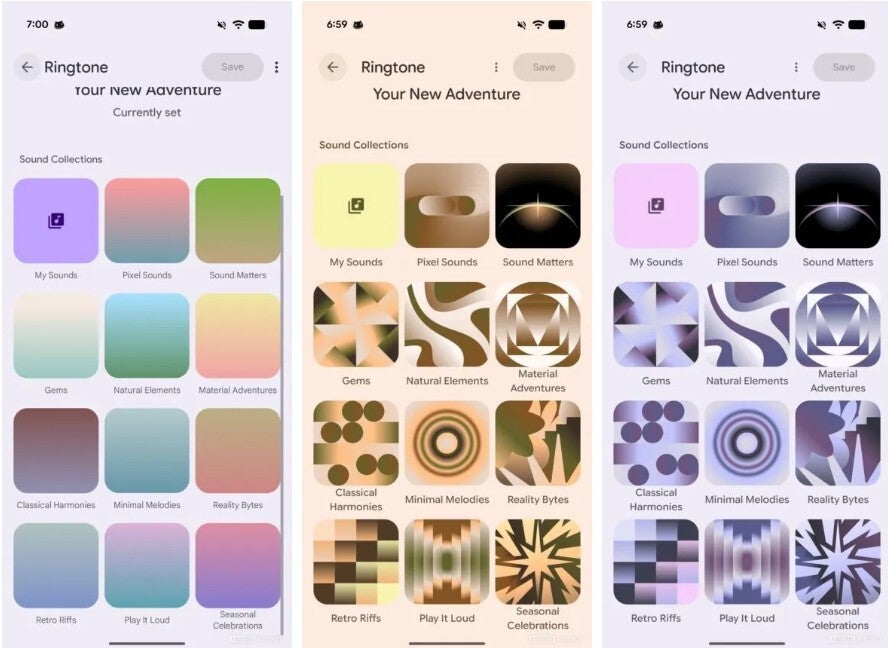
Pixel Sounds v3.3: New UI, wildlife ringtones, and smarter sound controls
Google is quietly giving Pixel owners a richer soundboard. The built-in Sounds app – exclusive to Pixel phones and not distributed through the Play Store – now offers a refreshed interface, dynamic colors that match your wallpaper, and a nature-inspired pack of ringtones, alarms, and notification tones. Whether you want a crisp new ring for calls or a softer nudge for alerts, this update makes finding and personalizing those sounds far easier.
Where to find the Pixel Sounds app
You won’t see a launcher icon. Instead, open Settings > Sound & vibration. Under Sound patterns, choose what you want to tweak: Ringtone, Notification sound, or Alarm sound. Tapping any of these opens the catalog. You’ll notice multiple collections (including the familiar Pixel Sounds) arranged as headings; open one to preview and pick a tone. When you’ve settled on a favorite, hit Done in the upper right to lock it in.
While you’re on the Sound & vibration page, you can fine-tune volumes independently for Media, Calls, Ring & Notifications, and Alarms. You can also set vibration intensity for calls, notifications, and alarms – handy if you want a strong buzz for calls but a gentler tap for everything else.
Don’t forget “Now Playing”
Pixel’s beloved Now Playing lives here too. When enabled, your lock screen identifies music playing around you, even offline, and you can browse a tidy history of matches right from Sound & vibration controls. It’s great for rediscovering that café track you forgot to Shazam.
What’s new in Sounds v3.3
The headline change is a new look. The app now adopts your phone’s main color theme – pulled from your wallpaper – so buttons, highlights, and category tiles blend with your current style. It feels unmistakably Pixel, consistent with Material You’s dynamic color approach.
The update also ships a serene set of tones recorded in the wilds of Hokkaido, Japan. They’re arranged by category so you can craft a cohesive audio profile across calls, alarms, and notifications.
New alarm tones
- Brown-Eared Bulbuls in Wild Hokkaido
- Cicadas Scree in Wild Hokkaido
- Cuckoo Hoots in Wild Hokkaido
- Dawn Chorus in Wild Hokkaido
- Frog Chorus in Wild Hokkaido
- Wren Trills in Wild Hokkaido
New notification sounds
- Black-Faced Bunting in Wild Hokkaido
- Frog Croak in Wild Hokkaido
- Japanese Bush Warbler in Wild Hokkaido
- White-Backed Woodpecker in Wild Hokkaido
- Woodpecker Drum in Wild Hokkaido
- Yezo Deer in Wild Hokkaido
New ringtones
- Cicadas Scree in Wild Hokkaido
- Cuckoos Whistle in Wild Hokkaido
- Frog Chorus in Wild Hokkaido
- Japanese Bush Warbler in Wild Hokkaido
- Japanese Thrush in Wild Hokkaido
- Sakhalin Leaf Warbler in Wild Hokkaido
These recordings skew organic and calming. Choose them if you want a ring that cuts through without sounding harsh, or an alarm that wakes you gently rather than jolting you upright.
How to check your version
If you’re wondering which Sounds release you have, go to Settings > Apps > All apps, scroll to Sounds, and open the App info page. The version number is listed at the bottom. For example, a Pixel 6 Pro on Android 16 QPR2 Beta 3.2 may still show version 3.1, which means the refreshed UI and the full Hokkaido pack might not be present yet. As usual, features can roll out in stages and may appear after a system or component update.
Pro tips for personalization
- Preview at real volume: After picking a tone, nudge the relevant volume slider to hear how it behaves in the wild.
- Match your vibe: Let the dynamic color theme and the wildlife tones create a cohesive feel – soft tones with pastel themes, brighter chimes with bold wallpapers.
- Per-contact flavor: For critical callers, assign distinct ringtones from the Contacts app so you can identify them by ear from across the room.
- Alarm hygiene: Pair a gentle Hokkaido alarm with stronger vibration so you wake smoothly but still reliably.
Troubleshooting & availability
If you don’t see the collections mentioned above, make sure you’re using a Google Pixel (the Sounds app is Pixel-only) and that your device is fully updated. Because the app ships as a system component, updates often arrive with system updates or Google Play system components rather than through the Play Store.
Bottom line: Pixel Sounds v3.3 is a thoughtful refresh. The interface feels more personal, and the new wildlife set adds texture and warmth to everyday alerts – proof that small design flourishes can make a phone feel brand new.
1 comment
now playing history is underrated, saved me twice this week