Samsung One UI 8.5 Priority Notifications: What’s New and Why It Matters
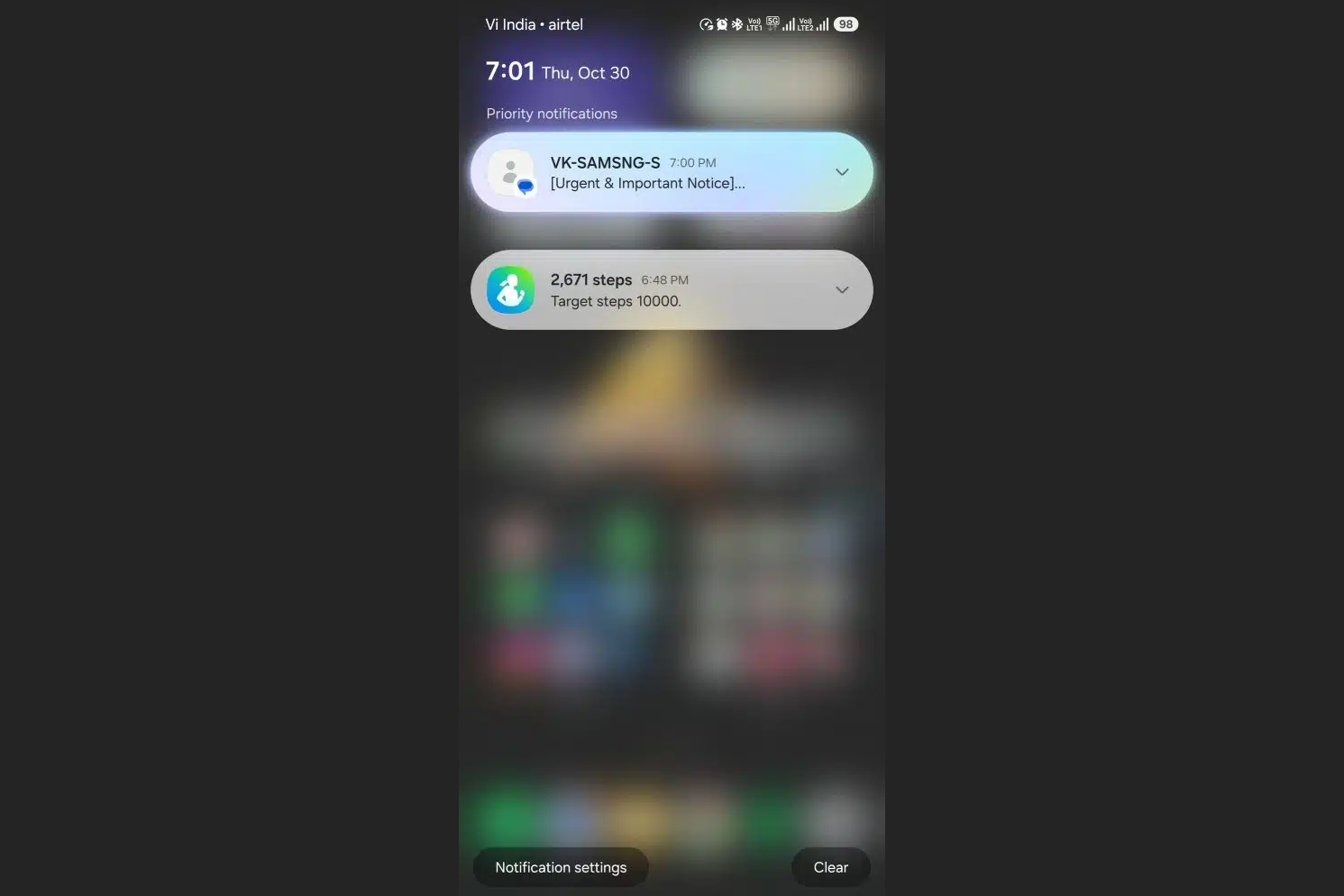
Samsung is preparing a fresh attack on notification overload, and this time the evidence looks tangible. A newer leaked build of One UI 8.5 finally shows the long-rumored Priority notifications system functioning as intended. Instead of leaving you to sort through a chaotic stream of pings, One UI 8.5 applies on-device intelligence to lift the most relevant alerts to the very top of your shade. Visually, these cards stand out with a soft glow and a Galaxy AI-inspired gradient, forming a neat stack that waits where your attention naturally lands first.
Under the hood, Samsung’s description is straightforward: the phone identifies notifications that “may be important” and pins them above the rest so you won’t miss them. Crucially, all of this classification is processed locally on your device, which means your messages and app alerts aren’t shipped off to a remote server for analysis. For privacy-conscious users, that local approach matters just as much as the convenience.
Control is another pillar of the design. You’re not locked into a black-box system that guesses in secret. Instead, One UI 8.5 lets you specify which apps are even eligible for prioritization. If you prefer Messages, banking, ride-hailing, and work chat to get VIP treatment while games and shopping apps stay quiet, you can draw that line up front. The end result is a hybrid approach: Samsung’s AI proposes what’s likely to be urgent, but you still set the boundaries and veto the categories that should never jump the queue.
Why is this a big deal? Because the modern notification feed isn’t just noisy – it’s unpredictable. Important alerts get buried under limited-time sales, promotional nudges, and automated status updates. Most of us have a story about missing a friend’s “I’m here” message because it was drowned by three game trophies and a shipping reminder. Priority notifications try to reverse that dynamic by elevating signals rather than merely hiding noise.
Samsung isn’t first to the concept, but it’s putting its own spin on it. Google’s Pixel line has supported Priority conversations that let you manually mark people as always-important, while Apple’s iOS approaches the problem from the opposite end with Focus modes and a Scheduled Summary that corrals less urgent alerts for later. Samsung is threading the needle: a little automation to detect what matters, coupled with explicit app-level whitelisting so power users can keep a tight grip on the rules.
Of course, timing is the wildcard. Earlier chatter pointed to a late-November beta, but that window appears to have slipped. The broader rollout is now expected to coincide with the stable One UI 8.5 release alongside the Galaxy S26 family, a launch that itself may land slightly later than Samsung’s usual cadence. For Galaxy S25 owners and upgraders, that creates a patience test; the most compelling notification upgrade in years may arrive just beyond their immediate horizon.
Will it work well in practice? That’s the question that will define whether this becomes a beloved everyday feature or another toggle you try once and forget. The definition of “important” is deeply personal, and algorithms often stumble on the nuance between a critical ping from a delivery driver and a routine marketing push. The saving grace here is the per-app switch: even if Samsung’s classifier misses the mark on day one, you can still craft a short list of apps that always float to the top, making the feature useful before the AI fully learns your habits.
Consider a few everyday scenarios. You’re traveling, and flight updates plus boarding notifications must trump everything – mark your airline and wallet apps as eligible for priority, then let the system hoist them over the noise. You’re a parent waiting on a message from school – whitelist your messaging app and email client so teacher notes never disappear into the scroll. You live in group chats – pin those conversations by app and allow the AI to highlight the specific threads it thinks you’ll care about most at that moment.
Design matters, too. The subtle glow and gradient treatment are more than decoration; they create a consistent visual anchor that helps your eye land on what matters without re-learning new cues for each app. Small touches like that reduce cognitive load. And because the ranking happens on-device, responsiveness should be immediate, with no dependency on network conditions to label a notification before it bubbles to the surface.
The cautious verdict, then: promising and overdue. Priority notifications in One UI 8.5 look like a thoughtful blend of automation, privacy, and user choice. If Samsung’s classifier earns trust – and the app-level controls remain as straightforward as they appear in leaks – Galaxy users could finally spend less time scrolling piles of alerts and more time responding to the ones that actually need attention. The only remaining hurdles are time and tuning: a delayed beta means a longer wait for feedback at scale, and the final polish will likely arrive with Galaxy S26. Until then, file this under “smart ideas that could stick,” provided the execution matches the ambition.