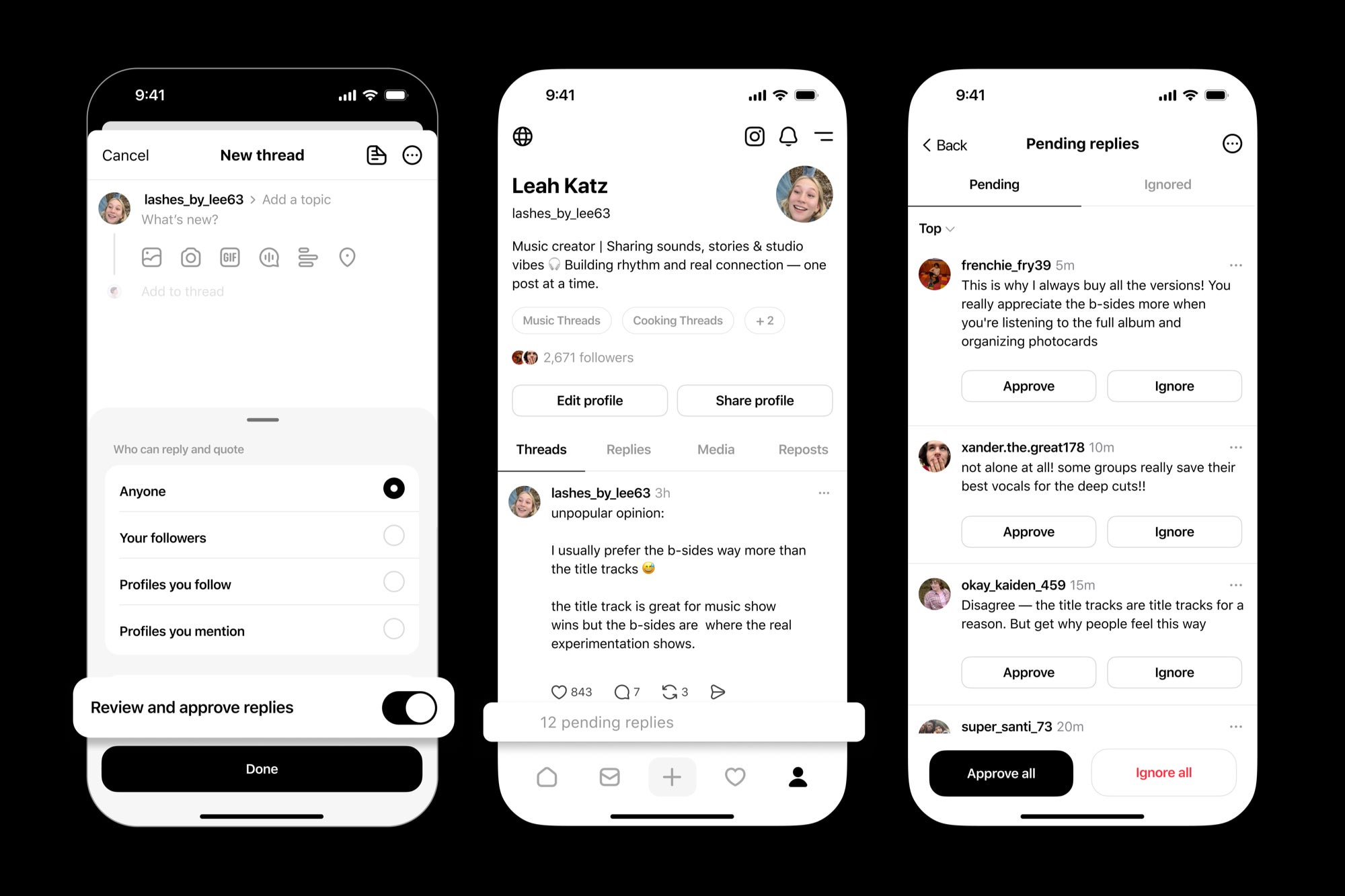
Threads rolls out reply approvals and smarter activity filters to tame the chaos
Public conversations are thrilling when they work and unbearable when they don’t. Meta’s latest Threads update squarely tackles that tension by giving account owners practical, hands-on moderation tools. Instead of hoping the algorithm understands context or trusting that a flagging system will arrive in time, the platform now lets you shape a discussion before it derails. The headline additions – Reply Approvals and Activity Feed Filters – turn Threads into a space where you can keep the energy of real-time chat without inviting a bonfire in your replies.
Reply Approvals: pre-moderation without the black box
Reply Approvals introduce a simple but powerful switch: for any specific post, you can require that every reply is approved by you before it becomes publicly visible. Think of it as a velvet rope for your mentions. New responses queue up privately; you skim, approve the ones that add value, and decline the ones that don’t. No performative dogpiling. No bad-faith bait rising to the top because it farmed outrage. Crucially, this isn’t a permanent account-wide setting – you can enable it selectively, saving your time and attention for posts that are likely to attract heat (product launches, sensitive announcements, viral opinions) while leaving casual updates fully open.
This is philosophically different from the usual “hide reply” model seen elsewhere, where harmful or off-topic comments still exist one click away, telegraphing that something messy happened. Pre-approval removes the spectacle. Readers encounter the discussion as you intended: a curated thread that sets expectations for tone, relevance, and civility.
Activity Feed Filters: cut through the noise
The new Activity Feed Filters do exactly what the name promises. You can filter your feed to show only mentions or only activity from people you follow. That means scanning signal without wading through a sea of low-value pings. For creators, social teams, and community managers, this is the difference between reactive firefighting and proactive engagement. It pairs neatly with existing controls (like limiting who can reply to a post) to create a layered defense that still keeps conversations discoverable and vibrant.
Why it matters now
The timing isn’t accidental. Since the turbulence around X (formerly Twitter), real-time conversation spaces have been searching for a new equilibrium. Some platforms lean on crowd-sourced context or automated moderation; others emphasize laissez-faire policies and user-side filters. Threads is pitching a third way: give the poster the steering wheel. By letting you approve replies up front and tune your notifications to the people you actually care about, Threads reduces both reputational risk and emotional labor. That’s appealing to brands, public figures, and anyone who’s simply tired of being forced to host content they didn’t ask for under their own posts.
Who benefits – and how
- Creators and publishers: Launching a contentious review or op-ed? Flip on Reply Approvals to keep the comment section constructive. You’ll still hear criticism – just minus the performative toxicity.
- Brands and social teams: Product announcements, support threads, or crisis comms can remain readable and on-message. Approvals prevent a few loud actors from hijacking the narrative.
- Communities: Hobby groups and niche interests can run AMAs or live chats without devolving into off-topic bait. Filters make it easier for moderators to track real participants.
- Everyday users: You don’t need a blue check to want a calmer experience. Use feed filters to see what matters and ignore the rest.
Trade-offs and best practices
More control always brings responsibility. Pre-moderation can be time-consuming if you overuse it, and heavy gatekeeping can create an echo chamber if you never approve dissenting views. A good rule: deploy Reply Approvals for context-sensitive posts, not routine updates. When you do moderate, be transparent. Consider adding a note in your post – “Replies are approved to keep this focused; disagreement is fine, low-effort snark isn’t.” That sets expectations and builds trust.
For teams, create a lightweight rubric. Approve contributions that add evidence, real questions, or first-hand experience; decline personal attacks, off-topic promotions, and repetitive misinformation. When appropriate, summarize common declined points in an update to the post, so critics feel heard without giving stage time to bad-faith replies.
How it compares to other platforms
Elsewhere, “hide reply” tools often function like a scarlet letter – controversy is still visible, inviting curiosity clicks. Crowd-notes approaches can be helpful, but they’re slow for fast-moving threads, and they rarely address the host’s immediate need to keep a discussion readable now. Threads’ pre-approval flips the script: instead of cleaning up after the mess, you prevent the mess from defining the room.
Practical workflow tips
- Pick your moments: Enable Reply Approvals only on posts likely to draw pile-ons or brigading.
- Batch review: Set brief check-in windows to approve replies rather than moderating continuously.
- Use filters tactically: During launches or live events, switch your activity view to mentions or followed accounts so you don’t miss high-value responses.
- Document tone guidelines: If you manage a brand account, align the team on what “constructive” means for your voice.
The bigger picture: healthier reach, safer brands
Advertisers and reputation-conscious partners crave brand-safe environments. Threads’ move signals to them – and to everyday users – that visibility no longer has to mean volatility. You can invite participation without surrendering your replies to the loudest actor in the room. That balance is the cornerstone of sustainable, real-time social media.
Bottom line
With Reply Approvals and Activity Feed Filters, Threads isn’t just adding features; it’s reframing what “public” can feel like. The update preserves the spontaneity that makes social fun while handing you the tools to keep conversations productive. Use them thoughtfully and you’ll spend less time firefighting, more time engaging, and all of your time in a space that better reflects the community you’re trying to build.
1 comment
As a community mod this is HUGE. No more 2am whack-a-mole