There’s a tiny feature on every smartphone that you’ve probably used hundreds of times without giving it much thought – the flashlight. It’s one of those tools that sits quietly in your phone’s quick settings, ready to save you when you drop your keys at night or need to find your way during a power outage. Yet, despite being so universally used, it’s a feature that phone manufacturers rarely ever talk about. No one chooses a new smartphone because it has a better flashlight. Until now, it has never been part of the marketing pitch from Apple, Samsung, or Google – but that might be about to change for Pixel users.
Recent leaks suggest that Google could be working on a major flashlight upgrade that will finally give Pixel owners control over their phone’s torch like never before. For years, iPhone users have had a slight edge here. On models with Dynamic Island, Apple lets users adjust flashlight brightness intuitively: slide a finger upward inside the Dynamic Island to increase brightness, or swipe down to dim it. 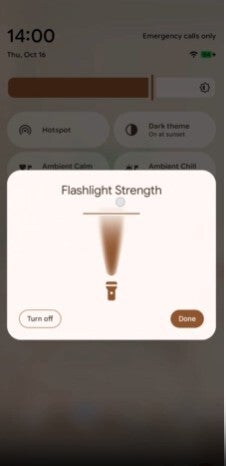
Moving the finger horizontally widens or narrows the beam, effectively letting you switch between a focused light and a broader floodlight. It’s subtle, but undeniably useful.
Pixel owners have long lacked this level of fine control. Currently, the only way to change flashlight strength is to download a third-party app, which feels unnecessarily clunky for something so basic. However, there’s a clever workaround already hidden in plain sight. Back in June, it was discovered that installing Google’s own Magnifier app from the Play Store unlocks a secret way to boost flashlight brightness dramatically. Once installed, opening the app and tapping the flashlight icon reveals a vertical slider. Drag that slider to the top, and you’ll instantly double your Pixel’s flashlight power. It’s a simple trick – and surprisingly effective – allowing you to modify intensity just by swiping your finger along the control.
But now it seems Google is preparing a native, system-level solution that will make this hack obsolete. A report uncovered hidden code inside the Android 16 QPR1 Beta 2 build that shows Google experimenting with an official flashlight strength slider. This control, visually similar to the existing brightness slider in Quick Settings, would let users adjust flashlight intensity directly from within the system interface – no extra apps required.
Even more interestingly, the feature was recently spotted in the Android Canary build 2510, and it looks very familiar. The interface shows a flashlight icon inside a vertical box, just like Apple’s implementation. Dragging your finger from the bottom up turns on the flashlight, and as you slide higher, the brightness increases, illustrated by a widening arc of light radiating from the icon. Move your finger downward, and the beam narrows, dimming gradually until it shuts off completely. It’s an elegant, visual approach – intuitive enough that you don’t need instructions to figure it out.
This update hasn’t appeared in the QPR2 Beta versions yet, suggesting that Google might be saving it for a bigger reveal. Insiders predict it could arrive as part of the March 2026 Pixel Feature Drop, likely alongside Android 16’s public release. If that timeline holds true, Pixel users could finally gain precise flashlight control within months – marking one of those small but meaningful quality-of-life improvements Google is increasingly known for.
It’s hardly the most headline-grabbing feature Google could add to its phones, but it’s the kind of polish that reinforces the company’s growing focus on thoughtful user experience. Being able to fine-tune the flashlight’s brightness can make a huge difference in real-world use – whether you’re trying not to blind someone in the dark, conserving battery, or just need a soft glow instead of a blazing beam. This attention to the little things is what makes Pixel devices so appealing to loyal users who value practicality over flash.
Until the update rolls out, the Magnifier app hack remains the best way to control your Pixel’s flashlight brightness. But once the Pixel Feature Drop lands, that little flashlight icon in your Quick Settings might finally become more than an afterthought – it’ll be a proper, customizable tool worthy of the Pixel name.