Google’s latest flagship, the Pixel 10, launched with a wave of exclusive AI-powered tricks, but one of the most eye-catching features is already breaking out of its exclusivity. The function, called “Help me edit”, is rolling out to all eligible Android devices, turning the Google Photos app into an incredibly intuitive editing suite that relies on natural language rather than manual adjustments. What started as a selling point for Pixel buyers is quickly shaping up to be a fundamental upgrade for the broader Android ecosystem.
So, what exactly is this tool? Instead of fumbling through a maze of sliders, filters, and menus, users can simply describe the transformation they want. 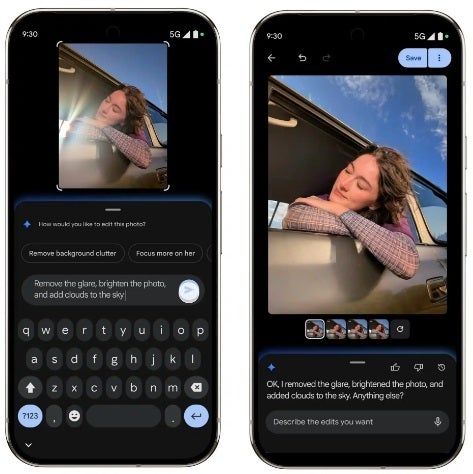
It could be as straightforward as “brighten the photo,” or as detailed as “remove glare, sharpen the focus on the subject, and add clouds to the sky.” Within seconds, the edits are applied. This means that people who previously felt overwhelmed by photo-editing apps can now rely on conversational AI to clean, restore, and even completely reinvent their pictures.
The convenience is remarkable. For instance, imagine pulling up an old, faded family photo. Typing “restore the photo” brings back sharpness and detail, almost as if the picture were newly developed. If you’re unsure what exactly needs fixing, a simple “make it better” request prompts Google’s AI to intelligently enhance the image. And if creativity is your aim, you can have fun adding quirky elements – say, sunglasses on a friend, or swapping a dull background for a sunny beach. The possibilities extend from practical corrections to playful transformations, with almost no learning curve required.
Accessing the tool is straightforward: open Google Photos, select a picture, tap Edit > Tools, and then choose Help me edit. A prompt invites you to describe the changes you want, while a small pill-shaped progress bar shows how far along the system is in processing your request. The feature is rolling out gradually, so some users – like those running Pixel 6 Pro on the Android 16 QPR2 Beta – may not see it just yet. iPhone owners are out of luck, as this remains Android-only for now.
The intelligence behind all this is driven by Google’s Gemini AI, which has increasingly become the engine powering Google’s creative tools. Gemini already underpins the Reimagine feature in Google Photos, and “Help me edit” builds on this by making the interaction far more conversational. The difference is subtle but important: Reimagine executes very specific transformations, while Help me edit acts as the conversational layer, letting you direct Gemini like an assistant. For example, asking to “change the background to a sunny beach” will trigger Reimagine to generate that background, but the request itself runs through the broader “Help me edit” framework.
Practicality aside, there’s a layer of fun experimentation here that gives the feature wide appeal. During testing, users were able to dress up pets with hats and sunglasses, or even add props like monocles and baseball caps, all while making the edits look photo-realistic. The AI convincingly integrates new objects into the scene, giving results that would normally require advanced Photoshop skills. This balance of practicality and entertainment makes the feature attractive for casual users, social media enthusiasts, and anyone interested in pushing their creativity without a steep learning curve.
Google’s approach of releasing “exclusive” features and then backporting them to older models is nothing new. Over the years, Pixel-exclusive camera modes and AI tricks have trickled down to previous generations, strengthening Google’s overall ecosystem. What makes “Help me edit” noteworthy is the speed of its rollout and the clear sign that Google views AI-driven photo editing as a central pillar of the Android experience going forward. This democratization of tools reduces the incentive to buy a brand-new Pixel solely for software perks, but it also reinforces Google’s reputation for supporting older hardware with meaningful upgrades.
Even more interesting is the dual input system. Users don’t just have to type; they can actually speak their requests. Saying “remove the cars in the background” works just as well as typing it, making the tool even more accessible to people who prefer voice commands. This conversational tone is key to why the feature feels so fresh – it’s less about controlling an app and more about collaborating with an AI assistant that understands intent.
At its core, “Help me edit” is another example of AI becoming less of a technical novelty and more of a practical, everyday utility. Just as autocorrect made typing faster and predictive text reduced friction in messaging, this tool reshapes photo editing into something anyone can do. Google is betting heavily on Gemini AI to power this future, and if early results are anything to go by, it’s a bet that’s already paying off. For Android users, this is a big win: a Pixel 10 highlight reimagined as a universal feature that turns photo editing into a conversation rather than a chore.