Gemini Split-Screen Multitasking Expands to Non-Foldable Pixel Phones
Google’s Gemini assistant is slowly transforming into a more versatile multitasking tool, and the latest update marks an important shift. What was once reserved for foldables and tablets is now reaching standard Pixel smartphones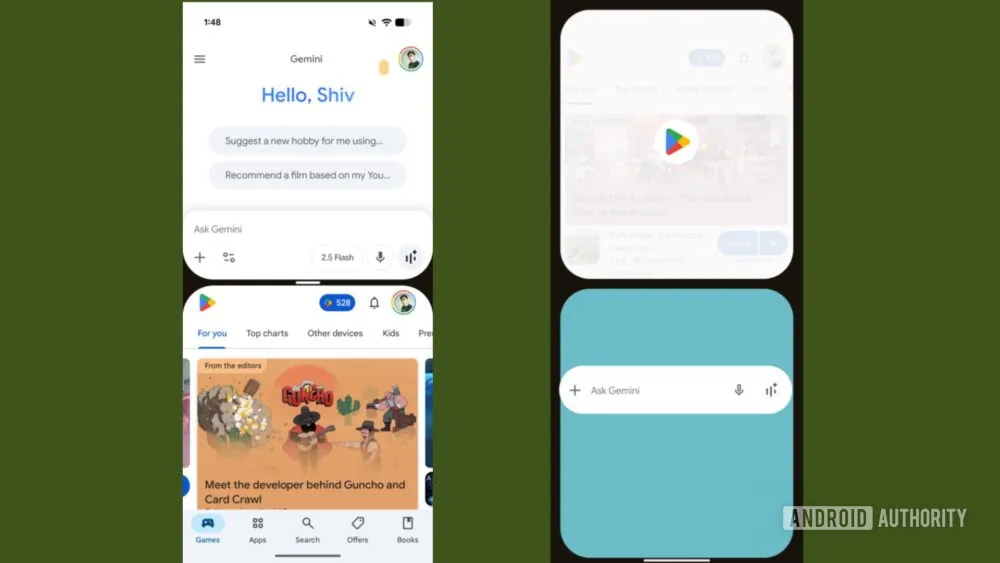
. Users of the Pixel 8 and Pixel 8 Pro, running beta builds of the Google app (notably version 16.35.63.sa.arm64 beta), are among the first to experience Gemini’s new split-screen multitasking feature on traditional slab-style phones.
Originally, Gemini’s split-screen interface was introduced on larger form factors – devices like the Samsung Galaxy Z Fold series, the Pixel Fold, or Android tablets such as the Pixel Tablet and Galaxy Tab. These devices naturally benefitted from dual-pane multitasking because of their expansive displays. Now, however, Google is bringing this once-exclusive experience down to mainstream phones, hinting at its intention to unify the multitasking experience across Android devices regardless of size.
How Split-Screen Works with Gemini
The activation process is straightforward but also distinct from the conventional Android split-screen method. Instead of digging through the recent apps carousel, users can summon the Gemini overlay while another app is running. By dragging the Gemini bar upward, the display seamlessly divides into two sections: one housing Gemini and the other hosting the original app. On foldables, the split can even be side-by-side depending on the drag direction, but on standard Pixels, the layout remains top-and-bottom.
What makes this noteworthy is that Gemini’s approach feels more direct. While Android has long supported split-screen since the release of Android 7.0 Nougat in 2016, accessing it through the recents menu often feels buried and clunky. With Gemini, users have a gesture-driven shortcut that integrates the assistant into multitasking, effectively blending conversational AI with productivity.
Availability and Limitations
As promising as it sounds, the rollout is currently limited. Early reports confirm availability on the Pixel 8 series but curiously not on newer devices like the Pixel 10 Pro XL. That absence suggests Google is either testing stability or staging a phased introduction. Owners of older models like the Pixel 6 Pro will not see the feature unless they opt into the beta channel of the Google app. For those without access, dragging the Gemini bar still launches a full-screen assistant view, which doubles as a way to check if the feature is enabled on your device.
This selective rollout also echoes Google’s cautious approach with new features – often starting small, gathering feedback, and expanding gradually. Historically, many Android features have debuted on Pixel devices before trickling down to other manufacturers, and Gemini’s split-screen tool seems to follow this familiar playbook.
Comparisons to Standard Android Split-Screen
It’s important to note that this isn’t the first time Android users have been able to run two apps simultaneously. The default method involves opening the app switcher, tapping the app icon, and selecting “Split screen.” You then pick a second app to pair. While effective, the process adds friction. Gemini’s overlay, on the other hand, reduces the steps by letting users initiate multitasking directly while already immersed in another app.
The convenience is especially noticeable for power users juggling tasks like messaging while referencing a web page, taking notes while watching a video, or comparing details across two apps. By reducing taps, Google is lowering the barrier for using split-screen in everyday scenarios, potentially reviving interest in a feature many have long ignored.
Practical Benefits for Multitasking
Productivity is the clear advantage. With Gemini paired alongside another app, users can query the assistant for information while keeping the original task open, eliminating the need for constant app switching. This setup works well for scenarios like drafting emails with Gemini’s help while reviewing documents, or asking quick contextual questions during video calls without leaving the meeting app. The fluidity of switching between two active panes can save time and minimize cognitive load.
Yet it’s not only for heavy multitaskers. Even casual users may find it useful in specific moments – like quickly translating text while browsing, or pulling up a recipe while messaging a friend. Google’s design here seems to target making multitasking more natural, rather than something buried in settings menus.
A Feature With a History
Android’s relationship with split-screen has been inconsistent. While Samsung pioneered custom dual-window implementations years before Google officially adopted it in Nougat, many users never fully embraced the mode, partly because it was hidden and partly because many apps weren’t optimized for it. Gemini’s reimagining of the process may finally breathe life into Android’s long-standing but underused multitasking capability.
Longtime Android fans may recall dismissing split-screen as a novelty, but with AI now integrated into the equation, the feature feels less about gimmickry and more about blending productivity with convenience. For those who already rely on Gemini as a personal assistant, the ability to anchor it permanently in half the display could transform how they manage their digital workflows.
Looking Ahead
Whether Gemini’s split-screen becomes widely adopted will depend on how quickly Google rolls it out to more devices and how well apps adapt to it. As of now, the Pixel 8 series is the proving ground. If successful, it’s reasonable to expect broader adoption not only across Pixels but eventually in Samsung, OnePlus, and other Android phones that support Gemini. For now, the feature’s selective availability leaves users of older or even flagship models waiting, but history suggests it won’t stay exclusive for long.
Until then, Pixel 8 owners get a glimpse of Google’s vision for the future of mobile multitasking – where digital assistants don’t just answer queries but coexist seamlessly alongside your apps.
4 comments
sounds cool but prob a battery killer
meh i’ll just keep switching apps, oldschool style
ngl i never use split screen, drains my brain lol
finally google making split screen less painful 😂