After unveiling its latest hardware, Google has now dropped a fresh software update for its devices. The new Android 16 QPR2 Beta 1 is the first release in the Quarterly Platform Release cycle for Android 16, or as it’s commonly known, the Pixel Feature Drop. This update marks the beginning of what’s expected to be a wave of new features, with the final version slated for release in December. 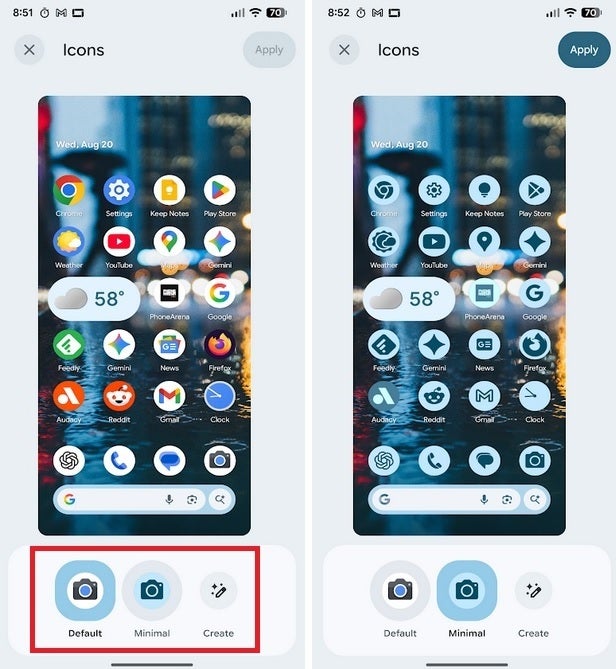
Android enthusiasts who were following the previous QPR1 Beta cycle will recognize that it ended with the Beta 3.1 update just five days ago, and the official Android 16 QPR1 release is expected later this month.
Android 16 QPR2 Beta 1 is a notable update and comes with software version BP41.250725.006. It’s available for a wide range of Pixel devices, including Pixel 6, 6 Pro, 6a, 7, 7 Pro, 7a, Pixel Fold, Pixel 8, 8 Pro, 8a, and even the upcoming Pixel 9 and Pixel Tablet. The update is a hefty 613MB for users on the Pixel 6 Pro, but the installation process is straightforward. To grab it, go to Settings > System > Software updates > System update, and you’ll be set.
Alongside this, the newly-announced Pixel 10 series is already up for pre-order, and it’s accompanied by a $100 gift card offer for the Pixel 10, a $200 gift card for the Pixel 10 Pro, and even more for the Pixel 10 Pro XL. With the release of the Tensor G5-powered Pixel 10, it’s clear that Google is looking to compete strongly in the premium smartphone market.
Now, let’s talk about what’s new in Android 16 QPR2 Beta 1. The most eye-catching update is the addition of new buttons for themed icons. These can be found on the Wallpaper & style page, accessed through the Settings menu on your Pixel device. Once there, tap on the Home screen option, and then go to Icons. You’ll see three options under Icons:
- Default: The classic icons you’ve grown accustomed to.
- Minimal: A sleek, new theme that draws its color scheme directly from your wallpaper.
- Create: This is the most exciting but currently inactive option. It hints at a future feature that could allow users to design custom icons. At the moment, tapping it simply reveals a message saying, “App isn’t installed.”
For users who aren’t interested in the Beta and want to stay with the stable version of Android 16 QPR1, you can opt out of the Beta program. Just be cautious – if you’ve already installed the QPR2 Beta 1 update, opting out requires a factory reset. The key point is that opting out of the Beta program prevents the installation of today’s update, and you can return to the stable QPR1 version once it’s officially rolled out.
In short: If you want to avoid a factory reset, don’t install QPR2 Beta 1 if you’re planning to opt out. Wait for the stable QPR1 release to get the latest stable version.
4 comments
The new icon options are nice, but I’m still waiting for a darker theme to match my mood 😂
Is the update really stable? Considering installing but not sure yet 🤔
Can’t wait to see what the ‘Create’ button will do when it’s functional. Super hyped!
Got the update for my 9pro xl Wednesday afternoon. No issues